Grass Block
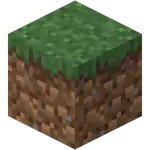
Grass Block
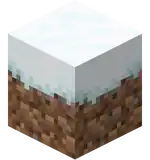
Snowy Grass Block

Snowy Grass Block (without snow)

| Renewable |
Yes |
|---|---|
| Stackable |
Yes (64) |
| Tool |
|
| Blast resistance |
0.6 |
| Hardness |
0.6 |
| Luminous |
No |
| Transparent |
No |
| Flammable |
No |
| Catches fire from lava |
No |
| Map color (JE) |
|

{
    "title": "Grass Block",
    "rows": [
        {
            "field": "Yes",
            "label": "(link to Renewable resource article, displayed as Renewable)"
        },
        {
            "field": "Yes (64)",
            "label": "Stackable"
        },
        {
            "field": "<span class=\"sprite-file\" style=\"height:32px;width:32px;--vertical-align:middle\">(link to File:SlotSprite Shovel Required.png article, displayed as 32x32px|link=Shovel|alt=|class=pixel-image|)</span>",
            "label": "Tool"
        },
        {
            "field": "0.6",
            "label": "(link to Explosion#Blast resistance article, displayed as Blast resistance)"
        },
        {
            "field": "0.6",
            "label": "(link to Breaking#Blocks by hardness article, displayed as Hardness)"
        },
        {
            "field": "No",
            "label": "(link to Light article, displayed as Luminous)"
        },
        {
            "field": "No",
            "label": "(link to Opacity article, displayed as Transparent)"
        },
        {
            "field": "No",
            "label": "(link to Flammable article, displayed as Flammable)"
        },
        {
            "field": "No",
            "label": "Catches fire<br>from (link to lava article, displayed as lava)"
        },
        {
            "field": "<span style=\"display: inline-block; white-space: nowrap;\"><span style=\"display: inline-block; background-color: rgb(127, 178, 56); border: 1px solid #888; border-radius: 0.3em; width: 1em; height: 1em; vertical-align: -0.36em; margin-right: -0.1em\"><br></span> 1 GRASS</span>",
            "label": "(link to Map color article, displayed as Map color) <small>((link to Java Edition article, displayed as ''JE''))</small>"
        }
    ],
    "invimages": [
        "Grass Block"
    ],
    "images": [
        "Grass Block.png",
        "Snowy Grass Block.png",
        "Snowy Grass Block (without snow).png"
    ]
}
A grass block is a natural block that generates abundantly across the surface of the Overworld.
Obtaining
Breaking
A grass block can be obtained by mining it using a tool enchanted with Silk Touch. Otherwise, it drops dirt. It can also be obtained by killing an enderman that is holding a grass block.
| Block | 
| |
|---|---|---|
| Hardness | 0.6 | |
| Tool | 
| |
| Breaking time (sec)[A] | ||
| Default | 0.9 | |
 Wooden Wooden
|
0.45 | |
 Stone Stone
|
0.25 | |
 Copper Copper |
0.2 | |
 Iron Iron
|
0.15 | |
 Diamond Diamond
|
0.15 | |
 Netherite Netherite
|
0.1 | |
 Golden Golden
|
0.1 | |
- incorrect tool, drops nothing
- correct tool, drops nothing or something other than the block itself
- correct tool, drops the block itself
- italicized can be instant mined
- ↑ These durations ignore other influential factors (e.g. Mining Fatigue), and are measured in seconds. For more information, see Breaking § Speed.
Natural generation
Grass blocks generate naturally in most biomes in the Overworld, and as part of villages and ancient cities.
Mob loot
Endermen can pick up grass blocks, and drop the blocks they are holding if killed, making it the only way to obtain grass blocks without the use of Silk Touch.
Post-generation

Grass can spread to nearby dirt blocks, but not coarse dirt or rooted dirt. Grass spreading without player intervention depends heavily on the time of day. For a dirt block to accept grass from a nearby grass block, the following requirements must be met:
- The dirt block receiving grass must be within a 3×5×3 range of the source grass block where the source block is in the center of the second topmost layer of that range.
- The source grass block must have a light level of 9 or brighter directly above it.
- The block directly above the dirt block must allow light to pass through it and hit the dirt block, even though the actual light level does not matter. That means blocks that partially let light through such as stairs and slabs must not have their light-blocking side(s) facing the dirt block.
- The block directly above the dirt block must not be lava, water, or a waterlogged variant of a block.
When grass is random ticked, it spreads by checking 4 blocks within range and converts any dirt blocks selected into grass.
Though water and lava are both light-filtering blocks (meaning they decrease skylight by 1 level but do not affect block light), other light-filtering blocks such as ice and slime blocks do not block grass from spreading to the dirt block. Grass blocks can grow under all other transparent blocks like glass, fences, or torches. Grass jumps directly from one block to a neighbor and is not affected by gaps or other blocks being "in the way." Grass blocks spread at random intervals and have an equal chance of spreading to any suitable dirt blocks that are in range. Because grass can spread as much as 3 levels downward, it tends to spread down slopes much faster than it spreads up them.
Appearance

The coloration of grass blocks is dependent on the biome they are in. A grass block always uses the color set to its location, regardless of how it was placed or of its source. This affects the side and top of the block.
In Bedrock Edition, biome colors also appear on maps.[1]
Color
Item
- In Java Edition, an item of grass block uses biome color with temperature 0.5, downfall 1.0, and as a result is colored
#7cbd6b.
Biome colors
These values are generated by the biome dyeing algorithm. See biome colors for more information.


Unused biomes in Bedrock Edition:
| Biome | Temperature | Downfall | Foliage color | Block |
|---|---|---|---|---|
(Default values) Deep Warm Ocean Deep Warm Ocean
|
0.5 | 0.5 | #71a74d |

|
 Snowy Mountains Snowy Mountains Legacy Frozen Ocean Legacy Frozen Ocean |
0.0 | 0.5 | #60a17b |

|
 Snowy Taiga HillsSnowy Taiga Mountains Snowy Taiga HillsSnowy Taiga Mountains |
-0.5 | 0.4 | ||
 Taiga HillsTaiga Mountains Taiga HillsTaiga Mountains |
0.25 | 0.8 | #86b783 |

|
 Desert Hills Desert Hills Desert Lakes Desert Lakes |
2.0 | 0.0 | #bfb755 |

|
 Badlands Plateau Badlands Plateau Modified Badlands Plateau Modified Badlands Plateau Modified Wooded Badlands Plateau Modified Wooded Badlands Plateau |
2.0 | 0.0 | #90814d[n 1] |

|
 Shattered Savanna Plateau Shattered Savanna Plateau |
1.0 | 0.5 | #82c245 |

|
 Swamp Hills Swamp Hills |
0.8 | 0.5 | #6a7039[n 2] #4c763c[n 3] |
 
|
 Wooded Hills Wooded Hills Tall Birch Hills Tall Birch Hills |
0.7 | 0.8 | #79c05a |

|
 Dark Forest Hills Dark Forest Hills |
0.7 | 0.8 | #507a32 |

|
 Birch Forest Hills Birch Forest Hills |
0.6 | 0.6 | #88bb67 |

|
 Giant Tree Taiga Hills Giant Tree Taiga Hills Giant Spruce Taiga Hills Giant Spruce Taiga Hills |
0.3 | 0.8 | #86b87f |

|
 Gravelly Mountains+ Gravelly Mountains+ Mountain Edge Mountain Edge |
0.2 | 0.3 | #8ab689 |

|
 Jungle HillsModified Jungle Jungle HillsModified Jungle Bamboo Jungle Hills Bamboo Jungle Hills |
0.95 | 0.9 | #59c93c |

|
 Modified Jungle Edge Modified Jungle Edge |
0.95 | 0.8 | #64c73f |

|
 Mushroom Field Shore Mushroom Field Shore |
0.9 | 1.0 | #55c93f |

|
Usage
Using bone meal on grass blocks causes short grass, tall grass, ferns, and flowers to grow.
Passive mobs tend to wander toward grass blocks. They also wander toward light.
When a sheep eats a grass block, the block becomes dirt, and a sheared sheep regrows its wool. Baby sheep graze grass much more often than adults and mature 1 minute faster when grazing.
Tilling a grass block with a hoe converts it to a farmland block.
Dirt paths can be created by using any type of shovel on the side or top of a grass block with air above it. The shovel loses 1 durability for each dirt path block created.
Death
Grass dies and changes to dirt a random time (when a random tick lands on the block) after it has been covered by any opaque blocks. Transparent blocks can kill grass in a similar manner if they cause the light level above the grass block to be four or below (like water does) and the surrounding area is not otherwise sufficiently illuminated.
Spawning
In Java Edition, animals occasionally spawn on grass blocks that have light level 9 or brighter in the space directly above. This is quite rare and requires that there be few other animals nearby or in the spawn chunks. Most animals are instead created along with the terrain.
In Bedrock Edition, most animals require surface grass blocks (grass blocks with no solid block anywhere above them at the same x, z coordinate) to spawn. Animals regularly spawn in most Overworld biomes on surface grass blocks that have light level 7 or brighter in the space directly above.
Snowy grass block
Grass blocks turn into a snowy grass block if snow, powder snow, or a snow block is placed on top of the block. Removing the snow layer turns the block into a normal grass block.
Composting
In Bedrock Edition, placing grass blocks into a composter has a 30% chance of raising the compost level by 1.[2]
Sounds
Generic
 grass sound type | ||||||||
|---|---|---|---|---|---|---|---|---|
| Sound | Subtitles | Source | Description | Resource location | Translation key | Volume | Pitch | Attenuation distance |
| Block broken | Blocks | Once the block has broken | block | subtitles | 1.0 | 0.8 | 16 | |
| Block placed | Blocks | When the block is placed | block | subtitles | 1.0 | 0.8 | 16 | |
| Block breaking | Blocks | While the block is in the process of being broken | block | subtitles | 0.25 | 0.5 | 16 | |
| Something falls on a block | Entity-Dependent | Falling on the block with fall damage | block | subtitles | 0.5 | 0.75 | 16 | |
| Footsteps | Entity-Dependent | Walking on the block | block | subtitles | 0.15 | 1.0 | 16 | |
grass sound type | |||||
|---|---|---|---|---|---|
| Sound | Source | Description | Resource location | Volume | Pitch |
| Blocks | Once the block has broken | dig | 0.7 | 0.8–1.0 | |
| Blocks | When the block is placed | use | 0.8 | 0.8–1.0 | |
| Blocks | While the block is in the process of being broken | hit | 0.3 | 0.5 | |
| Players | Falling on the block with fall damage | fall | 0.4 | 1.0 | |
| Players | Walking on the block | step | 0.3 | 1.0 | |
| Blocks | Jumping from the block | jump | 0.11 | 1.0 | |
| Blocks | Falling on the block without fall damage | land | 0.21 | 1.0 | |
Unique
| Sounds | ||||||||
|---|---|---|---|---|---|---|---|---|
| Sound | Subtitles | Source | Description | Resource location | Translation key | Volume | Pitch | Attenuation distance |
| Shovel flattens | Blocks | When a shovel creates a dirt path | item | subtitles | 1.0 | 1.0 | 16 | |
| Sounds | |||||
|---|---|---|---|---|---|
| Sound | Source | Description | Resource location | Volume | Pitch |
| Blocks | When a shovel creates a dirt path | use | 1.0 | 0.8 | |
Data values
ID
| Name | Identifier | Form | Block tags | Translation key |
|---|---|---|---|---|
| Grass Block | grass_block | Block & Item | animals_spawnable_onbamboo_plantable_ondry_vegetation_may_place_onenderman_holdablevalid_spawnmoss_replaceablelush_ground_replaceablemineable/shoveldirtsniffer_diggable_block | block |
| Name | Identifier | Alias ID | Numeric ID | Form | Item ID[i 1] | Translation key |
|---|---|---|---|---|---|---|
| Grass Block | grass_block | grass | 2 | Block & Giveable Item[i 2] | Identical[i 3] | tile |
Block states
| Name | Default value | Allowed values | Description |
|---|---|---|---|
| snowy | false | falsetrue | If true, the block uses a snowy side and top texture. In-game, this is true when a snow block or snow is on top. |
History

The specific instructions are: Grass block inventory icon in 0.30
| Java Edition pre-Classic | |||||||
|---|---|---|---|---|---|---|---|
| Cave game tech test |  Added grass blocks. Added grass blocks.
| ||||||
| Grass blocks are one of the first two blocks in Minecraft, along with stone.[3] | |||||||
| Grass generation is randomized, but it generates only on fully lit tiles. The higher the Y level is, the greater the chance of grass generating. At the top of the map, grass generates on all fully lit tiles. | |||||||
 The bottom texture of grass blocks is mirrored vertically. The bottom texture of grass blocks is mirrored vertically. | |||||||
| rd-20090515 |   The top texture and model of grass blocks have been changed. The top texture and model of grass blocks have been changed.
| ||||||
| The model now uses new texture on the side faces and dirt texture on the bottom face. | |||||||
| Grass now spreads to dirt under sunlight, allowing new grass blocks to be created. | |||||||
| Due to the lack of dynamic lighting mode, grass in shadows eventually dies and changes to dirt. | |||||||
| Java Edition Classic | |||||||
| 0.24 SURVIVAL TEST | Grass blocks now drop dirt when broken. | ||||||
| October 25, 2009 | On Notch's blog, sheep were shown to eat grass to regrow wool on their bodies, reverting the block to dirt. Often, the grass would regrow just as quickly as sheep would eat it. | ||||||
| 0.28 | Sheep added, with the behavior described above. | ||||||
| 0.30 (Creative) | Attempting to place grass blocks by means of hacking one's inventory in Classic Creative multiplayer now causes the server to automatically kick the player. | ||||||
| Grass blocks in the player's inventory, at this point, have the green top-texture on all sides of the block. | |||||||
| Java Edition Indev | |||||||
| 0.31 | 20091223-1457 | With the introduction of dynamic lighting, grass is now able to grow in more dimly-lit areas, not having to be fully lit by the sun. | |||||
| 20100124-2119 | Grass blocks now generate in indev house chests. | ||||||
| Grass blocks are now placeable, although grass placed from the chest never reverts to dirt when in the shade. The only way to kill the grass is to break the block, so that it drops as dirt. | |||||||
| 20100129-1447 | Grass blocks no longer generate in indev house chests. | ||||||
| 20100202 | Sheep no longer eat grass blocks. | ||||||
| 20100206-2034 | Grass blocks can now be tilled with a hoe into farmland, and had a chance of dropping wheat seeds. | ||||||
| Java Edition Alpha | |||||||
| v1.0.4 |  Added snowy grass blocks. Added snowy grass blocks.
| ||||||
| Snowy grass blocks appear when the grass blocks are under snow. | |||||||
 The model of snowy grass blocks without snow use grass top texture on the top face. The model of snowy grass blocks without snow use grass top texture on the top face.
| |||||||
 The model of grass blocks in item form has been changed. The model now uses grass block side texture on all faces. The model of grass blocks in item form has been changed. The model now uses grass block side texture on all faces. | |||||||
| v1.0.5 | Snowy grass blocks appear when the grass blocks are under snow blocks. | ||||||
| v1.2.0 | preview |   The top texture of grass blocks and snowy grass blocks has been changed. The texture are now grayscale and are affected by biome colors. The top texture of grass blocks and snowy grass blocks has been changed. The texture are now grayscale and are affected by biome colors.
| |||||
| This change is not noticeable when snowy grass blocks are under snow layers or snow blocks. | |||||||
| Java Edition Beta | |||||||
| 1.5 |  The model of grass blocks now uses an overlay texture on its side faces, which, like its top texture, is grayscale and is affected by biome colors. This overlay texture is exclusive to the "Fancy" graphics setting. The model of grass blocks now uses an overlay texture on its side faces, which, like its top texture, is grayscale and is affected by biome colors. This overlay texture is exclusive to the "Fancy" graphics setting.
| ||||||
| Grass blocks do not use the overlay on fast graphics. | |||||||
| 1.6 | Test Build 3 | Wheat seeds can no longer obtained by using a hoe on a grass block; short grass instead occasionally drops seeds when broken. | |||||
| 1.6.6 | Bone meal now causes short grass to grow when applied to grass blocks. | ||||||
| 1.7 |  The model of snowy grass block has been changed. The model of snowy grass block has been changed. | ||||||
| 1.8 | Pre-release 2 ;) | It was again possible to legitimately obtain grass blocks in one's inventory, with the introduction of Creative mode. | |||||
| The model of grass block in item form have been changed. Grass blocks now use grass block top texture on the top face and and dirt texture on the bottom face. The top face is now tinted with #7cbd6b. | |||||||
| Name changed from Grass to Grass Block. | |||||||
| Java Edition | |||||||
| 1.0.0 | Beta 1.9 Prerelease | The swamp grass and foliage tints has been changed to hard-coded tints #5C694E and #496137. | |||||
| Beta 1.9 Prerelease 4 | Grass blocks have become obtainable for the first time in Survival mode through use of the Silk Touch enchantment, introduced with the new enchanting system. | ||||||
| Beta 1.9 Prerelease 5 |    The top texture of grass blocks has been changed. The top texture of grass blocks has been changed.
| ||||||
| This change is not noticeable when snowy grass blocks under the snow layers or snow blocks. | |||||||
| Beta 1.9 Prerelease 6 |   The side texture of grass blocks has been changed. The side texture of grass blocks has been changed. | ||||||
| ? | Slabs have now been changed so that they no longer revert grass blocks beneath them to dirt, allowing grass to spread to and from underneath. | ||||||
| 1.1 | 11w49a | Sheep can now graze on grass blocks again. | |||||
| 12w01a | Grass blocks are now generating in superflat world type. | ||||||
| 1.2.1 | 12w07a | The player is now unable to till a grass block with a hoe when there is a block on top of the grass block. | |||||
| 1.4.2 | 12w38a | New sounds were added for walking on grass blocks. | |||||
| 1.5 | 13w02a | Grass blocks do not use the overlay on fancy graphics. | |||||
| 13w02b | Grass blocks use the overlay on fancy graphics, once again. | ||||||
| 1.7.2 | 13w36a | A "grassless" dirt variant, that grass would not spread to, has now been added. | |||||
| 1.8 | 14w10a |  On the new block model, the side overlay texture is removed and the side faces are now fully biome colored.[4] On the new block model, the side overlay texture is removed and the side faces are now fully biome colored.[4] | |||||
| 14w10b | The changes in snapshot 14w10a have been fixed. | ||||||
| 14w25a |  The top of snowy grass blocks is no longer biome-affected. The top of snowy grass blocks is no longer biome-affected.
| ||||||
| Grass blocks now always use the side overlay regardless of graphics setting. | |||||||
| 14w25b | The item form of grass blocks now has the same color on the side as the top. | ||||||
| 14w27b | The top texture of grass is now rotated randomly, due to the addition of arrays to the block model format. | ||||||
| 1.9 | 15w31a | Grass blocks can now be turned into grass paths by right-clicking on them with a shovel. | |||||
| Grass blocks can now be obtained by killing an enderman that is holding the block. | |||||||
| 1.14 | 18w48a | Grass blocks now generate in the updated plains villages. | |||||
| 18w49a | Grass blocks now generate in the updated savanna villages and the new snowy tundra villages. | ||||||
| 18w50a | Grass blocks now generate in the updated desert and taiga villages. | ||||||
| 19w05a | Grass blocks are now renewable because wandering traders now offer to sell podzol. | ||||||
| 19w08a | The side texture of grass blocks has been changed.
| ||||||
  The side texture of snowy grass blocks and the texture of snow have been changed. The side texture of snowy grass blocks and the texture of snow have been changed. | |||||||
| 1.17 | 21w11a |   The side texture of snowy grass blocks has been changed. The side texture of snowy grass blocks has been changed. | |||||
| 1.18 | experimental snapshot 3 | Grass blocks are no longer able to generate underwater. | |||||
| 1.19 | 22w13a | Grass blocks now generate as part of ancient cities. | |||||
| 1.19.4 Experiment | 23w07a | Sniffers can now dig grass blocks. | |||||
| Pocket Edition Alpha | |||||||
| Pre-release |  Added grass blocks tinted with Added grass blocks tinted with #339933. | ||||||
| v0.1.0 | Grass block has an item form. The model uses grass block side textures on all faces. | ||||||
| v0.2.0 |   The textures of grass blocks have been changed. The textures of grass blocks have been changed. | ||||||
| v0.4.0 | Grass can now be tilled with a hoe into farmland, and has a chance of dropping seeds. | ||||||
| v0.5.0 |   The side texture of grass blocks for block and item form has been changed. The item form now uses a separate top texture for its top face. The side texture of grass blocks for block and item form has been changed. The item form now uses a separate top texture for its top face. | ||||||
| v0.8.0 | build 1 |  The side texture has been changed to the texture from before v0.5.0. The top texture for the block form is now tinted with The side texture has been changed to the texture from before v0.5.0. The top texture for the block form is now tinted with #87cd49. The top texture for item form has been changed to the pre-tinted top texture, which is identical to the block form. | |||||
| build 3 | Grass now has a chance to drop beetroot seeds, carrots, or potatoes when tilled. | ||||||
| build 4 | Tilling can no longer spawn carrots or potatoes. | ||||||
| v0.9.0 | build 1 |  The top texture in block form now tinted with biome colors. The side texture has been changed to various pre-tinted textures dependent by biome. The top texture in block form now tinted with biome colors. The side texture has been changed to various pre-tinted textures dependent by biome. | |||||
| v0.11.0 | build 1 | Grass now can be pressed into grass path blocks when tapped with a shovel. | |||||
| v0.12.1 | build 1 | Grass blocks no longer drop beetroot seeds when a hoe is used. | |||||
| Grass blocks can now be obtained using the Silk Touch enchantment. | |||||||
| build 8 | Grass blocks no longer drop wheat seeds when a hoe is used. | ||||||
| build 10 | The sound of grass blocks has now been changed to match up with grass sound from Java 1.4.2. | ||||||
| v0.14.0 | build 1 | Grass blocks can now be obtained by killing an enderman that is holding the block. | |||||
| v0.16.0 | build 1 | The biome-dependent colors of grass blocks now appear on maps. | |||||
| Bedrock Edition | |||||||
| 1.11.0 | beta 1.11.0.1 | Grass blocks can now be used to fill up composters. | |||||
| beta 1.11.0.5 | The side texture of grass blocks has been changed.
| ||||||
| The side texture of snowy grass blocks and texture of snow has been changed. | |||||||
| Legacy Console Edition | |||||||
| Xbox 360 | Xbox One | PS3 | PS4 | PS Vita | Wii U | Switch | |
| TU1 | CU1 | 1.00 | 1.00 | 1.00 | Patch 1 | 1.0.1 | Added grass blocks. |
| TU3 | Changed the texture of grass blocks. | ||||||
| TU5 | It is now possible to legitimately obtain grass blocks in one's inventory, with the introduction of Creative mode. | ||||||
| Name changed from Grass to Grass Block. | |||||||
| TU7 | The swamp grass and foliage tints has been changed to hard-coded tints #5C694E and #496137. | ||||||
| Grass blocks have become obtainable for the first time in Survival mode through use of the Silk Touch enchantment, introduced with the new enchanting system. | |||||||
| TU9 | Grass blocks can now be eaten by sheep. | ||||||
| TU43 | CU33 | 1.36 | 1.36 | 1.36 | Patch 13 | Grass blocks can now be turned into grass paths by pressing  / /  / /  / /  / /  / /  / /  on them with a shovel. on them with a shovel. | |
| TU46 | CU36 | 1.38 | 1.38 | 1.38 | Patch 15 | Grass blocks can now be obtained by killing an enderman that is holding the block. | |
| 1.83 | The side of non-snowy grass blocks is now 3d. | ||||||
| 1.91 | Grass blocks can now be used to fill up composters. | ||||||
| New Nintendo 3DS Edition | |||||||
| 0.1.0 | Added grass blocks. | ||||||
Data history
| Java Edition | |||||||
|---|---|---|---|---|---|---|---|
| 1.8 | 14w06a | Grass blocks now have a dedicated model json file (models/block/grass.json); previously the geometry was defined in the game code itself. | |||||
| 1.13 | 17w47a | The ID of grass blocks has been changed from grass to grass_block.
| |||||
| Prior to The Flattening, this block's numeral ID was 2. | |||||||
| 1.17 | 21w16a | Grass blocks are now in the dirt tag.[5] | |||||
| Bedrock Edition | |||||||
| 1.20.70 | Preview 1.20.70.20 | The ID of grass blocks has been changed from grass to grass_block. | |||||
Issues
Issues relating to "Grass Block" are maintained on the bug tracker. Issues should be reported and viewed there.
Trivia
- Grass blocks and dirt blocks changing between each other is a common cause of chunk updates.
- The grass block has become a widely used symbol of Minecraft.
- The icons for Java Edition and Bedrock Edition apps, except Java snapshots and Bedrock previews, are based on a grass block.
- The favicon for minecraft.net, as well as the icon for the Minecraft Launcher, used to be a grass block.
- The top face of snowy grass blocks is not affected by biome tinting and therefore appears gray. Normally, snowy grass blocks are covered by snow and their top face cannot be seen by players, unless they create a snowy grass block with no other blocks on its top using commands or the debug stick.
Gallery
Mojang images
-
 A grass block floating in midair.
 -
 Grass blocks in a birch forest.
 -
 An image used to represent grass blocks.
In other media
-
![Artwork of a bright grass block, used during the 10th anniversary.[6]](./_assets_/b5fe0449d6de05eb2bd450f866c62b23.png) Artwork of a bright grass block, used during the 10th anniversary.[6]
Artwork of a bright grass block, used during the 10th anniversary.[6] -
 Render of a grass block on a beige background.
 -
 A grass-growing guide made in early 2010.
 -
 Diagram of a grass block and various alternative soil blocks.
 -
 Jens describing grass blocks.
 -

-
 An official sticker for the grass block sold by JINX.
 -
 Grass block figure of Flippin' Figs
References
- ↑ "[MC-130658] Grass/foliage colors on maps still use the colors from Alpha v1.1.2_01 and earlier / do not change color with biomes - Jira" – Mojira.
- ↑ MCPE-140266
- ↑ "Cave game tech test" – (Archive) Nizzotch on YouTube, May 13, 2009
- ↑ MC-50222 — Dirt texture on Grass Blocks is green — resolved as "Fixed".
- ↑ "[MC-222004] Grass block isn't apart of the #dirt block tag - Jira" – Mojira, April 2, 2021. Resolved as "Fixed".
- ↑ "Celebrate with Us" – minecraft.net.
External links
- "Block of the Week: Grass" by Duncan Geere – Minecraft.net, October 6, 2017.


