Crying Obsidian


| Renewable |
Yes |
|---|---|
| Stackable |
Yes (64) |
| Tool |
|
| Blast resistance |
1,200 |
| Hardness |
50 |
| Luminous |
Yes (10) |
| Transparent |
No |
| Flammable |
No |
| Catches fire from lava |
No |
| Map color (JE) |
|

{
    "title": "Crying Obsidian",
    "rows": [
        {
            "field": "Yes",
            "label": "(link to Renewable resource article, displayed as Renewable)"
        },
        {
            "field": "Yes (64)",
            "label": "Stackable"
        },
        {
            "field": "<span class=\"sprite-file\" style=\"height:32px;width:32px;--vertical-align:middle\">(link to File:Invicon Diamond Pickaxe.png article, displayed as 32x32px|link=Diamond Pickaxe|alt=|class=pixel-image|A diamond pickaxe or better is required to mine this block)</span>",
            "label": "Tool"
        },
        {
            "field": "1,200",
            "label": "(link to Explosion#Blast resistance article, displayed as Blast resistance)"
        },
        {
            "field": "50",
            "label": "(link to Breaking#Blocks by hardness article, displayed as Hardness)"
        },
        {
            "field": "Yes (10)",
            "label": "(link to Light article, displayed as Luminous)"
        },
        {
            "field": "No",
            "label": "(link to Opacity article, displayed as Transparent)"
        },
        {
            "field": "No",
            "label": "(link to Flammable article, displayed as Flammable)"
        },
        {
            "field": "No",
            "label": "Catches fire<br>from (link to lava article, displayed as lava)"
        },
        {
            "field": "<span style=\"display: inline-block; white-space: nowrap;\"><span style=\"display: inline-block; background-color: rgb(25, 25, 25); border: 1px solid #888; border-radius: 0.3em; width: 1em; height: 1em; vertical-align: -0.36em; margin-right: -0.1em\"><br></span> 29 COLOR_BLACK</span>",
            "label": "(link to Map color article, displayed as Map color) <small>((link to Java Edition article, displayed as ''JE''))</small>"
        }
    ],
    "invimages": [
        "Crying Obsidian",
        "Crying Obsidian BE"
    ],
    "images": [
        "Crying Obsidian.png"
    ]
}
Crying obsidian is a luminous variant of obsidian that can be used to craft a respawn anchor. Purple particles drip from its faces. Like obsidian, It has high hardness and blast resistance, rendering it immune to normal explosions. It can be obtained by mining it with a diamond or netherite pickaxe.
Obtaining
Breaking
Crying obsidian can be harvested only with a diamond pickaxe or better.
| Block | 
| |
|---|---|---|
| Hardness | 50 | |
| Tool | 
| |
| Breaking time (sec)[A] | ||
| Default | 250 | |
 Wooden Wooden
|
125 | |
 Stone Stone
|
62.5 | |
 Copper Copper |
50 | |
 Iron Iron
|
41.7 | |
 Diamond Diamond
|
9.4 | |
 Netherite Netherite
|
8.35 | |
 Golden Golden
|
20.85 | |
- incorrect tool, drops nothing
- correct tool, drops nothing or something other than the block itself
- correct tool, drops the block itself
- italicized can be instant mined
- ↑ These durations ignore other influential factors (e.g. Mining Fatigue), and are measured in seconds. For more information, see Breaking § Speed.
There is no way to convert normal obsidian into crying obsidian. It can be obtained only via the methods listed below.
Natural generation
Crying obsidian can generate as part of ruined portals.
Generated loot
| Item | Structure | Container | Quantity | Chance |
|---|---|---|---|---|
| Java Edition and Bedrock Edition | ||||
|
|
 Bastion Remnant Bastion Remnant
|
Hoglin stable chest | 1–5 | 22.8%{ "item": "Crying Obsidian", "stacksize": "1–5", "chance": 0.22793887963348602, "structure": "Bastion Remnant", "container": "Hoglin stable chest" }
|
| Treasure chest | 3–5 | 33.7%{ "item": "Crying Obsidian", "stacksize": "3–5", "chance": 0.33668648071940255, "structure": "Bastion Remnant", "container": "Treasure chest" }
| ||
| Generic chest | 1–5 | 19%{ "item": "Crying Obsidian", "stacksize": "1–5", "chance": 0.18999999999999995, "structure": "Bastion Remnant", "container": "Generic chest" }
| ||
| Bridge chest | 3–8 | 11.2%{ "item": "Crying Obsidian", "stacksize": "3–8", "chance": 0.11242603550295849, "structure": "Bastion Remnant", "container": "Bridge chest" }
| ||
Bartering
Piglins have a ~8.71% chance (40⁄459) to barter 1–3 crying obsidian when given a gold ingot.
Usage
Much like obsidian, crying obsidian is a resilient building block. It has a blast resistance of 1,200 and cannot be destroyed by the ender dragon. On the other hand, crying obsidian cannot be used to create a nether portal frame,[1] and End crystals are unable to be placed on them.[2]
When placed, crying obsidian occasionally produces purple dripping particles, which are purely decorative.
Crafting ingredient
Crying obsidian is used to make the respawn anchor, a block that has the function of letting players respawn in the Nether.
| Name | Ingredients | Crafting recipe |
|---|---|---|
| Respawn Anchor | + Glowstone |
  |
Light
Crying obsidian gives off a light level of 10, which does not melt snow or ice. Its blast resistance distinguishes it from other light-emitting blocks.
Note blocks
Crying obsidian can be placed under note blocks to produce the "bass drum" sounds.
Piston interactivity
Crying obsidian cannot be pushed or pulled by pistons or sticky pistons.
Sounds
 stone sound type | ||||||||
|---|---|---|---|---|---|---|---|---|
| Sound | Subtitles | Source | Description | Resource location | Translation key | Volume | Pitch | Attenuation distance |
| Block broken | Blocks | Once the block has broken | block | subtitles | 1.0 | 0.8 | 16 | |
| Block placed | Blocks | When the block is placed | block | subtitles | 1.0 | 0.8 | 16 | |
| Block breaking | Blocks | While the block is in the process of being broken | block | subtitles | 0.25 | 0.5 | 16 | |
| Something falls on a block | Entity-Dependent | Falling on the block with fall damage | block | subtitles | 0.5 | 0.75 | 16 | |
| Footsteps | Entity-Dependent | Walking on the block | block | subtitles | 0.15 | 1.0 | 16 | |
stone sound type | |||||
|---|---|---|---|---|---|
| Sound | Source | Description | Resource location | Volume | Pitch |
| Blocks | Once the block has broken | dig | 1.0 | 0.8-1.0 | |
| Blocks | When the block is placed | dig | 1.0 | 0.8-1.0 | |
| Blocks | While the block is in the process of being broken | hit | 0.37 | 0.5 | |
| Players | Falling on the block with fall damage | fall | 0.4 | 1.0 | |
| Players | Walking on the block | step | 0.3 | 1.0 | |
| Blocks | Jumping from the block | jump | 0.12 | 1.0 | |
| Blocks | Falling on the block without fall damage | land | 0.22 | 1.0 | |
Data values
ID
| Name | Identifier | Form | Block tags | Translation key |
|---|---|---|---|---|
| Crying Obsidian | crying_obsidian | Block & Item | dragon_immunemineable/pickaxeneeds_diamond_tool | block |
| Name | Identifier | Numeric ID | Form | Item ID[i 1] | Translation key |
|---|---|---|---|---|---|
| Crying Obsidian | crying_obsidian | 544 | Block & Giveable Item[i 2] | Identical[i 3] | tile |
Advancements
| Icon | Advancement | In-game description | Actual requirements (if different) |
|---|---|---|---|
 | Who is Cutting Onions? | Obtain Crying Obsidian | Have a block of crying obsidian in the inventory. |
Video
History
| Java Edition Beta | |||||||
|---|---|---|---|---|---|---|---|
| 1.3 |  The texture of crying obsidian has been added to terrain.png. The texture of crying obsidian has been added to terrain.png. | ||||||
| February 23, 2011 | Jeb states he would like to add crying obsidian as a block. | ||||||
| March 30, 2011 | Jeb states that crying obsidian would act as a way of setting a respawn point. The idea would later be discarded in favor of beds.[3] | ||||||
| April 15, 2011 | Jeb states that the grass edge tile has replaced the crying obsidian in the texture file. | ||||||
| 1.5 | The texture of crying obsidian has been removed. | ||||||
| February 9, 2012 | Jeb states that he will bring back crying obsidian as soon as he's made preparations for more texture space. | ||||||
| Java Edition | |||||||
| December 3, 2019 | Maria Lemón notes that many players suggest implementing crying obsidian alongside new Nether features. | ||||||
| 1.16 | 20w09a |  Added crying obsidian. Added crying obsidian.
| |||||
| Crying obsidian is currently obtainable only through bartering. | |||||||
| Crying obsidian has no function. | |||||||
| Crying obsidian produces a light level of 10. | |||||||
| Crying obsidian can be harvested with any pickaxe. | |||||||
| 20w10a |  Crying obsidian now uses its old texture when using Programmer Art. Crying obsidian now uses its old texture when using Programmer Art. | ||||||
| 20w11a | Crying obsidian now requires a diamond or netherite pickaxe in order to be mined.[4] | ||||||
| Crying obsidian can no longer be destroyed by the ender dragon.[5] | |||||||
| Crying obsidian can no longer be moved by pistons.[6] | |||||||
| 20w12a | Crying obsidian is now used to craft respawn anchors. | ||||||
| 20w16a | Crying obsidian now generates in bastion remnants chests. | ||||||
| Crying obsidian now generates as part of ruined portals. | |||||||
| 20w20a | Crying obsidian is now required for the "Who is Cutting Onions?" advancement. | ||||||
| Pocket Edition Alpha | |||||||
| v0.1.0 | The texture of crying obsidian has been added to the game's files. | ||||||
| v0.2.0 | The texture of crying obsidian has been removed. | ||||||
| Bedrock Edition | |||||||
| 1.16.0 | beta 1.16.0.57 | Added crying obsidian. | |||||
| beta 1.16.0.63 | Crying obsidian now requires a diamond or netherite pickaxe in order to be mined.[7] | ||||||
| 1.19.20 | Preview 1.19.20.22 | Crying obsidian can no longer be destroyed by the ender dragon. | |||||
Issues
Issues relating to "Crying Obsidian" are maintained on the bug tracker. Issues should be reported and viewed there.
Trivia
- When it was originally going to be added in Beta 1.3, it was going to act as a way to reset the player’s spawn point and would be crafted using lapis lazuli. When beds were added, they took this role instead. In 1.16, the respawn anchor was added, which is crafted with crying obsidian.
- According to Brandon Pearce, crying obsidian was added when they wanted to have cracked obsidian for the ruined nether portals. They decided to add it as crying obsidian instead because it was more unique and due to high player demand.
- The team considered having crying obsidian be obtained by throwing obsidian through a nether portal, or by having regular obsidian be struck by lightning. However, they chose bartering with piglins as a way to make bartering useful.[8]
- The earliest known instance of a developer referring to the original crying obsidian texture as "crying obsidian"[9] significantly postdates the name's general adoption by the community. The earliest known usages of the name "crying obsidian"[10][11] are from about two months earlier. As it had no given name, it was first referred to as a "mystery block" with crying obsidian being given as one potential name among others, such as "bleeding obsidian".[12][13][14][15]
Gallery
-
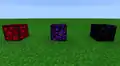 A comparison between glowing obsidian (left), crying obsidian (middle), and regular obsidian (right)
 -
 A bunch of crying obsidian placed in the Nether.
 -
 Obsidian and crying obsidian, as they appear in the Programmer Art resource pack. Note how it still produces purple particles.
 -
 A picture of crying obsidian part of a ruined portal.
 -
 An animated render of the crying obsidian.
 -
 Crying obsidian in the overworld.
 -
 Crying obsidian with programmer art textures.
See also
References
- ↑ "It's intentional that you cannot make portals with them." – @kingbdogz on X (formerly Twitter), February 26, 2020
- ↑ MC-173416 — Unable to place end crystal on crying obsidian — resolved as "Works As Intended".
- ↑ "@Bobinti It was a set respawn point project, before we added beds" – @jeb_ (Jens Bergensten) on X (formerly Twitter), November 26, 2011
- ↑ MC-173302
- ↑ MC-173384
- ↑ MC-173243
- ↑ MCPE-72102
- ↑ "Block of the Week: Crying Obsidian" by Duncan Geere – Minecraft.net, July 29, 2020.
- ↑ "For texture packers, the grass edge tile has replaced the crying obsidian in the texture file" – @jeb_ (Jens Bergensten) on X (formerly Twitter), April 15, 2011
- ↑ https://www.reddit.com/r/Minecraft/comments/fqonz/comment/c1hx4bi/
- ↑ https://www.reddit.com/r/Minecraft/comments/fqpwe/comment/c1hxgbn/
- ↑ https://minecraft.wiki/?title=Crying_Obsidian&diff=62580&oldid=62526
- ↑ https://www.reddit.com/r/Minecraft/comments/fqffu/comment/c1hvl6p/
- ↑ "@notch What is this about 'bleeding obsidian' as the wiki is now calling it?" – @starclaws on X (formerly Twitter), February 22, 2011
- ↑ https://www.minecraftforum.net/forums/search?display-type=0&forum-scope=f&page=34&search=crying%20obsidian&search-type=0&submit=y
External links
- Block of the Week: Crying Obsidian – Minecraft.net on July 29, 2020


