Border


| Renewable |
No |
|---|---|
| Stackable |
Yes (64) |
| Tool |
None |
| Blast resistance |
? |
| Hardness |
-1 |
| Luminous |
No |
| Transparent |
Yes |
| Waterloggable |
Yes |
| Flammable |
No |
| Catches fire from lava |
No |
{
    "title": "Border",
    "rows": [
        {
            "field": "No",
            "label": "(link to Renewable resource article, displayed as Renewable)"
        },
        {
            "field": "Yes (64)",
            "label": "Stackable"
        },
        {
            "field": "None",
            "label": "Tool"
        },
        {
            "field": "(link to Template:blast resistance values#Missing value article, displayed as ?)(link to Category:Missing blast resistance article, displayed as Category:Missing blast resistance)",
            "label": "(link to Explosion#Blast resistance article, displayed as Blast resistance)"
        },
        {
            "field": "-1",
            "label": "(link to Breaking#Blocks by hardness article, displayed as Hardness)"
        },
        {
            "field": "No",
            "label": "(link to Light article, displayed as Luminous)"
        },
        {
            "field": "Yes",
            "label": "(link to Opacity article, displayed as Transparent)"
        },
        {
            "field": "Yes",
            "label": "(link to Waterlogging article, displayed as Waterloggable)"
        },
        {
            "field": "No",
            "label": "(link to Flammable article, displayed as Flammable)"
        },
        {
            "field": "No",
            "label": "Catches fire<br>from (link to lava article, displayed as lava)"
        }
    ],
    "invimages": [
        "Border"
    ],
    "images": [
        "Border.png"
    ]
}
Border blocks are unbreakable blocks that prohibit movement through, over or under them. They are exclusive to Minecraft Education and Bedrock Edition.[1]
Obtaining
Border blocks can be obtained only by using commands, or using pick block in Creative mode. No tool or explosion can damage them (they act as if they have no collision box when the player tries).
Usage
Border blocks are generally used to surround an area to prevent students (or players) and mobs from entering it, or to confine them within the surrounded area. They create an invisible, impassable barrier of infinite height above and below themselves (but not sideways). They prevent players who lack the worldbuilder ability from doing any of the following:
- Jumping, climbing, tunneling, or swimming over or under them,
- Walking through them,
- Building (placing or destroying blocks) over or under them,
- Destroying the border block.
Most mobs cannot pass over or under border blocks and cannot target a player or other mob through them. However, they do not stop the ender dragon. Weapons, projectiles, and explosions interact with them as if they were regular walls. Because of this, it is possible to use an ender pearl, chorus fruit, or rideable entity on the other side, to cross one.
Placing or breaking a border block requires the worldbuilder or operator ability, which can be granted to the player by an operator or host. Border blocks continuously emit red particles.
When used in Bedrock Edition without Education Edition features enabled, border blocks are indestructible, with a height of 1.5 blocks and a width of 1 block.
Piston interactivity
Border cannot be pushed by pistons. It also cannot be pushed nor pulled by sticky pistons.
Sounds
 stone sound type | |||||
|---|---|---|---|---|---|
| Sound | Source | Description | Resource location | Volume | Pitch |
| Blocks | Once the block has broken | dig | 1.0 | 0.8-1.0 | |
| Blocks | When the block is placed | dig | 1.0 | 0.8-1.0 | |
| Blocks | While the block is in the process of being broken | hit | 0.37 | 0.5 | |
| Players | Falling on the block with fall damage | fall | 0.4 | 1.0 | |
| Players | Walking on the block | step | 0.3 | 1.0 | |
| Blocks | Jumping from the block | jump | 0.12 | 1.0 | |
| Blocks | Falling on the block without fall damage | land | 0.22 | 1.0 | |
Data values
ID
| Name | Identifier | Numeric ID | Form | Item ID[i 1] | Translation key |
|---|---|---|---|---|---|
 Border Border | border_block | 212 | Block & Giveable Item[i 2] | Identical[i 3] | tile |
Block states
Bedrock Edition and Minecraft Education:
| Name | Metadata Bits | Default value | Allowed values | Values for Metadata Bits |
Description |
|---|---|---|---|---|---|
| wall_connection_type_east | Not Supported | none | noneshorttall | Unsupported | How the wall extends from the center post to the east. |
| wall_connection_type_north | Not Supported | none | noneshorttall | Unsupported | How the wall extends from the center post to the north. |
| wall_connection_type_south | Not Supported | none | noneshorttall | Unsupported | How the wall extends from the center post to the south. |
| wall_connection_type_west | Not Supported | none | noneshorttall | Unsupported | How the wall extends from the center post to the west. |
| wall_post_bit | Not Supported | true | falsetrue | Unsupported | Whether or not the wall has a center post. |
History
| Pocket Edition Alpha | |||||||
|---|---|---|---|---|---|---|---|
| v0.16.0 | build 1 |  Added border blocks. Added border blocks. | |||||
| Their addition was likely accidental due to Pocket Edition sharing the same codebase as Education Edition. | |||||||
| build 2 | Removed border blocks. | ||||||
| Bedrock Edition | |||||||
| 1.16.0 | beta 1.15.0.51 | Re-added border blocks. | |||||
| 1.19.20 | Preview 1.19.20.22 | Borders can no longer be destroyed by the ender dragon. | |||||
| 1.20.70 | Preview 1.20.70.21 | Border no longer drops itself when breaking. | |||||
| Minecraft Education | |||||||
| 1.0 | Added border blocks. | ||||||
Issues
Issues relating to "Border" are maintained on the bug tracker. Issues should be reported and viewed there.
Trivia
- Border blocks and walls share the same block models and inventory model.
Gallery
Screenshots
-
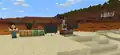 The border placed in a world along with other Education Edition features.
 -
 Border blocks placed in a world in Pocket Edition Alpha.
References


| |||||||||||||||||||
| |||||||||||||||||||


