World generation

World generation (sometimes abbreviated as worldgen) is the procedural generation process Minecraft uses to algorithmically generate terrain, biomes, features, and thus ultimately decides which blocks are placed where. Minecraft worlds are made of 16×16 blocks wide chunks stretching the full height of the dimension. Because there are more than 18 quintillion () possible worlds, the game generates them using randomness, algorithms, and some manually built decorations. The benefits of procedural world generation include smaller game file size and practically infinite possibilities of gameplay.
Randomness
In order to generate a different world every time, the game uses random numbers generated from a seed. However, pure randomness makes terrain and biomes too chaotic with no continuity.[1]
To solve this problem, the game makes use of gradient noise algorithms, like Perlin noise.[2] This makes sure blocks and chunks fit with its neighbors and gives the world both continuity and randomness.
Even though noise looks random and continuous, using it to generate terrain still lacks variation like hills and valleys that stand out and have a large height difference. To solve this, multiple noise functions are generated with different frequencies and amplitudes and then added up, which gives a more natural result. These noise functions are called octaves.
-
 Pure randomness (also known as white noise) is too chaotic.
 -
 Perlin noise makes it random and continuous.
 -
 Multiple octaves are combined to create variation.
Steps

World generation happens in multiple steps. The game may freeze some chunks that are far from players at an early generation step for better performance, as shown on the graph. As the player approaches these chunks, the chunks advance through the generation steps again until they finish generating. Incomplete chunks that are temporarily frozen at a step are called proto-chunks, while chunks that are ready and accessible to players are called level chunks. In Java Edition, the steps of world generation are sorted into:
empty: The chunk is not yet loaded or generated.
structures_starts: This step calculates the starting points for structure pieces. For structures that are the starting in this chunk, the position of all pieces are generated and stored.
structures_references: A reference to nearby chunks that have a structures' starting point are stored.
biomes: Biomes are determined and stored. No terrain is generated at this stage.
noise: The base terrain shape and liquid bodies are placed.
surface: The surface of the terrain is replaced with biome-dependent blocks.
carvers: Carvers carve certain parts of the terrain and replace solid blocks with air.
features: Features and structure pieces are placed and heightmaps are generated.
initialize_light: The lighting engine is initialized and light sources are identified.
light: The lighting engine calculates the light level for blocks.
spawn: Mobs are spawned.
full: Generation is done and a chunk can now be loaded. The proto-chunk is now converted to a level chunk and all block updates deferred in the above steps are executed.
Biomes


Overworld
Biome generation in the Overworld is based on 6 parameters: temperature, humidity (aka. vegetation), continentalness (aka. continents), erosion, weirdness (aka. ridges), and depth. Except for "depth", the other 5 parameters are based only on horizontal coordinates.
They can be thought of as a six-dimensional (6D) space, where multiple intervals are defined for each biome, as described below. If the 6 parameters at a location fall outside all the defined biome intervals, the game uses the closest biome interval in the 6D space.
Temperature is a noise parameter used only in biome generation and does not affect terrain generation. Temperature values are divided into 5 levels. The corresponding ranges from level 0 to level 4 are: -1.0~-0.45, -0.45~-0.15, -0.15~0.2, 0.2~0.55, 0.55~1.0.
Note that the temperature parameter is not the same as the temperature property of a biome, but they roughly correspond each other, e.g. if a location's temperature parameter is level 0, the base temperature of the biome here is usually low enough or the terrain is high enough, that the surface is covered in snow and ice.
Humidity (also known as vegetation) is a noise parameter used only in biome generation and does not affect terrain generation. Humidity values are also divided into 5 levels. The corresponding ranges from level 0 to level 4 are: -1.0~-0.35, -0.35~-0.1, -0.1~0.1, 0.1~0.3, 0.3~1.0.
Continentalness (also known as continents) is used to decide between ocean/beach/land biomes. Higher values correspond to more inland biomes.
- If -1.2~-1.05: Mushroom fields
- If -1.05~-0.455: Deep ocean
- If -0.455~-0.19: Ocean
- If -0.19~-0.11: Coast
- If -0.11~0.03: Near-inland
- If 0.03~0.3: Mid-inland
- If 0.3~1.0: Far-inland
Erosion is mainly used to decide between flat and mountainous biomes. When erosion is high the landscape is generally flat. Erosion values are divided into 7 levels. The corresponding ranges from level 0 to level 6 are: -1.0~-0.78, -0.78~-0.375, -0.375~-0.2225, -0.2225~0.05, 0.05~0.45, 0.45~0.55, 0.55~1.0.
Weirdness (also known as ridges) affects whether to generate a biome variant or not. If the weirdness value is greater than 0, the generated biome becomes weirder. For example, using the variant of the Jungle biome — Bamboo Jungle. Additionally, weirdness also affects where peaks and valleys generate. Because of this, a biome and its variant often do not appear on the same bank of a river.

The PV (peaks and valleys, aka. ridges folded) value is calculated through the formula .
- If -1.0~-0.85: Valleys
- If -0.85~-0.2: Low
- If -0.2~0.2: Mid
- If 0.2~0.7: High
- If 0.7~1.0: Peaks
Depth is a parameter not based directly on noise, instead it corresponds approximately to the terrain height. It is roughly 0 at the surface and increases by 1⁄128 (0.0078125) for every 1 block down. The depth parameter affects whether a surface biome or a cave biome is placed.
The table below lists the defined depth values for Overworld biomes, and any additional noise values required for cave biomes to generate. Any other values result in the closest biome interval being used instead. Note that regions of lush caves and dripstone caves overlap.[3]
| Depth | Additional requirement | Biomes |
|---|---|---|
| D=0.0 | N/A | Surface biomes |
| D=0.2~0.9 | Continentalness=0.8~1.0 |  Dripstone Caves Dripstone Caves
|
| D=0.2~0.9 | Humidity=0.7~1.0 |  Lush Caves Lush Caves
|
| D=1.0 | N/A | Surface biomes |
| D=1.1 | Erosion=-1.0~-0.375 |  Deep Dark Deep Dark
|
The generation of non-inland biomes is not based on humidity, erosion and weirdness. The following table lists the relation between non-inland surface biomes and continentalness and temperature.
| Temperature | Oceans | Deep oceans | Mushroom fields |
|---|---|---|---|
| T=0 |  Frozen Ocean Frozen Ocean
|
 Deep Frozen Ocean Deep Frozen Ocean
|
 Mushroom Fields Mushroom Fields
|
| T=1 |  Cold Ocean Cold Ocean
|
 Deep Cold Ocean Deep Cold Ocean
| |
| T=2 |  Ocean Ocean
|
 Deep Ocean Deep Ocean
| |
| T=3 |  Lukewarm Ocean Lukewarm Ocean
|
 Deep Lukewarm Ocean Deep Lukewarm Ocean
| |
| T=4 |  Warm Ocean Warm Ocean
| ||
The following table lists the relation between inland surface biomes and continentalness, erosion and PV.
| PV | Erosion | Coast | Near-inland | Mid-inland | Far-inland |
|---|---|---|---|---|---|
| Valleys | E=0~1 |  Frozen River(T=0) Frozen River(T=0) River(T>0) River(T>0)
|
Frozen River(T=0)River(T>0)
|
Middle biomes[bo 1](T<4) Badland biomes[bo 1](T=4) | |
| E=2~5 | Frozen River(T=0)River(T>0)
| ||||
| E=6 | Frozen River(T=0) Swamp(T=1,2) Swamp(T=1,2) Mangrove Swamp(T=3,4) Mangrove Swamp(T=3,4)
| ||||
| Low | E=0~1 |  Stony Shore Stony Shore
|
Middle biomes(T<4) Badland biomes(T=4) |
 Snowy Slopes(T=0; H=0,1) Snowy Slopes(T=0; H=0,1) Grove(T=0; H=2,3,4) Grove(T=0; H=2,3,4)Middle biomes(0<T<4) Badland biomes(T=4) | |
| E=2 | Middle biomes | Middle biomes(T<4) Badland biomes(T=4) | |||
| E=3 | Beach biomes | ||||
| E=4 | Middle biomes | ||||
| E=5 | Beach biomes(W<0) Middle biomes(W>0; T=0,1 OR H=4)  Windswept Savanna(W>0; T=2,3,4; H=0,1,2,3) Windswept Savanna(W>0; T=2,3,4; H=0,1,2,3)
|
Middle biomes(W<0 OR T=0,1 OR H=4)Windswept Savanna(W>0; T=2,3,4; H=0,1,2,3)
| |||
| E=6 | Beach biomes | Middle biomes(T=0)Swamp(T=1,2)Mangrove Swamp(T=3,4)
| |||
| Mid | E=0 | Stony Shore
|
Snowy Slopes(T<3; H=0,1)Grove(T<3; H=2,3,4) Plateau biomes(T=3,4) | ||
| E=1 | Snowy Slopes(T=0; H=0,1)Grove(T=0; H=2,3,4) Middle biomes(0<T<4) Badland biomes(T=4) |
Snowy Slopes(T=0; H=0,1)Grove(T=0; H=2,3,4) Plateau biomes(T>0) | |||
| E=2 | Middle biomes | Middle biomes(T<4) Badland biomes(T=4) |
Plateau biomes | ||
| E=3 | Middle biomes | Middle biomes(T<4) Badland biomes(T=4) | |||
| E=4 | Beach biomes(W<0) Middle biomes(W>0) |
Middle biomes | |||
| E=5 | Beach biomes(W<0) Middle biomes(W>0; T=0,1 OR H=4) Windswept Savanna(W>0; T=2,3,4; H=0,1,2,3)
|
Middle biomes(W<0 OR T=0,1 OR H=4)Windswept Savanna(W>0; T=2,3,4; H=0,1,2,3)
|
Shattered biomes | ||
| E=6 | Beach biomes(W<0) Middle biomes(W>0) |
Middle biomes(T=0)Swamp(T=1,2)Mangrove Swamp(T=3,4)
| |||
| High | E=0 | Middle biomes | Snowy Slopes(T<3; H=0,1)Grove(T<3; H=2,3,4) Plateau biomes(T=3,4) |
 Jagged Peaks(T=0,1,2; W<0) Jagged Peaks(T=0,1,2; W<0) Frozen Peaks(T=0,1,2; W>0) Frozen Peaks(T=0,1,2; W>0) Stony Peaks(T=3) Stony Peaks(T=3)Badland biomes(T=4) | |
| E=1 | Snowy Slopes(T=0; H=0,1)Grove(T=0; H=2,3,4) Middle biomes(0<T<4) Badland biomes(T=4) |
Snowy Slopes(T<3; H=0,1)Grove(T<3; H=2,3,4) Plateau biomes(T=3,4) | |||
| E=2 | Middle biomes | Plateau biomes | Plateau biomes | ||
| E=3 | Middle biomes(T<4) Badland biomes(T=4) | ||||
| E=4 | Middle biomes | ||||
| E=5 | Middle biomes(W<0 OR T=0,1 OR H=4)Windswept Savanna(W>0; T=2,3,4; H=0,1,2,3)
|
Shattered biomes | |||
| E=6 | Middle biomes | ||||
| Peaks | E=0 | Jagged Peaks(T=0,1,2; W<0)Frozen Peaks(T=0,1,2; W>0)Stony Peaks(T=3) Badland biomes(T=4) |
Jagged Peaks(T=0,1,2; W<0)Frozen Peaks(T=0,1,2; W>0)Stony Peaks(T=3) Badland biomes(T=4) | ||
| E=1 | Snowy Slopes(T=0; H=0,1)Grove(T=0; H=2,3,4) Middle biomes(0<T<4) Badland biomes(T=4) | ||||
| E=2 | Middle biomes | Plateau biomes | Plateau biomes | ||
| E=3 | Middle biomes(T<4) Badland biomes(T=4) | ||||
| E=4 | Middle biomes | ||||
| E=5 | Shattered biomes(W<0 OR T=0,1 OR H=4)Windswept Savanna(W>0; T=2,3,4; H=0,1,2,3)
|
Shattered biomes | |||
| E=6 | Middle biomes | ||||
In which, the specific biome generation of beach biomes, badland biomes, middle biomes, plateau biomes, and shattered biomes is determined by the temperature, humidity, and weirdness values.
Beach biomes generate in low lying terrain along the coast, and the specific biome generation is related only to the temperature value.
| Temperature | Biomes |
|---|---|
| T=0 |  Snowy Beach Snowy Beach
|
| T=1,2,3 |  Beach Beach
|
| T=4 |  Desert Desert
|
Badland biomes usually generate inland with low erosion value, and can also generate along the coast with high terrain and low erosion. The specific biome generation is related to humidity and weirdness.
| Humidity | Biomes |
|---|---|
| H=0,1 |  Badlands(W<0) Badlands(W<0) Eroded Badlands(W>0) Eroded Badlands(W>0)
|
| H=2 | Badlands
|
| H=3,4 |  Wooded Badlands Wooded Badlands
|
Middle biomes are the most extensive biomes inland. The specific biome generation depends on temperature, humidity, and weirdness.
Temperature Humidity
|
T=0 | T=1 | T=2 | T=3 | T=4 |
|---|---|---|---|---|---|
| H=0 |  Snowy Plains(W<0) Snowy Plains(W<0) Ice Spikes(W>0) Ice Spikes(W>0)
|
 Plains Plains
|
 Flower Forest(W<0) Flower Forest(W<0) Sunflower Plains(W>0) Sunflower Plains(W>0)
|
 Savanna Savanna
|
Desert
|
| H=1 | Snowy Plains
|
Plains
| |||
| H=2 | Snowy Plains(W<0) Snowy Taiga(W>0) Snowy Taiga(W>0)
|
 Forest Forest
|
Forest(W<0)Plains(W>0)
| ||
| H=3 | Snowy Taiga
|
 Taiga Taiga
|
 Birch Forest(W<0) Birch Forest(W<0) Old Growth Birch Forest(W>0) Old Growth Birch Forest(W>0)
|
 Jungle(W<0) Jungle(W<0) Sparse Jungle(W>0) Sparse Jungle(W>0)
| |
| H=4 | Taiga
|
 Old Growth Spruce Taiga(W<0) Old Growth Spruce Taiga(W<0) Old Growth Pine Taiga(W>0) Old Growth Pine Taiga(W>0)
|
 Dark Forest Dark Forest
|
Jungle(W<0) Bamboo Jungle(W>0) Bamboo Jungle(W>0)
| |
Plateau biomes generate at inland high terrain with moderate erosion, which results in biomes like meadows and savanna plateaus. The specific biome generation depends on temperature, humidity, and weirdness.
Temperature Humidity
|
T=0 | T=1 | T=2 | T=3 | T=4 |
|---|---|---|---|---|---|
| H=0 | Snowy Plains(W<0)Ice Spikes(W>0)
|
 Meadow(W<0) Meadow(W<0) Cherry Grove(W>0) Cherry Grove(W>0)
|
Meadow(W<0)Cherry Grove(W>0)
|
 Savanna Plateau Savanna Plateau
|
Badlands(W<0)Eroded Badlands(W>0)
|
| H=1 | Snowy Plains
|
Meadow
| |||
| H=2 | Forest(W<0)Meadow(W>0)
|
Meadow(W<0)Forest(W>0)
|
Forest
|
Badlands
| |
| H=3 | Snowy Taiga
|
Taiga(W<0)Meadow(W>0)
|
Meadow(W<0)Birch Forest(W>0)
|
Wooded Badlands
| |
| H=4 | Old Growth Spruce Taiga(W<0)Old Growth Pine Taiga(W>0)
|
 Pale Garden Pale Garden
|
Jungle
|
Shattered biomes are generated at inland places with high erosion. The specific biome generation depends on temperature, humidity, and weirdness.
Temperature Humidity
|
T=0~1 | T=2 | T=3 | T=4 |
|---|---|---|---|---|
| H=0~1 |  Windswept Gravelly Hills Windswept Gravelly Hills
|
 Windswept Hills Windswept Hills
|
Savanna
|
Desert
|
| H=2 | Windswept Hills
|
Forest(W<0)Plains(W>0)
| ||
| H=3 |  Windswept Forest Windswept Forest
|
Jungle(W<0)Sparse Jungle(W>0)
| ||
| H=4 | Jungle(W<0)Bamboo Jungle(W>0)
| |||
The Nether

The Nether uses 3 parameters to generate biomes: temperature, humidity and offset. Unlike the Overworld, the Nether specifies biomes with a single point.
The offset parameter is not a noise, instead it is always 0 at any location in a world. This means that the parameter point of a location is always in the temperature-humidity-plane. The closer the offset (of a biome point) is to 0, the closer the point is to the T-H-plane and the greater the advantage it has during biome generation.
| Biomes | Temperature | Humidity | Offset |
|---|---|---|---|
 Basalt Deltas Basalt Deltas
|
-0.5 | 0 | 0.175 |
 Crimson Forest Crimson Forest
|
0.4 | 0 | 0 |
 Nether Wastes Nether Wastes
|
0 | 0 | 0 |
 Soul Sand Valley Soul Sand Valley
|
0 | -0.5 | 0 |
 Warped Forest Warped Forest
|
0 | 0.5 | 0.375 |
The End
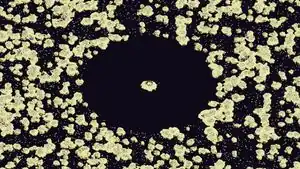
In Java Edition, the End uses only one noise parameter: erosion. If the horizontal distance from the chunk origin of a chunk to the world origin is less than 1024, the blocks in the chunk are in  The End. Otherwise, the biome is determined by erosion.
| Biome | Erosion | Distance |
|---|---|---|
 Small End Islands Small End Islands
|
-1~-0.21875 | >1024 |
| -0.21875~-0.0625 | ||
 End Midlands End Midlands
|
-0.0625~0.25 | |
 End Highlands End Highlands
|
0.25~1 | |
| The End | N/A | <1024 |

In Bedrock Edition, the End has only one biome: The End.
Terrain

Terrain shaping determines which blocks should be solid and which blocks should be filled with air.
3D noise
If the noise is in two dimensions, it controls only surface height and it is impossible to add terrain above the surface. To add overhangs and 3D shapes, the game uses 3D Perlin noise function that gives an output called density for every single block. A density > 0 means it is filled with solid block, otherwise it is filled with air.
Density is then given a height bias and a base height. Height bias "squeezes" the blocks. Base height is the base of the squeezing process where the density is left unchanged. Changing base height moves the ground up and down.
- In the Overworld, there is a single pair of height bias and base height, meaning the higher the block is, the less density it has and vice versa. Height bias and base height are both configured by a couple of different noises. Notably, amplified worlds are generated by tuning height bias to be lower than default, so that terrain stretch in the vertical direction more.
- In the Nether, there are two pairs of base heights that create the thick, solid ceiling and ground, and the hollow space between them.
- In the End, these parameters are configured to squeeze the map into a big island located relatively at the bottom of the dimension.
-
 The side view of a world using a single noise
 -
 The side view of a world using 3D noise, creating overhangs
Splines
To give the world some dramatic terrain shapes like cliffs, fjords and plateaus, the game uses three 2D noise maps. These noises are mapped using splines to calculate the height offset and a vertical stretch factor. The same noises are also used in biome generation, which creates a soft link between biome and terrain. For example, a mountainous area generates mountainous biome and plains biomes are generally flatter.
The larger the continentalness, the higher the average terrain height. Continentalness is used mainly for differentiating ocean and land.
The erosion parameter affects inland terrain during terrain generation. Erosion is mainly used to create large area of flat ground. The higher the erosion at a location, the lower the terrain height and the flatter the terrain.
The peaks and valleys (PV) value is calculated from weirdness. As the name suggests, it is mainly used for generating better peaks and valleys. The higher the PV value, the higher the terrain. Usually, at places with low continentalness or high erosion, when the PV level is "Valleys", the terrain is low enough to generate rivers. At high terrain, negative weirdness values lead to taller and more jagged and point peaks. When the erosion level is approximately 5, positive weirdness values result in weird inland terrain that is shattered and extremely precipitous and craggy.
-
 Continentalness creates distinction between land and ocean
 -
 Large area of flat plains is created by high erosion.
 -
 PV creates peaks and valleys like this fjord.
Noise caves
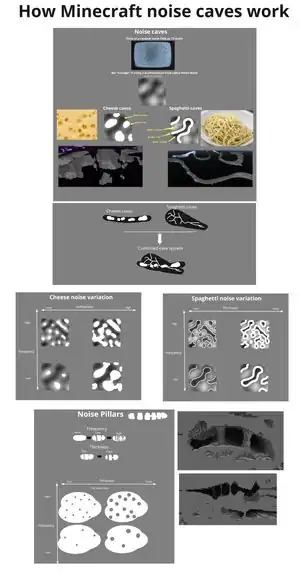
Noise caves are part of the base terrain generation and are generated using 3D Perlin noises. They come in the form of cheese caves, spaghetti caves, and noodle caves. Three noise maps, frequency, hollowness, and thickness, are parameters that control this process. Frequency controls the frequency of the cave generation.
- Cheese caves are pocket areas of the underground that come in various sizes. They are generated by taking the white area in a Perlin noise map. Hollowness controls the size of cheese caves.
- Spaghetti caves are long, narrow caves that wind their way through the underground. When generating, the edge of black and white part of noise image becomes air, making it look like long and wide spaghetti. Thickness controls the thickness of spaghetti caves.
- Noodle caves are a thinner and squigglier variant of spaghetti caves. They consist of tunnels usually 1 to 5 blocks in width. Its generating mechanism is similar to that of spaghetti caves. Thickness controls the thickness of noodle caves.
Additionally, noise pillars generate inside big cheese cave chambers. Frequency controls the frequency of the pillar generation while thickness control the thickness of them.
-
 Inside of a cheese cave.
 -
 Inside of a spaghetti cave.
 -
 Inside of a noodle cave.
Aquifers

Aquifers are liquid systems used in the Overworld to determine the fluid in all empty areas. Without aquifers all empty areas between sea-level and y=-54 would be filled with water. Areas below y=-55 are always filled with lava. To avoid all caves being flooded, aquifers are used to determine the fluid state of each position instead. Aquifers don't change the lava below y=-55. An aquifer can be in 3 different states, with a state selected for each position:
- Empty: Always filled with air
- Flooded: As if aquifers didn't exist: filled with air above the sea-level and a fluid below.
- Local fluid level: Picks a local liquid level and fills areas below with a liquid and areas above with air.
For positions above the preliminary surface, the aquifer state is "Flooded". In areas of the deep dark (Erosion < -0.22 and Depth > 0.9) the state is always "Empty". Otherwise the state is determined bases on a noise. Values below 0.4 are "Empty", values above 0.8 are "Flooded", otherwise a local fluid level is used.
In positions near areas where the preliminary surface is below the sea-level the area of the "Flooded" aquifer state reaches slightly below the preliminary surface. In these areas the cutoff values for the noise are linearly decreased from 64 blocks below the preliminary surface upward. At the surface they are below -0.8 for "Empty" and above -0.3 for "Flooded". This causes the "Flooded" state to be much more common directly below rivers and oceans.
The local water level is determined in cells of size 16x40x16 blocks using a different noise. Whether to place water or lava is determined in cells of 64x40x64 blocks based on a third noise. Areas above y=-10 always use water.
Barriers are used to separate areas of different liquids and to separate liquids from air. The height of the barriers is dependent on a fourth noise, causing water or lava to sometimes spill over the barrier.
Ore veins
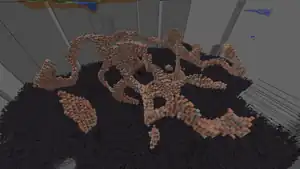
Ore veins generate only in the Overworld. Three noises are used for vein generation: toggle, ridge, and gap.
Toggle is always 0 outside Y=-60 to Y=51 and can be negative or positive inside the range. The game attempts to generate an iron or a copper vein depending on whether toggle is < 0 or > 0. The attempts might fail because veins have a configured generating height.
Ridge is always -0.08 if Y level is outside the range. If ridge is > 0, the game skips the block.
Gap determines the ratio of ore-to-filler material, between 10% and 30% for any given vein. For non-filler blocks, 98% generate as normal ore blocks, while 2% are generated as raw ore blocks (Block of Raw Copper and Block of Raw Iron, respectively).
The blocks used in vein generation are hardcoded, though their size can be changed with datapacks.
Surface

After the base terrain is generated, the game replaces some blocks with grass blocks, sand, dirt, etc., depending on the biome and other conditions.
Overworld
| Conditions | Result block | ||||
|---|---|---|---|---|---|
| Gradient Y=-64 → Y=-59 |  Bedrock Bedrock
| ||||
| Surface[s 1] | Floor[s 2] | Wooded Badlands
|
Above Y=97 | Noise[s 3] |  Coarse Dirt Coarse Dirt
|
| No water above |  Grass Block Grass Block
| ||||
| Otherwise |  Dirt Dirt
| ||||
| Swamp
|
At Y=63 | Noise[s 4] |  Water Water
| ||
| Mangrove Swamp
|
Between Y=61 and Y=63 | ||||
| BadlandsEroded BadlandsWooded Badlands
|
Floor[s 2] | Above Y=256 |  Orange Terracotta Orange Terracotta
| ||
| Above Y=74 | Noise[s 3] |  Terracotta Terracotta
| |||
| Otherwise |  Hoodoo[s 5] Hoodoo[s 5]
| ||||
| Water no deeper than 1 | Ceiling[s 6] |  Red Sandstone Red Sandstone
| |||
| Otherwise |  Red Sand Red Sand
| ||||
| Erosion[s 7] | Orange Terracotta
| ||||
| Water |  White Terracotta White Terracotta
| ||||
| Ceiling[s 6] |  Stone Stone
| ||||
| Otherwise |  Gravel Gravel
| ||||
| Surface is above Y=63 | Above Y=63 and surface is below Y=74 | Orange Terracotta
| |||
| Otherwise | Hoodoo[s 5]
| ||||
| Floor[s 2] | Water no deeper than 6 blocks | White Terracotta
| |||
| Floor[s 2] and water no deeper than 1 |
Frozen OceanDeep Frozen Ocean
|
Erosion[s 7] | No water above |  Air Air
| |
| Cold[s 8] |  Ice Ice
| ||||
| Otherwise | Water
| ||||
| Frozen Peaks
|
Steep face[s 9] or noise[s 10] |  Packed Ice Packed Ice
| |||
| Ice noise within 0~0.025 | Ice
| ||||
| No water above |  Snow Block Snow Block
| ||||
| Snowy Slopes
|
Steep face[s 9] | Stone
| |||
| Noise[s 11] | No water above |  Powder Snow Powder Snow
| |||
| No water above | Snow Block
| ||||
| Jagged Peaks
|
Steep face[s 9] | Stone
| |||
| No water above | Snow Block
| ||||
| Grove
|
Noise[s 11] | No water above | Powder Snow
| ||
| No water above | Snow Block
| ||||
| Stony Peaks
|
Calcite noise within -0.0125~0.0125 |  Calcite Calcite
| |||
| Otherwise | Stone
| ||||
| Stony Shore
|
Noise[s 12] | Ceiling[s 6] | Stone
| ||
| Otherwise | Gravel
| ||||
| Otherwise | Stone
| ||||
| Windswept Hills
|
Surface noise ≥ 4/33 | Stone
| |||
| Warm OceanBeachSnowy BeachDesert
|
Ceiling[s 6] |  Sandstone Sandstone
| |||
| Otherwise |  Sand Sand
| ||||
| Dripstone Caves
|
Stone
| ||||
| Windswept Savanna
|
Surface noise ≥ 7/33 | Stone
| |||
| Surface noise ≥ -2/33 | Coarse Dirt
| ||||
| Windswept Gravelly Hills
|
Surface noise ≥ 8/33 | Ceiling | Stone
| ||
| Otherwise | Gravel
| ||||
| Surface noise ≥ 4/33 | Stone
| ||||
| Surface noise ≥ -4/33 | No water above | Grass Block
| |||
| Otherwise | Dirt
| ||||
| Ceiling | Stone
| ||||
| Otherwise | Gravel
| ||||
| Old Growth Pine TaigaOld Growth Spruce Taiga
|
Surface noise ≥ 7/33 | Coarse Dirt
| |||
| Surface noise ≥ 19/165 |  Podzol Podzol
| ||||
| Ice Spikes
|
No water above | Snow Block
| |||
| Mangrove Swamp
|
 Mud Mud
| ||||
| Mushroom Fields
|
 Mycelium Mycelium
| ||||
| No water above | Grass Block
| ||||
| Otherwise | Dirt
| ||||
| Floor[s 2] and water no deeper than 6 |
Frozen OceanDeep Frozen Ocean
|
Erosion[s 7] | Water
| ||
| Floor with depth[s 13] and water no deeper than 6 |
Frozen Peaks
|
Steep face[s 9] or noise[s 14] | Packed ice
| ||
| Ice noise within -0.0625~0.025 | Ice
| ||||
| No water above | Snow Block
| ||||
| Snowy Slopes
|
Steep face[s 9] | Stone
| |||
| Noise[s 15] | No water above | Powder Snow
| |||
| No water above | Snow Block
| ||||
| Jagged Peaks
|
Stone
| ||||
| Grove
|
Noise[s 15] | Above water | Powder Snow
| ||
| Otherwise | Dirt
| ||||
| Stony Peaks
|
Calcite noise within -0.0125~0.0125 | Calcite
| |||
| Otherwise | Stone
| ||||
| Stony Shore
|
Noise[s 12] | Ceiling[s 6] | Stone
| ||
| Otherwise | Gravel
| ||||
| Otherwise | Stone
| ||||
| Windswept Hills
|
Surface noise ≥ 4/33 | Stone
| |||
| Warm OceanBeachSnowy BeachDesert
|
Ceiling[s 6] | Sandstone
| |||
| Otherwise | Sand
| ||||
| Dripstone Caves
|
Stone
| ||||
| Windswept Savanna
|
Surface noise ≥ 7/33 | Stone
| |||
| Windswept Gravelly Hills
|
Surface noise ≥ 8/33 | Ceiling | Stone
| ||
| Otherwise | Gravel
| ||||
| Surface noise ≥ 4/33 | Stone
| ||||
| Surface noise ≥ -4/33 | Dirt
| ||||
| Ceiling | Stone
| ||||
| Otherwise | Gravel
| ||||
| Mangrove Swamp
|
Mud
| ||||
| Otherwise | Dirt
| ||||
| Warm OceanBeachSnowy Beach
|
Floor with depth and secondary depth 6 | Sandstone
| |||
| Desert
|
Floor with depth and secondary depth 30 | ||||
| Floor[s 2] | Frozen PeaksJagged Peaks
|
Stone
| |||
| Warm OceanLukewarm OceanDeep Lukewarm Ocean
|
Ceiling | Sandstone
| |||
| Otherwise | Sand
| ||||
| Ceiling | Stone
| ||||
| Otherwise | Gravel
| ||||
| Below Y=0 and gradient Y=0 → Y=8 |  Deepslate Deepslate
| ||||
| Otherwise | Stone
| ||||
The Nether
| Conditions | Result block | ||||
|---|---|---|---|---|---|
| Gradient Y=0 → Y=5 | Bedrock
| ||||
| Gradient Y=127 → Y=122 | |||||
| Above Y=122 |  Netherrack Netherrack
| ||||
| Basalt Deltas
|
Ceiling[s 6] |  Basalt Basalt
| |||
| Floor[s 2] | Patch noise ≥ -0.012 | Surface between Y=30 and Y=35 | Gravel
| ||
| Nether noise ≥ 0 | |||||
| Otherwise |  Blackstone Blackstone
| ||||
| Soul Sand Valley
|
Ceiling[s 6] | Nether noise ≥ 0 |  Soul Sand Soul Sand
| ||
| Otherwise |  Soul Soil Soul Soil
| ||||
| Floor[s 2] | Patch noise ≥ -0.012 | Surface between Y=30 and Y=35 | Soul Sand
| ||
| Nether noise ≥ 0 | Soul Sand
| ||||
| Otherwise | Soul Soil
| ||||
| Floor[s 2] | Below Y=33 | Erosion[s 7] |  Lava Lava
| ||
| Warped Forest
|
Netherack noise ≥ 0.54 | Above Y=31 | Nether wart noise ≥ 1.17 |  Warped Wart Block Warped Wart Block
| |
| Otherwise |  Warped Nylium Warped Nylium
| ||||
| Crimson Forest
|
Netherack noise ≥ 0.54 | Above Y=31 | Nether wart noise ≥ 1.17 |  Nether Wart Block Nether Wart Block
| |
| Otherwise |  Crimson Nylium Crimson Nylium
| ||||
| Nether Wastes
|
Floor with depth[s 13] | Soul sand noise ≥ -0.012 | Not erosion[s 7] | Surface between Y=30 and Y=35 | Soul Sand
|
| Otherwise | Netherrack
| ||||
| Floor[s 2] | Above Y=31 and surface below Y=35 |
Gravel layer noise ≥ -0.012 | Above Y=32 | Gravel
| |
| Not erosion[s 7] | |||||
| Otherwise | Netherrack
| ||||
The End
| Conditions | Result block | ||||
|---|---|---|---|---|---|
| Always |  End Stone End Stone
| ||||
- ↑ Above preliminary surface (aka. not in noise caves)
- ↑ a b c d e f g h i j Only the top layer of the floor surface
- ↑ a b Surface noise within -0.909~-0.5454, -0.1818~0.1818, or 0.5454~0.909
- ↑ Swamp surface noise ≥ 0
- ↑ a b Special hardcoded rule that places the bands of terracotta
- ↑ a b c d e f g h Only the top layer of the ceiling surface
- ↑ a b c d e f A hole in the terrain, where the surface noise is 0
- ↑ Whether it is cold enough to snow here
- ↑ a b c d e The vertical gradient of the north and south side is greater than 2
- ↑ Packed ice noise within 0~0.2
- ↑ a b Powder snow noise within 0.35~0.6
- ↑ a b Gravel noise within -0.05~0.05
- ↑ a b The top few layers of the floor surface
- ↑ Packed ice noise within -0.5~0.2
- ↑ a b Powder snow noise within 0.45~0.58
Carvers

Carvers include carver caves and carver canyons. As the name suggest, they "carve" through the ground.
Carver caves and carver canyons are configured to have different probability to be generated in each chunk. If the carver generates, it carves through the ground in random directions starting at the configured start Y level:
- Carver caves generate from Y=-56 to Y=180. The probability of cave generation is higher at Y=-56 to Y=47. Carver caves sometimes include a main room and can have branches.
- Nether carver caves generate Y=0 to Y=126.
- Canyons can start at levels 10 to 72.
-
 A carver cave in the Overworld with a main room.
 -
 Soul Sand Valley with a Nether carver cave.
 -
 A canyon in the Overworld.
Structures
Structures are grouped into structure sets. A structure set determines the placement positions of the structures and places a structure at these positions based on the biome. If no structure matches the biome, then no structure is placed at a given position. The structure positions are usually calculated based on the spacing, separation, and frequency parameters of the structure set. Spacing determines the average distance between structure placement position in chunks, and separation determines the minimum distance. Frequency controls the probability that a determined position is used. If the biome at the placement attempt does not match the requirement, the structure is not placed. An exception are strongholds in Java Edition, which are placed as concentric rings, see Stronghold#Generation.
The following table gives the placement parameters for each structure set, as they are in Java Edition.


- ↑ Also requires surrounding to be river and ocean biomes only.
- ↑ Can't be placed within 10 chunks of any placement position of the "Villages" structure set.
- ↑ Strongholds are placed using concentric rings, see Stronghold#Generation.
- ↑ The placement position is biased toward most land biomes, away from river and ocean biomes.
Once a structure start has been determined, the structure itself is generated. First, the layout of the pieces is determined. This also happens in the structure_starts generation step. Since structures can spread across many chunks, the entire structure has to be generated as soon as any chunk the structure could reach is fully generated. The resulting piece positions are stored in the chunk of the structure start. Other chunks store a reference to the chunk that stores the structure pieces. When a chunk is generating its decoration in the features step, the stored pieces are placed in the world (see #Features).
Features

The generation of features and placement of structure pieces (see #Structures) happens in the same step and are called decorations collectively. Each biome has a list of allowed features and structures that are possible to generate in them.
Decoration steps
Features and structures generate in 11 steps after each other called decoration steps.
raw_generation: Small end islandslakes: Lava lakeslocal_modifications: Amethyst geodes and icebergsunderground_structures: Trial chambers, buried treasure, mineshafts, trail ruins, monster rooms and fossilssurface_structures: All other structures, desert wells and blue ice patchesstrongholds: Unused, strongholds use thesurface_structuresstepunderground_ores: Ore blobs and sand/gravel/clay disksunderground_decoration: Infested block blobs, nether gravel and blackstone blobs, and all nether ore blobsfluid_springs: Water and lava springsvegetal_decoration: Trees, bamboo, cacti, kelp, and other ground and ocean vegetationtop_layer_modification: Freeze top layer feature
Generation

To generate features in a chunk, the game first determines a list of biomes that appear in that chunk or the 8 surrounding chunks. Using that biome list the game constructs a list of features that are possible to generate in those biomes. For each decoration step, first the matching structure pieces are placed, followed by the features. When a structure piece crosses a chunk border, only the part in the current chunk is placed. Each feature has its own placement rules including the number of placement attempts and where in the chunk should the feature try to be placed. The game follows the rules to select a block in the chunk then checks if the biome, block and its surroundings at the current position allows that feature to spawn, and if so places the feature. Features can place block outside the current chunk's boundaries but are limited in the nearby 3×3 area.
When features are generated, they can spill over into neighboring chunks that have already had their features generated. Thus, the feature order specified above is not always adhered to. It is therefore also possible for two worlds generated with the same seed, from the same version of Minecraft, to differ slightly depending on the players' travel routes, because the chunk generation order may determine which of two conflicting features overwrite or suppress the other.
Lighting
As one of the last steps of chunk generation, the light levels for each block are calculated. Before this step, no block placement updates light, and light updates are instead deferred to this step.
Mob spawning

In Java Edition many animals generate upon initial chunk creation. One in ten newly-generated chunks attempts to generate animal mobs, usually in packs of up to 4 of the same species.
In Bedrock Edition animals do not spawn during chunk generation, but they continually attempt to spawn as part of the environmental spawning algorithm.
Notably, mobs that spawn with a structure (e.g. elder guardian in ocean monuments) are immediately spawned when the structure is placed and are not spawned in this step.
Heightmaps
In Java Edition, heightmaps are technically calculated at every step of world generation. Before features are placed, there are only 2 heightmaps – OCEAN_FLOOR_WG and WORLD_SURFACE_WG. After feature placement, OCEAN_FLOOR, WORLD_SURFACE, MOTION_BLOCKING and MOTION_BLOCKING_NO_LEAVES are calculated.
Videos
Videos by Henrik Kniberg:
History
A world generation algorithm has been included in the game since its very inception. World generation was often changed significantly before the Java Edition's release. Notably, after its release, world generation has changed greatly in Java Edition 1.7.2 and Java Edition 1.18. For Bedrock Edition, significant changes were made in Pocket Edition v0.9.0 alpha and Bedrock Edition 1.18.0.
You may find more information on this topic at the History subpage.
References
- ↑ "Minecraft terrain generation in a nutshell" – Henrik Kniberg on YouTube, February 6, 2022
- ↑ "2D Perlin Noise; lecture notes for CMSC 425 (Game Programming)" by Dave Mount and Roger Eastman, Spring 2018.
- ↑ MC-262252 — The generation of lush caves and dripstone caves is poorly defined
- ↑ "I get a lot of questions about how the new Minecraft noise caves work, and why we call them silly things like Cheese caves and Spaghetti caves. Here's an attempt to summarize it in a picture, hope it makes some kind of sense :)" – @henrikkniberg on X (formerly Twitter), February 23, 2021
External links
- More information on xoroshiro128++, the PRNG algorithm Minecraft uses for Overworld generation by University of Milan
- More information on Perlin noise by Raouf Touti
| Geography | |||||||
|---|---|---|---|---|---|---|---|
| Sky and fog | |||||||
| Dimensions | |||||||
| World types |
| ||||||
| Player constructions |
| ||||||
| Matter | |||||||
| Sound | |||||||
| Weather | |||||||
| Joke |
| ||||||
| Removed |
| ||||||


