Java Edition distance effects/Historical effects

This page is a near-comprehensive list of all known distance effects throughout the game's history. A page that only accounts for those which affect the latest versions of the game can be found at Java Edition distance effects.
Table of known effects
Note: This history section is sorted by when each case was fixed, shaded areas in gray in the introduction/fix columns are non-actual versions or testing for versions needed, and shaded areas in yellow indicate distance effects affecting in the development versions only.
High-distance precision loss bugs

- Piston sounds lost precision somewhat at high distances which can be detected by ear - from my memory it affects 1.4 but was fixed in or before 1.6
- Further research is needed into mob spawning and pathfinding precision loss and its overall history - will likely require direct analysis of spawning/pathfinding code. Pathfinding was definitely broken in 19w08b
- Test item frame drop location throughout history
- MC-205680
- Possibly MC-280133.
| From | Until | Change type | Error | Example | Notes | |
|---|---|---|---|---|---|---|
| Likely Classic | Indev 20100218-0011 | Feature removed (with regression) |
Rain appears stretched out at extreme heights. | 
|
Effectively returned in later versions with the introduction of Winter Mode, and proper weather in Beta 1.5 | |
| Likely from the start | Infdev 20100227-1414 | Fixed | Entities use 32-bit floats for position, rather than doubles. | → Go to section | ||
| Likely from the start | Infdev 20100313[1] | Fixed | Blocks stop being solid after X/Z: +16,777,216. | |||
| Likely Classic | Infdev 20100313[1] | Fixed | Particles are stretched and deformed at high distances. | 
|
||
| 0.0.13a | Infdev 20100313[1] | Fixed | The outline box of blocks shakes and jitters considerably at high distances. | 
|
→ Go to section | |
| Likely from the start | Infdev 20100313[1] | Fixed | World rendering loses precision in such a way that chunks become detached from each other. | 
|
→ Go to section | |
| Likely from the start | Infdev 20100313[1] | Fixed | The world periodically stops rendering entirely when the player is at far distances. | 
|
→ Go to section | |
| Infdev 20100313 | Infdev 20100316 | Fixed | Flowers, mushrooms, torches, saplings and wheat lose precision and appear 2D at high distances. | 
|
→ Go to section | |
| Likely Classic | Infdev 20100327 | Fixed | Terrain is blockier at high distances. | 
|
May also affect newer versions if they are modded to generate terrain up to the 64-bit limit | |
| Indev 20100128-2200 | Alpha v1.0.1 | Feature removed |
Gears appear visually stretched at high distances. | 
|
→ Go to section | |
| Infdev 20100325-1545 | Infdev 20100624 | Feature removed |
Particles generated by stationary water blocks lose precision. | 
|
||
| Infdev 20100413 | Feature removed (with regression) |
Rain particles in third person mode lose precision at high coordinates. | 
|
The appearance of these particles in the first place is a bug, likely due to remaining F5 rain code. | ||
| Alpha v1.0.4 | Alpha v1.2.0 | Feature removed (with regression) |
Snow in worlds with winter mode appears stretched at high heights. | 
|
||
| Alpha v1.0.1 | Beta 1.5 | Changed | Redstone wire appears bugged at high distances when traveling up a block. | 
|
→ Go to section | |
| Infdev 20100607 | Beta 1.8 (pre) |
Fixed | Ladders appear visually stretched at high distances. | 
|
→ Go to section | |
| Infdev 20100616 | Beta 1.8 (pre) |
Fixed | Water and lava side textures render incorrectly at high distances. | 
|
→ Go to section | |
| Infdev 20100618 | Beta 1.8 (pre) |
Fixed | Rails appear visually stretched at high distances. | 
|
→ Go to section | |
| Infdev 20100624 | Beta 1.8 (pre) |
Fixed | The terrain rendering appears offset and loses precision at high coordinates, giving way to the famous jitter of the Far Lands. | 
|
→ Go to section | |
| Beta 1.3 | Beta 1.8 (pre) |
Fixed | The top faces of redstone repeaters lose precision at high coordinates. | 
|
→ Go to section | |
| Beta 1.5 | Beta 1.8 (pre) |
Fixed | Powered rails and detector rails appear visually stretched at high distances. | 
|
→ Go to section | |
| Beta 1.5 | Beta 1.8 (pre) |
Fixed | Redstone wire appears offset from its base block, although otherwise correctly sized, when traveling up a block. | 
|
→ Go to section | |
| 1.0.0 (Beta 1.9-pre4) |
1.3.1 (12w18a) |
Feature removed (with regression) |
Smoke from adding an eye of ender to an end portal frame loses precision. | 
|
These particles would no longer display starting in 12w18a due to a change in that snapshot to make singleplayer use a multiplayer server. Later regression in 19w14a to 1.16-pre1 when they show up again. | |
| 1.4.2 (12w34a) |
1.4.4 (1.4.3) |
Fixed | The wall collision box loses precision. | 
|
→ Go to section | |
| Infdev 20100618 | 1.4.6 (12w49a) |
Fixed | Gravity-affected blocks at high distances can duplicate blocks and allow for infinite items, with natural configurations potentially autonomously generating thousands of item entities. | |||
| 1.0.0 (Beta 1.9-pre2) |
1.5 (13w06a) |
Fixed | Fence and nether brick fence collision boxes are broken at high distances. | 
|
→ Go to section | |
| Indev 20100223 | 1.7.2 (13w38a) |
Changed | Paintings are placed at the incorrect positions when far from the origin. | 
|
||
| 1.4.2 (12w34a) |
1.7.2 (13w38a)[2] |
Changed | Item frame rendering breaks at high coordinates, with the frames following the player's position somewhat. | 
|
||
| 1.7.2 (13w38a) |
1.7.2 (13w41a)[3] |
Changed | Item frame rendering is further broken at high coordinates, still following the player's position to an extent but also erratically changing position depending on the camera angle. | 
|
Potentially fixed due to the fix for MC-31619 | |
| 1.7.2 (13w38a) |
1.7.2 (13w41a)[3] |
Changed | Painting rendering breaks at high coordinates, now following the player's position to an extent and also erratically changing position depending on the camera angle. | 
|
||
| 1.7.2 (13w38a) |
1.7.2 (13w41a)[3] |
Fixed | Entities, tile entities, translucent blocks and the wireframe hitbox seem desynced from the terrain itself, especially pronounced with View Bobbing active. | 
|
Entities, block entities such as chests and signs, the wireframe hitbox shown around blocks, and ice and water are all in sync with each other. These become desynced from the terrain. The terrain is in sync with itself. The objects desynced from terrain become very jittery on some hardware. | |
| Infdev 20100624 | 1.8? |
Fixed | World rendering loses precision at high distances, resulting in chunks disappearing from the player's view even if the player is inside them. | 
|
||
| Likely Indev | 1.8 (14w02a) |
Fixed (with regression) |
Lava ember particles lose precision. | 
|
There exists a later regression from 18w10c to 1.16-pre1. | |
| Beta 1.7 | 1.8 (14w02a) |
Fixed | The arms of pistons lose precision, causing them to stretch or even escape the block itself if far enough. | 
|
→ Go to section | |
| Beta 1.8 (pre1) |
1.8 (14w02a) |
Fixed (with regression) |
Underwater particles lose precision. | 
|
There exists a later regression from 18w10c to 1.15pre4. | |
| 1.0.0 (Beta 1.9-pre1) |
1.8 (14w02a) |
Fixed | Water dripping particles lose precision. | 
|
||
| 1.0.0 (Beta 1.9-pre1) |
1.8 (14w02a) |
Fixed | Lava dripping particles lose precision. | 
|
||
| 1.0.0 (Beta 1.9-pre3) |
1.8 (14w02a) |
Fixed | The inside faces of cauldrons lose precision, and can escape the block itself if far enough. | 
|
→ Go to section | |
| 1.3.1 (12w22a) |
1.8 (14w02a) |
Fixed | The tripwire model loses precision, causing it to disappear or stretch when far enough. | 
|
→ Go to section | |
| 1.3.1 (12w22a) |
1.8 (14w02a) |
Fixed | The tripwire hook model when connected to tripwire loses precision. | 
|
→ Go to section | |
| 1.4.2 (12w34a) |
1.8 (14w02a) |
Fixed | The inside faces of flower pots lose precision, and can escape the block itself if far enough. | 
|
→ Go to section | |
| 1.5 (13w01a) |
1.8 (14w02a) |
Fixed | The inside faces of hoppers lose precision, and can escape the block itself if far enough. | 
|
→ Go to section | |
| 1.0.0 (Beta 1.9-pre1) |
1.8 (14w10a) |
Fixed | Lily pads appear glitched at 8388608 blocks out and are invisible from 8388609 blocks onward. | 
|
||
| Indev 20100109-1939 | 1.8 (14w17a) |
Fixed | Fire's model (on a wall) breaks at high distances and can z-fight with its base or become very outstretched from it. | 
|
→ Go to section | |
| Alpha v1.0.1 | 1.8 (14w17a) |
Fixed | Redstone wire appears bugged at high distances. | 
|
→ Go to section | |
| Infdev 20100618 | 1.8 (14w25a) |
Fixed | Falling block spawning at high distances snaps to the corners of blocks. | 
|
||
| Likely Indev | 1.8 (14w28a) |
Fixed | When breaking a container, the contained items are dropped in the wrong area. | 
|
||
| 1.8 (14w30a) |
1.8 (14w30c)[4] |
Fixed | World rendering breaks at high distances, resulting in chunk borders being visible and chunks constantly jumping around in response to camera movement. | 
|
→ Go to section | |
| Indev 20100125 | 1.8 (14w32a)[5] |
Fixed | Torch flame particles are formed at the wrong positions at high distances. | 
|
Wall torch particles are offset further after losing precision, to account for wall torches not being centered on the block. | |
| Indev 20100125 | 1.8 (14w32a)[5] |
Fixed | Fire smoke particles are formed at the wrong positions at high distances. | 
|
||
| Indev 20100219 | 1.8 (14w32a)[5] |
Fixed | Furnace flame particles are formed at the wrong positions at high distances. | 
|
||
| Infdev 20100618 | 1.8 (14w32a) |
Fixed | Sand, gravel, dragon eggs and anvils can become suspended in midair at high distances. | 
|
Upon receiving a block update, they can create an entity for some frames before reverting to block form. | |
| Infdev 20100624 | 1.8 (14w32a) |
Fixed | Minecarts are placed incorrectly at high distances. In some cases (usually stretches of rail), the minecart itself renders in the correct position but its shadow and rider are offset. | 
|
||
| Beta 1.8 (pre1) |
1.8 (14w34c) |
Feature removed |
Void particles are formed incorrectly at high distances. | 
|
"Fixed" by removing them entirely. | |
| 1.7.2 (13w41a) |
1.8 (pre2) |
Fixed | Paintings are placed at the incorrect positions when far from the origin. | 
|
||
| 1.4.2 (12w34a) |
1.8 (pre2)[6] |
Fixed | There existed high-distance bugs with item frames clipping and not being interactable. | 
|
||
| Beta 1.5 | 1.8.2 (pre5) |
Fixed (with regression) |
Rain particles lose precision. | 
|
There exists a later regression from 20w06a to 1.16-pre1. | |
| Beta 1.8 (pre) |
1.8.2 (pre5)[7] |
Fixed | Rain rendering loses precision at high horizontal distances, becoming visible only sometimes beyond 2^23 and becoming completely invisible at 2^24. | 
|
||
| Beta 1.8 (pre1) |
1.8.2 (pre5) |
Fixed (with regression) |
Smoke particles from rain hitting lava lose precision. | 
|
There exists a later regression from 20w06a to 1.16-pre1. | |
| Alpha v1.0.1 | 1.8.2 (pre5)[8] |
Fixed | Redstone torch particles lose precision. | 
|
||
| 1.0.0 (Beta 1.9-pre6) |
1.9 (15w31a) |
Fixed | End crystals generated atop obsidian pillars would be offset at high distances. | 
|
Impossible to witness in vanilla, as End terrain does not generate this far out. However, with mods (such as those that re-enable the Far Lands), all End terrain would spawn obsidian pillars, allowing for this to be seen. Potentially an early manifestation of MC-92901 | |
| 1.9 (15w31a) |
1.9 (15w33a) |
Fixed | The end gateway block's effect breaks when far from the origin. | 
|
||
| Alpha v1.0.1 | 1.9 (15w37a) |
Fixed | Pressure plates detect activating entities wrongly when far from the origin. | 
|
Some pressure plates only recognize the player when stepping on a precision loss point, and others can preserve a signal even when the player is off them. | |
| Alpha v1.0.11 | 1.9 (15w38a) |
Fixed | The cactus collision box loses precision. | 
|
→ Go to section | |
| Beta 1.2 | 1.9 (15w38a) |
Fixed | The cake collision box loses precision. | 
|
→ Go to section | |
| Beta 1.2 | 1.9 (15w38a) |
Fixed | The cake outline box loses precision. | 
|
→ Go to section | |
| 1.1 (12w01a) |
1.9 (15w38a) |
Fixed | The fence gate collision box loses precision. | 
|
→ Go to section | |
| Alpha v1.0.11 | 1.9 (15w49a) |
Fixed | The cactus outline box loses precision. | 
|
→ Go to section | |
| 1.8 (14w32a) |
1.9 (15w49a) |
Changed | Falling block rendering at high distances snaps to the corners of blocks. | 
|
||
| Alpha v1.0.6 | 1.9 (16w04a) |
Fixed | Boats are placed at the wrong position when far enough. | 
|
Fix potentially related to MC-90011 | |
| 1.6 (13w16a) |
1.9 (16w06a) |
Fixed | Lead knots are placed at the wrong position when far enough. | 
|
||
| 1.4.2 (12w34a) |
1.9 (16w06a) |
Fixed | Item frames are placed at the incorrect positions when far from the origin. | 
|
Hard to notice prior to 13w41a due to them not appearing at their actual position. Manifestation may differ across versions. | |
| Beta 1.2 | 1.11 (16w40a)[9] |
Fixed | Piston, command block, dispenser and other blocks which can be placed in 6 directions approximate the player's position using a precision-losing float. | 
|
||
| Beta 1.7 | 1.11 (16w40a)[10] |
Fixed | The extension and contraction animations of pistons act oddly, somewhat following the player around at high distances. | 
|
→ Go to section | |
| 1.0.0 (Beta 1.9-pre3) |
1.11 (16w40a) |
Fixed | The rendering of the end portal block breaks and jitters intensely at high distances, giving way to complete blackness. | 
|
In this version, the effect was made to remain static in respect to the screen, as opposed to moving with the player, a change made to end gateway blocks early in their development which also fixed high distance bugs. | |
| Likely Infdev |
1.13 (18w06a) |
Fixed | Terrain features seem to periodically "avoid" certain stripes of land at high distances on world generation. | |||
| Alpha v1.0.2 | 1.13 (17w47a) |
Fixed | Redstone ore particles are formed wrongly when far from the origin. | 
|
||
| 1.9 (15w44a) |
1.13 (17w47a)[11] |
Fixed | End crystals were placed at the wrong position when far from the origin. | 
|
||
| 1.4.6 (12w49a) |
1.14 (19w03a) |
Fixed | Firework rockets are placed at the wrong positions when far from the origin. | 
|
||
| Beta 1.3 | 1.14 (19w08a) |
Fixed | Beds place the player at their edge when used far from the origin, and drop them off at a precision-losing point when far as well. | 
|
||
| 1.9 (15w49a) |
1.15 (19w39a)[12] |
Fixed | Falling blocks render very oddly at high distances, constantly jumping around in response to camera movement, and jitter when falling even with a still camera. | 
|
→ Go to section | |
| Classic or Indev | 1.15 (pre1) |
Feature removed |
Black smoke particles from TNT exploding are generated at the wrong place at far distances. | 
|
"Fixed" by removing these particles entirely, see MC-165991 | |
| Classic or Indev | 1.15 (pre1) |
Fixed | White smoke particles from TNT exploding are generated at the wrong place at far distances. | 
|
"Fixed" by removing these particles entirely, see MC-165991, despite them seemingly not even being removed at all | |
| Classic or Indev | 1.15 (pre4)[13] |
Fixed | When lit manually, TNT is generated at the wrong place at far distances. | 
|
||
| Infdev 20100625-1917 | 1.15 (pre4) |
Fixed | Monster Spawner particles lose precision. | 
|
||
| Alpha v1.2.0 | 1.15 (pre4) |
Fixed | The particles of the nether portal block form at the wrong place high distances. | 
|
||
| 1.0.0 (Beta 1.9-pre1) |
1.15 (pre4) |
Fixed | Mycelium particles lose precision. | 
|
||
| 1.0.0 (Beta 1.9-pre3) |
1.15 (pre4) |
Fixed | The particles of the end portal block form at the wrong place high distances. | 
|
||
| 1.0.0 (Beta 1.9-pre3) |
1.15 (pre4) |
Fixed | Brewing stand particles lose precision. | 
|
||
| 1.0.0 (Beta 1.9-pre3) |
1.15 (pre4)[14] |
Fixed | The book of the enchanting table faces the wrong direction when far enough from the origin. | 
|
||
| 1.5 (13w06a) |
1.15 (pre4) |
Fixed | Particles from minecart with spawners lose precision. | 
|
||
| 1.7.2 (13w36a) |
1.15 (pre4) |
Fixed | Particles from falling from a height lose precision. | 
|
||
| 1.7.2 (13w36a) |
1.15 (pre4)[15] |
Fixed | Particles from fishing lose precision. | 
|
||
| 1.8 (14w04a) |
1.15 (pre4) |
Fixed | The /particle command generates particles at the wrong place at far distances.
|

|
||
| 1.8 (14w06a) |
1.15 (pre4) |
Fixed | Barrier particles lose precision. | 
|
||
| 1.8 (14w33a) |
1.15 (pre4) |
Fixed | Particles from breaking an armor stand lose precision. | 
|
||
| 1.9 (15w31a) |
1.15 (pre4)[16] |
Fixed | End gateway particles move to the wrong place. | 
|
||
| 1.9 (15w34b) |
1.15 (pre4) |
Fixed | Dark heart particles from hurting mobs lose precision. | 
|
||
| 1.9 (15w34c) |
1.15 (pre4) |
Fixed | Particles from sweep attacks lose precision. | 
|
||
| 1.10 (16w20a) |
1.15 (pre4) |
Fixed | The particles of suspended gravity affected blocks form at the wrong place at high distances. | 
|
||
| 1.13 (18w07a) |
1.15 (pre4)[17] |
Fixed | Squid ink particles lose precision. | 
|
||
| 1.13 (18w10c) |
1.15 (pre4) |
Fixed | Underwater particles lose precision. | 
|
||
| 1.13 (18w15a) |
1.15 (pre4)[18] |
Fixed | Conduit particles move to the wrong place. | 
|
||
| 1.5 (13w04a) |
1.16 (20w12a)[19] |
Fixed | Bone meal particles lose precision. | 
|
||
| 1.16 (pre1)[20] |
Fixed | Mob spawning breaks at high distances. | 
|
May be related to a bug that caused naturally spawned passive mobs to suffocate in blocks when generated at high distances.[21] Example shows before and after 268435456. | ||
| Likely Indev | 1.16 (pre1)[22] |
Fixed | When set off by another explosion, TNT is generated at the wrong place at far distances. | 
|
||
| Beta 1.3 | 1.16 (pre1)[23] |
Fixed | Red smoke from redstone repeaters loses precision. | 
|
The smoke is offset further after precision loss depending on the repeater's delay. | |
| Beta 1.5 | 1.16 (pre1)[24] |
Fixed | Detector rails do not detect the presence of minecarts properly. | 
|
||
| 1.0.0 (Beta 1.9-pre3) |
1.16 (pre1)[25] |
Fixed | The book of the enchanting table sometimes does not open at all when far enough from the origin. | 
|
||
| 1.3.1 (12w22a) |
1.16 (pre1)[26] |
Fixed | Dripping particles from leaves lose precision. | 
|
||
| 1.5 (13w02a) |
1.16 (pre1)[27] |
Fixed | Minecarts with chests that generate in mineshafts appear at the wrong locations at high distances. | 
|
||
| 1.13 (18w10c) |
1.16 (pre1)[28] |
Fixed | Embers from lava lose precision. | 
|
||
| 1.14 (19w03a) |
1.16 (pre1)[29] |
Fixed | Embers from campfires lose precision. | 
|
||
| 1.14 (19w14a) |
1.16 (pre1)[30] |
Fixed | Smoke from adding an eye of ender to an end portal frame loses precision. | 
|
due to fix for MC-10369 | |
| 1.16 (20w06a) |
1.16 (pre1)[31] |
Fixed | Rain particles lose precision. | 
|
Likely from fix to MC-131770 | |
| 1.16 (20w06a) |
1.16 (pre1)[32] |
Fixed | Smoke particles from rain hitting lava lose precision. | 
|
resurfaced due to MC-164158 and above ticket | |
| 1.16 (20w06a) |
1.16 (pre1)[33] |
Fixed | Smoke particles from rain hitting campfires lose precision. | 
|
Likely related to the very similar lava case | |
| 1.16 (20w06a) |
1.16 (pre1)[34] |
Fixed | Ambient particles from the crimson forest, soul sand valley and warped forest lose precision. | 
|
The example to the left was taken at >2^30 blocks, as the effect, while reproducible, is hard to demonstrate in an image within vanilla bounds. | |
| 1.16 (20w12a) |
1.16 (pre1)[35] |
Fixed | Pathfinding of mobs breaks at high distances causing mobs to rotate in a humorous fashion. | |||
| 1.16 (20w15a) |
1.16 (pre1)[36] |
Fixed | Smoke particles from rain hitting soul campfires lose precision. | 
|
||
| 1.16 (20w15a) |
1.16 (pre1)[37] |
Fixed | Ambient particles from the basalt deltas lose precision. | 
|
||
| 1.16 (20w19a) |
1.16 (pre1)[38] |
Fixed | Particles from active redstone wire lose precision. | 
|
From the fix to MC-181566 | |
| Infdev 20100325-1545 | 1.16.2 (20w28a)[39] |
Fixed | Ore blobs generate more blocky at high distances. | 
|
Between 67,108,864 and 134,217,728 blocks, this bug will cause the game to crash, as ore blobs end up being placed in adjacent chunks, resulting in a huge chain reaction of chunk loading.[40] | |
| 1.8 (14w17a) |
1.17 (21w17a) |
Fixed | The world border's radius is controlled by a float, making many world border sizes inaccessible. | |||
| Infdev 20100327 | 1.18 | Fixed | The noise generator sampling loses precision at very high coordinates, resulting in blocky terrain. | Can only be seen with modifying the game as this only starts becoming noticeable beyond 2^55 blocks. | ||
| 1.17 (20w49a) |
1.19 (22w12a)[41] |
Fixed | Vibrations for sculk sensors are created at the wrong positions | → Go to section | ||
| 1.17 (21w20a) |
1.19.4 (pre2)[42] |
Fixed | Dropped items are created at the wrong positions | 
|
||
| 1.7.2 (13w41a) |
1.21.2 (24w36a)[43] |
Fixed | Translucent blocks (or translucent elements such as different parts of slime blocks and honey blocks) can sometimes erroneously stop different translucent blocks/elements behind them from rendering, likely due to it assuming they wouldn't be seen from the player's precision-deficient position. | 
|
→ Go to original page's section | |
| Likely from the start |
Current[44] | Current | Sounds can come from the wrong places at high distances. | → Go to original page's section | ||
| Beta 1.6.5 | Current[45] | Current | Rain and snow appear stretched when the player is high up or low down enough. | 
|
→ Go to original page's section | |
| 1.9 (16w02a) |
Current[46] | Current | Temperature is blockier at high distances, resulting in blockier snow and ice generation and more. | 
|
→ Go to original page's section | |
| 1.17 () |
Current[47] | Current | Projectiles do not collide with players above 8,388,608 on the Y axis. |
High-time precision loss bugs
While not strictly distance effects, these similarly concern precision loss issues with float casting that happen due to excessive time values, regardless of spatial position.
| Introduced | Fixed/changed | Error | Example | Notes |
|---|---|---|---|---|
| 1.4.2 (12w38a) |
1.8.1 (pre3)[48] |
The beacon beam becomes more jittery in rotation, eventually stopping rotating and its texture becoming visually broken at high time values. | 
|
|
| 1.8 (14w30a) |
1.15 (19w35a)[49] |
Banners stop moving in the wind after a certain amount of time. | 
|
The value is somewhere between 3m and 3.5m. |
| 1.15 (19w38a) |
1.15 (pre3)[49] |
Banners stop moving in the wind after a certain amount of time. | 
|
|
| 1.15
(19w40a) |
1.19.4 | Guardian beam rendering stops working at a high enough time value. | ||
| 1.20.5
(24w13a) |
1.21.2 | The ominous spawner item ejection animation breaks after a certain amount of time passed (specifically 2^24 ticks, or 9.71 real life days). | ||
| 1.21.3
(24w44a) |
1.21.5 | The animation of boats in bubble columns degrade over time (starts at 2^24 ticks, or 9.71 real life days). | ||
| 1.4.2 (12w38a) |
Current[53] | The animations of certain entities (specifically bees and bats) breaks after the entity has existed for too long. |
Other float precision loss issues

- Rotation precision loss
- Walking animation and view bobbing stopping
- Brightness breaking at 16777220 and above / -16777218 and below
Analysis
Model issues
Model issues were permanently fixed in 1.8, due to hardcoded block models being replaced with standardized models using JSON files.
Redstone wire
First affected version: Alpha v1.0.1
Last affected version: 14w11b
Notable changes in Beta 1.5, Beta 1.8 Pre-release and 14w02a
- 262,144 - 1,048,575 blocks

Between Alpha v1.0.1 and Beta 1.7.3 inclusive, the first distortions of redstone wire can be seen beyond 262,144 blocks. After this point, if redstone wire climbs a block face perpendicular to the direction 262,144 blocks are exceeded on, it will appear in the same plane as that block face, resulting in major z-fighting. This effect remains like this until 16,777,216 blocks, where error exceeds a full block.
In Beta 1.8 Pre-release and later, vertically travelling redstone is no longer affected by precision loss.
- 1,048,576 - 4,194,303 blocks

Between Alpha v1.0.1 and release 1.8 snapshot 14w11b inclusive, redstone wire first begins to distort beyond 1,048,576 blocks. This distortion is rather subtle, and solely affects the dot - other connections are unaffected. In the screenshot, the redstone at the top (which is the smallest) is before 1,048,576 blocks on both axes, and thus appears at its normal size. The bottom redstone, which is beyond this position, appears bigger. The other two dots are beyond this position on only one axis each, and appear slightly rectangular as a result.
- 4,194,304 - 8,388,607 blocks

Beyond 4,194,304 blocks, redstone starts to distort more significantly and in more ways. Notably, single dots are invisible - since at these coordinates, precision can only be half a block, this splits a block's top surface into a 2×2 grid with 9 possible vertices. As the redstone dot is centered onto the block, the vertices of the model are presumably rounded to the center of the block, producing an invisible 0-dimensional result. Corner turns of redstone dust are now somewhat shrunken as to only cover a corner of the block face, and T-shapes are stretched to cover only half of the block's top face. Crosses and lines are unaffected.
- 8,388,608 - 16,777,215 blocks

Redstone rendering degrades further upon another subsequent doubling of the distance. Redstone dots' model vertices are now rounded out to the corners of the block rather than the center, producing an again visible result which now covers the full block face. T-shapes and corner turns now also cover the full block top face. Lines and crosses remain unaffected at this point due to them covering the full top face in the first place.
-
 Redstone after 8,388,608 blocks in Alpha. Since it assumes a cross shape by default, it needs to be connected to adjacent dust to show the stretching in action here.
- 16,777,216 - 33,554,431 blocks

Beyond 16,777,216 blocks, precision loss exceeds one full block, and redstone renders even more oddly as a result. For example, only half (if exceeded on one axis) / a quarter (both axes) of all redstone dust placed here will actually render - the rest, while it still exists, functions and influences the visual connections of redstone that does render, will remain entirely invisible. Of what does render, redstone will be stretched to visually occupy two blocks if over this distance on one axis, or a 2×2 space of blocks if beyond it on two.
Beyond this distance on only one axis, the stretching on each block is as follows:
- 4n: Invisible
- 4n+1: Renders, stretched towards the negative direction
- 4n+2: Renders, stretched towards the positive direction
- 4n+3: Invisible
For both axes, these effects mix, and therefore only redstone whose coordinates are both 4n+1 and 4n+2 can render.
In versions 14w02a until this effect's fixing, the rendering is as follows:
- 4n: Invisible
- 4n+1: Invisible
- 4n+2: Renders, stretched towards the positive direction
- 4n+3: Invisible
-
 At these distances and beyond, it is possible for dots to appear visually adjacent even though in reality they are disjoint.
 -
 A superflat world with redstone at 16,777,216 blocks on both axes (before 14w02a).
 -
 A superflat world with redstone at 16,777,216 blocks on both axes (after 14w02a).

For vertically travelling redstone, depending on the version, it can appear very distant from the block it is climbing. This ranges from the redstone line floating off of its supporting block by a full block, being flush with its surface and z-fighting, or being inside of the block and therefore invisible under usual circumstances (viewing would require x-raying in some capacity, as at the time redstone did not render from its rear). The possible vertically travelling arrangements are as follows:
Going in the positive direction (would display on the negative face of the block it travels up if closer to spawn):
- 4n: Displays a full block off of the face it climbs
- 4n+1: Flush with the block face, causing z-fighting
- 4n+2: Displays inside of the block it climbs - requires x-ray to see
- 4n+3: Flush with the block face, causing z-fighting
From Alpha v1.0.1 through Beta 1.4_01 inclusive, vertically travelling redstone would also appear stretched. From Beta 1.5 through to Beta 1.7.3 inclusive, it no longer appeared stretched, but still appeared disconnected from its supporting block as described previously. As vertically travelling redstone can only have a line appearance, it would not be able to appear stretched before 16,777,216 blocks, as it would already be taking up the full block face area and no precision would be able to be lost.
-
 Vertically travelling redstone within the 16,777,216 - 33,554,431 bracket prior to Beta 1.3. The lower wire is in a spot where it is visible, but the upper wire is not.
 -
 Vertically travelling redstone from Beta 1.3 through 1.4_01, showcasing a combination of displacement and stretching. In this case, the upper redstone wire is in a position where it renders, where the lower wire is not.
 -
 Vertically travelling redstone from Beta 1.5 through 1.7.3, showcasing solely displacement.
 -
 Vertically travelling redstone from Beta 1.8 Pre-release through to 14w11b, which no longer appears distorted at all.
- 33,554,432+ blocks
Beyond every power of two, redstone dust will stretch more and more, and vertically travelling redstone will become more and more disjoint from its intended position in versions where such effects exist, both effects obviously doubling for each integer exponent of 2 surpassed. These effects can only be seen in modded versions, or (in Beta 1.7.3 and prior) via editing coordinates externally and exploiting the spawn chunk glitch (see Java Edition hard limits#Spawn chunk glitch (X/Z: ±524,288–X/Z: ±1,073,741,824)).
Past X/Z: 536,870,912, a single unit of redstone dust renders large enough to cover four chunks at a time, and beyond X/Z: 1,073,741,824, will appear as large as 128 blocks wide. For a redstone dot, this would result in a single pixel being 128/6 = 64/3 = 21.3333333333333... blocks wide.
Were worlds to theoretically function out to the 64-bit limit (X/Z: ±9,223,372,036,854,775,807), a single unit of redstone dust placed at the correct position would be 2.2 trillion blocks wide.
-
 Redstone dust dot past X/Z 1,073,741,824 (halfway to X/Z 2,147,483,648), at a spot where it would render, on only one axis.
 -
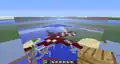 Giant redstone dust past X/Z 1,073,741,824 on both axes. It appears 128 blocks wide in both directions.
 -
 A superflat world with redstone past X/Z 1,073,741,824 blocks on one axis.
Tripwire and tripwire hooks
First affected version: 12w22a
Last affected version: 1.7.10
- 262,144 - 8,388,607 blocks
Beyond 262,144 blocks on both axes, tripwire string simply stops rendering. Beyond this point on only one axis, it will only stop rendering in the direction perpendicular to the axis it is exceeded on. Of what remains, some subtle z-fighting can be seen.
-
 A superflat world with tripwire at 262,144 blocks on both axes.
- 8,388,608 - 16,777,215 blocks

Things become especially odd for tripwire specifically when precision loss is one full block. The texture ends up becoming ridiculously stretched to cover the entire block face and somewhat visually resembles a shag carpet.
-
 A close up of a 2×2 square of tripwire at this distance.
 -
 A superflat world with tripwire at 8,388,608 blocks on both axes.
When attached to a tripwire hook, the results vary visually depending on the version being played on. From 12w22a through 13w01b inclusive, it appears effectively identical to the tripwire itself. However, from 13w02a through to 1.7.10, the section attached to the hook has a very thick gray section. This is almost certaintly due to a model change that affected the brightness and shape of tripwire in that same snapshot, making that section of wire less dotty and more linear; stretching that line perpendicularly to itself would create a planar sheet, as opposed to stretching dots which would create lines.
-
 Prior to 13w02a
 -
 After 13w02a
- 16,777,216+ blocks
After this point, tripwire once again stops rendering perpendicular to the axis of travel.
-
 A superflat world with tripwire at 16,777,216 blocks on both axes.
Pistons
First affected version: Beta 1.7
Last affected version: 1.7.10
Note: this section deals with stationary pistons and does not include pistons in motion.
- 2,097,152 - 4,194,303 blocks
The arm section of a piston begins to distort at this point. If the piston's direction is perpendicular to that of the direction of travel (including vertically facing), the arm will now appear completely flat on that axis. If beyond this point on both axes and extending in a vertical direction, this will result in the arm to appear completely 1-dimensional and therefore invisible.
- 4,194,304 - 8,388,607 blocks
The above details still apply at this point. Pistons now gain an additional distortion at this point. If it is extending parallel to the direction of travel, it will now appear shorter, and detached from the piston body slightly. At 4,194,303 blocks exactly, the texture on the arm will appear slightly squished if facing in the negative direction (as tested on only one positive axis). Beyond this point, the texture mapping will no longer be squished, but part of the arm will be inside of the head (to compensate for its detachment), which can be seen by clipping inside of it.
- 8,388,608 - 16,777,215 blocks
Piston arms now become extremely distorted after this point. Arms parallel to the direction of travel still look the same as their 4,194,304+ counterparts, but those which run perpendicularly are dramatically stretched to cover a full block's width. If on both axes, this can cause a vertically extended piston to appear like two stacked full blocks.
-
 A powered sideways piston. It can be seen that it is at a far distance in both coordinates, due to the stretching and the detachment.
 -
 A powered vertical piston on both axes, with notable stretching
- 16,777,216 - 33,554,431 blocks
The appearance of piston arms is now very dependent on the position of the block itself. If beyond this point on only one axis, pistons which extend parallel to the travel will usually have completely invisible arms (presumably these are reduced to 2D planes which have no texture on the faces anyway due to these parts of the piston arm never being normally visible). It seems that this is always the case for pistons extending in the positive direction. However, for pistons extending in the negative direction, one in every four will have the arm appear stretched to be two full blocks wide. Specifically, the piston must be placed such that the arm extends into block 4n+2.
For arms extending in the two directions perpendicular, the arm will appear completely flat, and either at the very edge of the piston block, or offset from it by a whole block (occurs for pistons at 4n+1).
Effects can be mixed by exceeding this distance on both axes. Vertically facing pistons will obviously always have invisible arms due to them being compressed into being one-dimensional. Other effects can be seen, though - for example, a piston at a coordinate 4x-1 and 4z+1 made to extend towards the negative X direction will result in a thin piston arm stretched to be two blocks wide and offset from the piston by a full block.
-
 Two thin, non-stretched, perpendicularly-offset piston arms, on only one axis.
 -
 Two thin, offset, stretched piston arms meeting at a V shape beyond 16,777,216 blocks on both axes.
Cauldrons and hoppers
First affected version: Beta 1.9 Prerelease 2 (cauldron), 13w01a (hopper)
Last affected version: 1.7.10
- 2,097,152 - 16,777,215 blocks
Between these points, cauldrons and hoppers become very slightly distorted, in that the inner face becomes coplanar with the outer face. This causes the inside of the block to appear slightly larger.
- 16,777,216 - 33,554,431 blocks
Cauldron and hopper inner face behavior becomes very interesting at this point onwards. Assuming one axis
- 4n: the internal faces are outright invisible
- 4n+1: the inner face in the positive direction is missing
- 4n+2: both inner faces will be offset outwards to adjacent blocks
- 4n+3: the inner face in the positive direction is missing
-
 This cauldron is beyond 16,777,216 blocks on both axes, specifically at a position where both the X and Z coordinates are even numbers which are not multiples of 4.
 -
 The previous example as shown with a hopper.
Flower pots
First affected version: 12w34a
Last affected version: 1.7.10
- 1,048,576 - 2,097,151 blocks
Beyond this point is where flower pots first become distorted. While not immediately obvious, paying attention to the dirt reveals that more of it is visible than previously. A flower pot at exactly 1,048,576 blocks will only be distorted on the positive half of the pot - the negative half will remain normal. Beyond this point, both the positive and negative halves on the applicable axes will be distorted.
- 2,097,152 - 4,194,303 blocks
Distortion on flower pots becomes more obvious beyond this point. The internal faces of the pot now are rounded to be closer to the center, rather than slightly farther from it like before. As a result, looking down into the pot allows the sides to be seen out through.
Similar to the previous entry, a pot at exactly 2,097,152 blocks will have the old distortion in the negative half, and the new distortion in the positive half.
It is worth noting for this entry and all subsequent flower pot entries that these internal faces are only rendered from the intended angle and are invisible from behind due to them never being normally seen from behind. This is intended design and is not a distance effect.
- 4,194,304 - 8,388,607 blocks
The flower pot's internal planes have now been completely ejected from the pot itself, such that there are now two full block pixels between the intended edge of the pot and the new position of the planes.
Similar to the previous entry, a pot at exactly 4,194,304 blocks will have the old distortion in the negative half, and the new distortion in the positive half.
- 8,388,607 - 16,777,215 blocks
Interestingly, distortion beyond this point is now positionally dependent, despite the precision loss not being greater than a full block at this point. Assuming only one axis exceeds this coordinate:
- 2n: the internal planes simply appear absent. However, some faces now appear at full brightness where they would usually not. This may mean that the internal faces are offset to coincide with the pot's faces in these cases, as the internal faces are always drawn at full brightness in these versions.
- 2n+1: pots will have their internal planes outright offset into adjacent blocks.
For mixing offsets, pots at double even coordinates have no inner faces and are fully bright, pots at an odd-even coordinate will have two fully bright faces and two offset faces, and double-odd pots will have all four faces offset (which can all be seen at once).
- 16,777,216 - 33,554,431 blocks
Distortion increases again beyond this point. Assuming only one axis:
- 4n: have no visible inside faces and some fully bright outside faces
- 4n+1: both of the inside faces will be offset in the negative direction
- 4n+2: have no visible inside faces and some fully bright outside faces
- 4n+3: both of the inside faces will be offset in the positive direction
Mixing coordinates functions as follows: for pots at double even coordinates, internal faces will be absent and the pot will be completely unaffected by ambient occlusion. At an odd-even coordinate, two outside faces will be fully lit, two inner faces will be absent, and the other two inner faces will be offset to the nearest multiple of 4 block. At a double-odd coordinate, two faces will be offset to one of the two closest multiple of 4 blocks, and the other two will be offset to the other.
-
Four pots at double-odd coordinates with a cauldron for comparison.
-
The previous example as shown with a hopper.
Flowing water and flowing lava
First affected version: Infdev 2010-06-16
Last affected version: Beta 1.7.3
- 16,777,216 - 33,554,431 blocks
As a fluid block's "footprint" always stretches across an entire block face, the effects of precision loss here can only be seen once precision itself can no longer represent blocks (integers) individually.
Interestingly, despite often having angular features, these are not actually lost with the precision loss as one may expect, and are somewhat preserved. However, the angle becomes clearly shallower.
-
 A stretched waterfall.
 -
 A stretched lava fall.
- 33,554,432+ blocks

As with other distance effects, exceeding each integer power of two will double the error systematically, allowing for fluid sides as long as 128 blocks to be witnessed in semi-vanilla bounds.
Rails, powered rails and detector rails
First affected version: Infdev 2010-06-18 (rail), Beta 1.5 (detector rail, powered rail)
Last affected version: Beta 1.7.3
- 16,777,216 - 33,554,431 blocks
- Where the rails show up and where they don't (assuming same as redstone)
- Check to see if repeaters behave identically here.
As a rail block's "footprint" always stretches across an entire block face, the effects of precision loss here can only be seen once precision itself can no longer represent blocks (integers) individually.
Beyond this point, a rail block will be stretched along the axes exceeded. Only half (a quarter if on both axes) of all rails placed will render, with the remaining half still being existent, but not visible.
Sloped rails will become stretched in much the same way as flat rails. If stretched in the direction of vertical travel, this will also result in the angle the rail makes with the terrain becoming shallower, as can be seen in a screenshot below.
-
 Distorted rail, powered rail and detector rail from before Beta 1.8, with single blocks for comparison.
 -
 Stretched circle of rails from before Beta 1.8
- 33,554,432+ blocks
Just like other precision loss issues, every power of two exceeded will cause rails to become even bigger, allowing rails up to 128 blocks big in vanilla bounds. These effects can only be seen by editing coordinates using map editors and exploiting the spawn chunk glitch (more details).
Gears and ladders
First affected version: Indev 2010-01-?? (gears), Infdev 2010-06-16 (ladders)
Last affected version: Alpha 1.0.1 (gears), Beta 1.7.3 (ladders)
- 16,777,216 - 33,554,431 blocks
Since gears and ladders cover the entire block face, the precision loss can only be noticed after this point, as blocks (integers) can no longer be represented individually after here.
Beyond this point, gears and ladders will be stretched and become two blocks wide. Furthermore, only half of all gears and ladders placed here will render - the ones that are placed on "invalid" locations will not.
- 33,554,432+ blocks
Just like other distance effects, every power of two causes gears and ladders to become stretched even further. They are 32 blocks wide beyond 268,435,456 blocks, and 128 blocks wide beyond 1,073,428,854 blocks. (That is the maximum size that they can be, since blocks no longer render past 2,147,483,519 blocks in these versions).
Fire
In some Infdev versions, fire particles render strangely at very high distances.
Torches, crops and cross models
In Infdev 20100313, beyond 8,388,608 blocks, torches, crops, flowers, saplings, and other cross models would lose precision, causing them to appear as 2D rectangles.
Hitbox issues
Fences, fence gates and walls
First affected version: Beta 1.9 Prerelease 2 (fences), 12w01a (fence gates), 12w34a (walls)
Last affected version: 13w06a (fences), 15w38a (fence gates), 1.4.3 (walls)
- 2,097,152 - 8,388,607 blocks
At this point, the hitboxes for fences, gates and walls begin to break. Before this point, pushing into a fence in the positive direction would allow the player to go as far as .07500 blocks into the space the fence occupies; beyond this point, the limit becomes .20000 blocks. It is also possible to easily see inside of walls due to this.
-
 The fence's entity hitbox before 2,097,152 blocks
 -
 The fence gate's entity hitbox before 2,097,152 blocks
 -
 The wall's entity hitbox before 2,097,152 blocks
-
 The fence's entity hitbox after 2,097,152 blocks
 -
 The fence gate's entity hitbox after 2,097,152 blocks
 -
 The wall's entity hitbox after 2,097,152 blocks
- 8,388,608 - 16,777,215 blocks
In this bracket, fence and wall hitboxes expand to fill out the entire block they occupy, similarly to how fences and gates were prior to Beta 1.8 Pre-release and release 1.1 respectively. This is obviously due to the integers being the only representable numbers with floats beyond this point.
-
 The fence's entity hitbox before 8,388,608 blocks
 -
 The fence gate's entity hitbox before 8,388,608 blocks
 -
 The wall's entity hitbox before 8,388,608 blocks
-
 The fence's entity hitbox after 8,388,608 blocks
 -
 The fence gate's entity hitbox after 8,388,608 blocks
 -
 The wall's entity hitbox after 8,388,608 blocks
- 16,777,216 - 33,554,431 blocks

Hitboxes beyond this point become very strange, and virtually non-existent in some cases. Assuming this distance is exceeded on only one axis and in the positive direction, a fence at a 4n coordinate will have an extremely thin hitbox at the negative side of the fence. A fence at a coordinate 4n+1 will have no hitbox at all, one at a 4n+2 coordinate will again have a thin hitbox at the negative side, and one at a 4n+3 coordinate will have its thin hitbox at the positive side. The image to the right showcases the solid faces approximately marked by signs.
Cakes and cacti
First affected version: Alpha v1.0.11 (cacti), Beta 1.2 (cakes)
Last affected version: 15w38a (collision boxes), 15w49a (outline boxes)
Fixing of cake outline box impossible to see due to MC-106300
- 1,048,576 - 2,097,151 blocks
After 1,048,576 blocks, the first breakdown of hitboxes can be witnessed for cakes and cacti. Previously, their hitboxes would perfectly fit their cuboidal shape, however any placed past this point would experience a minor distortion; the hitboxes would be stretched to a full block width on whatever axis this distance was surpassed on. This also affects their collision boxes - previously pressing against these on their negative-facing side would get a value of .76250, but after this point this value is now .70000, like a full block. Cacti can still cause damage with this expanded hitbox.


As cakes can also be eaten to change their hitbox, partially eaten cakes will also experience hitbox breakdowns. Cakes with more than six slices taken out of them are affected in much the same way.
Before:


After:


- 2,097,152 - 4,194,303 blocks
- 4,194,304 - 8,388,607 blocks
- 8,388,608 - 16,777,215 blocks

- 16,777,215 - 33,554,431 blocks
Beyond this point, the hitboxes of these blocks start to become quite strange. As a block's collision box cannot extend outside of the block space it occupies, it becomes very easy to outright clip through the blocks in several cases. On one axis, the hitbox will either be a plane or stretched to occupy two different blocks at once.
Rendering bugs
Infdev-Beta terrain rendering offset/jitter

First affected version: Infdev 2010-06-24
Last affected version: Beta 1.7.3

Many effects are noticeable after traveling millions of blocks away from the center of the map. The first effect that becomes evident from 0624 Infdev to Beta 1.7.3 is the jumpy or stuttering movement of the map. In old versions of Minecraft, when the game renders the map around the player, there are two different versions that are generated, the rendering of the blocks themselves (i.e. entities, how much the block generates) and the visual aspect to the blocks (e.g. the hitbox, block pixels etc.). In Java Edition Beta 1.7 and prior, the visual aspect of world rendering loses precision, resulting in the jumpy movement. The reason the world loses precision in the first place is that the rendering engine uses double-double precision, which determines the position of the world around the player. The rendering engine then uses a floating point integer to determine how far the already rendered blocks move around the player when they move. Unfortunately, this floating point integer cuts the double-double precision number in half, and thus the rendering engine doesn't have enough information to render the terrain correctly, and the information gets cut in half every time the player doubles their distance. Removing the floating text from the rendering engine fixes the stuttering movement.
This jumpy movement is notable even at an X/Z of ±16,384, becoming increasingly noticeable around ±524,288. The intensity of such glitches doubles every time the player passes a coordinate that is a power of two (e.g. 2,097,152 or 4,194,304). After about X/Z 16,777,216, the hitbox is a full block off, which makes placing and destroying blocks almost impossible. The floating point precision errors are no longer noticeable past X/Z 2,147,483,519, as surface textures stop rendering and blocks no longer generate. At the center of the world, the world would be off by only 1⁄4194304 (0.000000238...) blocks. Past the 32-bit limit, the world would be off by 256 blocks. For any position between n and 2n, where n is a power of 2, the world is offset by n⁄8388608 blocks, or n⁄524288 block pixels.
-
 X-ray bug with the movement.
 -
 An Item floating due to the bug
Piston offset/jitter
First affected version: Beta 1.7
Last affected version: 1.10.2
At excessive X/Z positions, the rendering of moving pistons break, causing them to follow the player's position. Althrough affecting Beta 1.7.x versions, it is impossible to notice this in these versions due to the world rendering being broken there as well. While world rendering was fixed in Beta 1.8, moving piston rendering was not fixed in this version and persisted until 1.11 when moving piston rendering was finally fixed.
Infdev 20100227 chunk detaching issue
- X/Z ±32,768: Chunks begin to shake. This effect doubles for every power of two that the player walked away from the spawn point.
- X/Z: ±2,097,152: World stops rendering completely at certain angles.
- X/Z: 268,435,456: Gaps between chunks become multiple blocks long, causing the world to look like either stripes or a grid (depending on the axes which exceed this distance).
Note: This issue could have been present in game versions prior to Infdev 20100227, but the world stopped rendering beyond 2560 blocks anyway in these versions, so this couldn't be noticed there. The world may also periodically stop rendering entirely at far distances.
A similar glitch occurred in snapshot 14w30a/b.
14w30a/b chunk detaching issue
Whether or not this issue occurs appears to be tied to the VBOs setting - switching this on will cause the issue to go away, and disabling VBOs will cause it to happen.
-
 A third person view of the shaky terrain.
World Renderer precision loss
First affected version: Infdev 2010-06-24
Last affected version: Beta 1.7.3
At excessive X/Z positions (depends on the operating system and version, but usually occurs between X/Z: ±268,435,456 and ±2,147,483,647, and early versions such as Beta), world render glitches out, resulting in terrain that appears to flicker. This does happen at X/Z: <±268,435,456, but it becomes very noticeable at X/Z: >±268,435,456 and gets worse every power of 2 beyond that. This could most likely be that past X/Z: ±268,435,456 the Minecraft world is 32 blocks off, which is as large as 2 chunks, though it is unconfirmed.
-
 World rendering causes chunks to spontaneously appear and disappear depending on the player's viewing angle.
First affected version: Beta 1.8
Last affected version: Release 1.7.10
World rendering would lose precision, resulting in chunks vanishing from the player's view.
-
 World rendering breaks at high distances.
Indev/Infdev hitbox rendering issue
- Every power of 2 that the player goes, the hitbox of the block that the player is facing becomes more and more distorted.
- The hitbox becomes increasingly more corrupted and distorted until it disappears entirely at X/Z ±2,147,483,648.
- X/Z ±2,048: Hitbox begins to flicker slightly around blocks.
- X/Z ±131,072: The shape of the hitbox begins to deform.
The shape of the hitbox distorting and becoming non-cubic is also possible on some GPUs.
Falling block rendering issue
The shape of the block distorting and becoming non-cubic is also possible on some GPUs.

Gameplay
Indev entity movement
- Every power of 2 that the player goes, it becomes harder and harder to walk along the axis the player is traveling on.
- At X/Z ±4,194,304, the player falls through the blocks. However, if the player teleports beyond this point they can still stand on the blocks but cannot move along that axis.
- At X/Z ±8,388,608, the player can no longer stand on the blocks and falls into the void.
Infdev 0227 blocks solidness issue
- X/Z ±16,777,216: Blocks are no longer solid; the player falls and hits a layer of lava.
Sculk vibration positioning errors
First affected version: 20w49a
Last affected version: 22w11a
- 4,194,304 - 8,388,607 blocks
Precision will be a factor of two times as accurate for every power of two crossed before this point. Beyond 4,194,304 blocks, vibrations will only be able to come from one of three lines on a block - one for each edge, and another through the center. Past this on both axes, precision loss will allow vibrations to only originate from nine points on a block: the center, the middle of each of the four edges, and the four corners.
- 8,388,608 - 16,777,215 blocks
After this point, precision will be half as precise again. Vibrations will lose the ability to come from the center of blocks, being relegated to one of two edges, or, if beyond this on both axes, one of the four corners.
- 16,777,216 - 33,554,431 blocks
Beyond 16,777,216 blocks, vibrations can come from completely separate positions than the actual source. If a button is placed at (4x+1,4z+1), the vibration will first appear at the center of the four blocks directly northwest of it. However, this does not appear to allow the sculk sensor to detect vibrations from any farther away than it should.
Bed positioning
First affected version: Beta 1.3
Last affected version: 1.13.2
- 8,388,608 - 16,777,215 blocks
The effects of this can be first seen after this point. Sleeping on a bed beyond this point causes the player to be placed on the edge of the bed, as the center can no longer be represented due to precision errors.
- 16,777,216 - 33,554,431 blocks
The position of the player sleeping on a bed becomes interesting beyond this point. If exceeded on one axis, sleeping can sometimes place the player outside of the bed depending of the position of the bed block. If beyond this point on both axes, sleeping can sometimes place the player on the center of the bed, but at a lower position than usual.
World generation
Terrain features
- 16,777,216 - 33,554,431 blocks
Blocky terrain
First affected version: Likely Pre-classic rd-20090515
Last affected version: Infdev 2010-03-25
At very high distances, the terrain start to become distorted and form blocky shapes. This can be first be seen at 4,194,304 blocks. At 8,388,608 blocks it becomes more noticeable. At 16,777,216 blocks and beyond the terrain becomes very distorted, all the way to the Far Lands in these versions. This is presumably caused due to the noise coordinate losing precision at high distances, althrough this is yet to be confirmed.
First affected version: Infdev 2010-03-27
Last affected version: 1.17.1 (?) Beyond 2^55 blocks especially, terrain starts to distort and form blocky shapes, due to gradient noise sampling losing precision.
Gallery
Fixed bugs
-
 Emerald ore is not affected by the ore blob generation precision loss.
 -
 Particles are offset. String and redstone appear to be stretched out.
Particle errors
-
 The corner of the world in Beta 1.5, with the void particles clearly losing precision.
 -
 The corner of the world in Beta 1.8 Pre-release, with the grid pattern of particles clearly visible.
 -
 The void in 1.6.2 from within.
 -
 Void particles near the end of their lifetime in Beta 1.8's development, still not precisely generated.
 -
 20 blocks short of the 30 million mark. Not only are the torches and their flames not lined up, but the flames each picked a different direction to bend.
 -
 Void particles in the world boundary appear in very specific patterns.
 -
 Particles are in wrong position.
 -
 A redstone torch hanging on solid boundary air in Release 1.7. There is a noticeable particle position desync.
 -
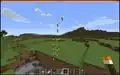 Torches placed on glowstone next to the invisible wall, the particles emitted from them are also in the wrong place.
 -
 Redstone ore lit beyond 224 on all three axes in 1.12.2 (as seen via the Cubic Chunks mod)
 -
 Four blocks of redstone ore lit beyond 225 blocks on both axes
 -
 A command-summoned TNT's explosion at 1,500,000,000 on both X and Z axis. The white and black smoke particles spawn in two different locations and different from the location of the TNT, due to floating-point precision errors.
Mods and map editors

Up until 1.1, there existed a bug with the OptiFine mod[54][55][56] which would progressively break world rendering when traveling a far enough distance away, with effects manifesting as soon as 10,000 blocks. The effects would appear to get more intense continuously when moving far away from the center of the world, as opposed to having cutoffs every 2n blocks, due to this rendering bug also taking rotation into account (although if the rotation is kept constant and along one axis discrete jumps become noticeable). The bug existed due to the mod undoing vanilla's fix for said bug.
-
 With the pre-1.1 optifine mod on GPUs that do not cause major geometrical distortion, block models would progressively distort with increased distance. After 16,777,216 blocks, with error reaching two blocks in magnitude, an effect analogous to the Stripe Lands can be seen on full blocks.
When viewing the Far Lands in a 3D Minecraft map editor, the player encounters errors. In MCEdit, the selection cubes start to distort and the map distorts when viewing. In addition, when the player rotates their view around a selected area, blocks are not lined up right and change how poorly lined up they are at random, making the whole world seem to shake.
-
 The selection box being distorted in MCEdit.
 -
 Twisting world and move player tool in MCEdit.
References
- ↑ a b c d e Likely due to changes mentioned in https://notch.tumblr.com/post/443693773/the-world-is-bigger-now (archive)
- ↑ Ticket is MC-3493, although the fix version is incorrect
- ↑ a b c Ticket is MC-31653, but resolution snapshot is a week late
- ↑ MC-63333
- ↑ a b c MC-3718
- ↑ MC-56551
- ↑ Has a bug tracker ticket at MC-72562, although fix was not noticed immediately and is assigned to a much later version
- ↑ MC-76747
- ↑ MC-4132
- ↑ MC-98093
- ↑ MC-92901
- ↑ MC-93810, MC-98656
- ↑ MC-125638
- ↑ MC-161888
- ↑ MC-161991
- ↑ MC-161999
- ↑ MC-161994
- ↑ MC-161993
- ↑ MC-76810
- ↑ MC-167103
- ↑ MC-123390
- ↑ MC-167047
- ↑ MC-167971
- ↑ MC-183174
- ↑ MC-167044
- ↑ MC-167091
- ↑ MC-182748
- ↑ MC-167046
- ↑ MC-167042
- ↑ MC-161969
- ↑ MC-171035
- ↑ MC-171037
- ↑ MC-185480
- ↑ MC-170872
- ↑ MC-177723
- ↑ MC-185480
- ↑ MC-170872
- ↑ MC-182748
- ↑ MC-185925
- ↑ https://www.reddit.com/r/Minecraft/comments/9u9d4i/floats_minecraft_and_the_far_lands/
- ↑ MC-207260
- ↑ MC-229293
- ↑ MC-186362
- ↑ MC-191170
- ↑ MC-164352
- ↑ MC-192718
- ↑ MC-221892
- ↑ MC-1279
- ↑ a b MC-63720
- ↑ MC-165595
- ↑ MC-273758
- ↑ MC-277865
- ↑ MC-199467
- ↑ https://youtube.com/watch?v=jVSvf06rqBg
- ↑ https://youtube.com/watch?v=FR9xvH-u21k
- ↑ https://youtube.com/watch?v=a8CHopq3Tzw
External links
- Video showcasing several high distance effects present in Minecraft 1.0.0
- Video showcasing several high distance effects present in Minecraft 1.4.2
- Video showcasing several high distance effects present in Minecraft 1.6.4
- Video showcasing several high distance effects present in Minecraft 1.7.2
- Video showcasing several high distance effects present in Minecraft 1.7.10