Java Edition distance effects

In Java Edition, certain game mechanics start to break down as the player's distance from the center of the world increases.
Vanilla bounds (X/Y/Z ±0–29,999,984)
Entities
- Entities are immune to damage above 8,388,608 blocks on the Y axis.[1]
Rendering
- Rain and snow appear stretched out at large heights.[2]
Sounds
- Many break down slightly.[3]
- Becomes considerably more pronounced beyond vanilla bounds at 228 (268 million blocks).
World
- Temperature distribution breaks at high distances,[4] which can be easily noticed with the creation of snow and ice in mountains appearing blockier due to both world generation and subsequent regeneration from snowfall or freezing.
Beyond the vanilla world boundary (X/Z ±29,999,984–2,147,483,647)


Horizontal distances far beyond 30 million blocks cannot be reached without modifying the game.
32-bit precision loss
Rendering
- Lighting breaks down after 225 (±33,554,432 blocks), causing hostile mobs to almost always spawn.
Broken sounds
Sounds
- Many sounds stop working if the player goes 16 blocks beyond 228 (±268,435,456 blocks).
Unknown (possibly 64-bit?)
Entities
- The player can easily get stuck in the positive sides of blocks after 230 (±1,073,741,824 blocks), mobs (except the player) can suffocate if pushed into the positive sides of blocks.
World
- Villages stop generating correctly after 230 (±1,073,741,824 blocks).
Beyond the 32-bit limit (X/Z ±2,147,483,648-9,223,372,036,854,775,807)
The standard format for doubles dedicates 52 bits to the fraction, as opposed to the 23 bits used by the 32-bit float. As a result, beyond 2^30 or 1,073,741,824 blocks, the player would only be off by (2^30)/ (2^52) = 1/2^22 = 1/4194304 blocks, which is absolutely indistinguishable from the distance back at spawn. This is around equivalent to the precision of 2 to 4 blocks out on Bedrock Edition.
Each doubling, however, indeed halves the precision used, up to a point where every single element of the game ends up breaking down.
64-bit precision loss
Minecraft: Java Edition uses 64-bit floating point precision for entity positions and other calculations. Several mechanics which do not break down within vanilla bounds break down at very high distances similarly to Bedrock Edition.
Entity movement
On the X axis:
- It becomes impossible to swim in newer versions (1.13 and later) after 231 (±2,147,483,648 blocks).
- At 235 blocks, biome fill noise overflows in older versions (Beta 1.7.3 and earlier), resulting in stripes of exposed stone in the terrain.
- At 236, or 68,719,476,736 blocks, the "spawn chunk glitch" happens. Teleporting to this position causes the game to load the spawn chunk at this position, overwriting the terrain with the content of the spawn chunk. This also happened in Beta 1.7.3 at 219 or 524,288 blocks.
- Jitter is noticeable at 248, or 281,474,970,710,656 blocks out, which is roughly the equivalent of 524,288 blocks in Bedrock Edition.[5] Beyond this point, in versions 1.14 and later, the skybox starts flashing between blue and purple colors when the player's camera moves. This effect becomes more intense at higher distances.
- At 251 blocks and beyond, it is no longer possible for the player to move along that axis by using normal walking speed.
- The player and all entities that have a hitbox equal to or smaller than 1 block fall through the world at 2^52, or 4,503,599,627,370,496 blocks out.[5]
- After 253 or 9,007,199,254,740,992, at every power of two, water, vines and lava get more and more stretched.
- Stripe Lands occur at 253, or 9,007,199,254,740,992 blocks out.[5]
- The Far Lands start to generate roughly 53 quadrillion blocks in versions from 1.7 to 1.13.2 (57 quadrillion blocks in versions from Beta 1.8 to 1.6.4), but due to terrain generation changes in 1.14, the Far Lands now occur 500x further out, rendering them unreachable.[5] These Far Lands are caused by the same glitch that causes the normal Far Lands, but at its 64-bit respective distance.
- At around 150 quadrillion blocks out, the Far Lands start to repeat segments of the broken terrain that generates.[5]
- At 257 blocks and beyond, terrain flickering occurs in modern versions, similar to 2^28 blocks in versions before Beta 1.8.[5]
- At around 4.312 quintillion blocks out, the repeating patterns entirely stop and leave no variation in the strips that generate, possibly due to the 64-bit Farther Lands.[5]
- The game immediately crashes when loading chunks beyond 263 or 9,223,372,036,854,775,808 blocks.[5]
On the Y axis:
- Beyond 248 blocks, the skybox starts flashing between blue and purple colors when the player's camera moves.
- Flying upwards or downwards in Creative becomes impossible after 252 (4,503,599,627,370,496) blocks.[6]
- Falling downwards becomes impossible after 255 (36,028,797,018,963,968) blocks.[6]
- The game freezes if the player points their camera at a 40 degree angle after 255 (36,028,797,018,963,968) blocks.
- In recent versions, NBT editing the player's position past 20,000,000 blocks on the Y axis automatically teleports the player downward.
-
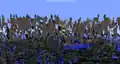
 The 64-bit Far Lands.
 -
-
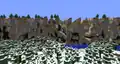 With a Stripe Lands fix.
 -
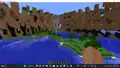 The 64-bit Corner Far Lands.
 -
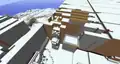 A Village generating in the 64-bit Corner Far Lands.
Stripe Lands
As 52 bits are dedicated to the fraction in the double format rather than 23 in the single format, after 253 or 9,007,199,254,740,992 blocks out, precision breaks to consider only every second block, and so on. The rendering breaks down in an effectively identical manner to Bedrock Edition and yields the famous Stripe Lands as a result.
Fluids break down differently from blocks; while block rendering breaks down to form the usual stripes, fluids instead stretch to the size of the precision loss, with the initiation of the Stripe Lands causing each liquid to become two blocks long, then four at the next doubling, and so on.
In older versions, beyond 254 blocks, the world would render similarly to the Slice Lands of Bedrock Edition, in newer versions (starting from around 1.12, or even earlier), the world renders stripes with a larger distance between them instead.
In modern versions of Minecraft (1.14 and later) the game freezes when the Stripe Lands are rendered, so a Stripe Lands rendering fix is required to traverse further.


Beyond the 64-bit Limit (X/Z ±9,223,372,036,854,775,808-21024)
- Distance Effects beyond 9,223,372,036,854,775,807 in Modern Versions.
Beyond the 64-bit integer limit, the precision loss becomes greater by every passing exponent of two that is passed.
On the X/Z axis:
- More precision is lost, resulting in bigger rendering slices. At X/Z: 256 and beyond, all entities are on the edges of chunks.
- Fringe Lands start to generate at roughly 8.175 quindecillion blocks out on the X axis, and breaks in stages (9.176 quindecillion for the second stage, 9.576 quindecillion for the third stage, 10.296 quindecillion for the 4th stage). They also start to generate at roughly 9.17 quindecillion blocks out on the Z axis.[7]
- Terrain generation on the X axis stops completely at around 20.596 quindecillion blocks out leaving an empty ocean with a bedrock floor, though on the Z axis it just gradually breaks down, and around 560 quindecillion (probably further if you were lucky enough), it stops too.[7]
- 21024 (179.77 uncentillion) is the limit for 64-bit floats, meaning that this limit cannot be surpassed without a rework of the entire coordinate system.
On the Y axis:
- Entity positions lose precision when the player passes every exponent of two.
- The skybox flashing continues until 21024.(179.77 uncentillion)
- The player cannot surpass 21024 (179.77 uncentillion) on the Y axis as that is the position limit for 64-bit floats.[8]
Skygrid
The Skygrid is a theoretical distance effect that occurs in the corner Fringe Lands or after the Z Fringe Lands. This effect occurred on Bedrock Edition until the Far Lands' removal in the 1.17.30 bugfix update.
Analysis
Due to precision loss becoming more extreme at greater distances, features affected at it behave different depending on how far out they are.
Rain/snow rendering
First affected bracket:
First affected version: Unspecified Classic
Last affected version: Indev 2010-02-14 2
Second affected bracket:
First affected version: Alpha v1.0.4
Last affected version: Alpha v1.1.2_01
Third affected bracket:
First affected version: Beta 1.6.5
Still affects the current release (1.21.5)
Suspected to affect as far back as Beta 1.5, but cannot be reasonably tested due to crashes
Note: This affects both rain and snow, but this can only be seen with rain in versions prior to 1.7 because temperature didn't change with height in these versions.
- 16,384 - 262,143 blocks
Beyond this point on the Y axis one can start to see the first signs of snow/rain jittering. Up to 65,535 blocks. this can only be reasonably seen with snowflakes with a mainly horizontal trajectory, as vertical traveling snowflakes are moving at a speed where travel still appears mostly smooth. Beyond 65,536 and especially 131,072 blocks, the effect becomes very obvious for almost all snow.
- 262,144+ blocks
The first signs of geometrical distortion in the snow itself can be seen - very little non-misshapen snow is present beyond here, and most of it has transformed into either lone rectangles, or the odd paired rectangles similar in shape to a pause button.
Deformity progresses after every power of two surpassed from this point. Past 16,777,216 blocks, snow becomes a near unrecognizable pattern of suspended vertical lines.
- 2,147,483,647+ blocks
Beyond this point, snow stops rendering. The sky still remains fine. When the player goes below the 32 bit integer limit, rain appears for an unknown reason.
Sound positioning errors

Becomes very severe beyond 2^28 blocks, where many sounds are simply no longer audible at all. this might happen all the way at 33,554,432 sometimes it is because Minecraft's default sound range is usually around 64 blocks. However, sounds can be heard up to a maximum distance of 256 blocks in a sphere around the player.
Temperature distribution breakdown
First affected version: 16w02a
Still affects 1.21.5
- 16,777,216 - 33,554,431 blocks
As snowfall/rainfall is handled on a per-block basis, the effects of precision loss here can only be seen once precision itself can no longer represent blocks (integers) individually.
Beyond this point, while perhaps not immediately obvious (especially due to the vertical variation in almost all biomes where this effect can be seen), the patterns resulting from snow landing on surfaces become much more angular than before, being commonly composed of large rectangles, thin lines and lone dots which are either filled with snow or have it completely absent. This is similarly true of water, with ice corresponding to cold blocks and water to warmer blocks.
As temperature varies with height, in order to properly see the effects of this, it is strongly recommended to build a flat plane for snow to accumulate on instead, or to generate a Superflat world with snow/ice set to generate with it as it would naturally. A modified Tunneler's Dream preset set to generate 94 layers of black concrete (Looking At Block should say 93 for the top concrete layer) is ideal for this case, providing a roughly 50/50 density of snowy and clear blocks, with black providing maximum contrast.
Teleporting to 16,777,216 on both axes should show four quadrants - one with normal looking snow/ice generation, and three with far more angular features due to the precision loss exceeding a full block. During times of precipitation, it can be seen that the blocky patterns of snow/ice match up with the weather directly above - snowy areas have snowfall where areas with no snow cover have rain. This is obviously true anywhere and is unrelated to precision loss, but (especially in the case of already-generated worlds) this can be used to prove that the precision loss lies with temperature calculation and is not merely a world generation issue disjoint from it.
-
 An example of snow generated correctly near the spawn point.
 -
 An example of snow generated at high distances. Notice the differing consistency composed of squares and lines.
 -
 Snow generated in an extreme hills biome in 1.8, showing intended behavior.
 -
 The exact same area as generated in 1.9, showing the newly broken generation.
- 33,554,432+ blocks
Beyond this point, temperature calculation becomes very broken depending of the axes where this position has been exceeded. If beyond this point on one axis, the terrain has clearly visible "stripes" of snow in mountain biomes. If beyond this point on both axes, snowy areas have square shapes covering several blocks (especially beyond 67,108,864 blocks). These effects can only be seen on modded versions, since terrain doesn't generate beyond 30,000,000 blocks in vanilla.
Historical effects
Due to the incredibly large amount of documentation on effects in older versions of the game, all such content has been relocated to /Historical effects.