Realms Stories


Realms Stories is a social hub for members of a Realm.
Usage
Realms Stories is available for all players that are member of a Realm in Bedrock Edition, for both Realms Plus and Realms Core subscriptions. It can be accessed from the main screen of the Realm in the play screen, and from the Edit Realm screen for the owner of the Realm. It can also be accessed from the pause menu while playing on the Realm.
The main screen of Realms Stories has three tabs, and a button to open the Realms Stories settings in the top-right.
Story Feed
In the Story Feed, all story posts from Realm members are shown on the right side of the screen, and a list of recently played members on the left side. A player can add with the purple button on the top-left. A story post can contain text, and/or a screenshot that is stored in-game.
Every story post in the Story Feed shows the player that added the story, and the time or date when the story was added. If the story contains a screenshot, the player can open it in full screen by clicking on it. Every post can also be liked with the button below, including a player's own posts. The amount of likes is shown on the left.
Players can also comment on every story post. These comments can only include text, but they can be liked by any player in the comments screen.
With the options button on the bottom-right of a post or comment, player's can remove their own posts, or report them to Xbox Enforcement. The Realm's owner can delete any story or comment, while other members can only delete their own. Other members can also notify the Realm's owner about a story. These reports can be accessed from the "Game Settings" tab in the Manage Realm screen for the owner.
Realm Events
These new stories are automatically posted to the feed when interesting events happen on a Realm. They can be toggled off in the Realms Stories settings by the owner.
| Icon | Event Message | Criteria | Frequency | Major Event? |
|---|---|---|---|---|
 |
The Ender Dragon was defeated! | Successfully defeat the ender dragon for the first time | First player only | Yes |
 |
The Wither was defeated! | Successfully defeat the wither for the first time | First player only | Yes |
 |
<player> defeated the Ender Dragon!... again | Successfully respawn and defeat the ender dragon | Unlimited per player | No |
 |
<player> defeated the Wither!... again | Successfully respawn and defeat the wither | Unlimited per player | No |
 |
<player> has a full diamond set | Craft a full set of diamond tools and armor | Once per player | No |
 |
<player> discovered an Abandoned Mineshaft XYZ: <X, Y, Z> |
Discover an abandoned mineshaft for the first time | First player only | No |
 |
<player> discovered an Ancient City XYZ: <X, Y, Z> |
Discover an ancient city for the first time | First player only | No |
 |
<player> discovered a Badlands XYZ: <X, Y, Z> |
Discover a badlands biome for the first time | First player only | No |
 |
<player> now commands the sea | Craft and power a conduit for the first time | First player only | No |
 |
<player> upgraded to Netherite | Upgrade an item to netherite | Once per player | No |
 |
<player> found a diamond | Find a diamond for the first time | First player only | No |
 |
<player> discovered enchanting | Enchant an item | Once per player | No |
 |
<player> traveled to the End? XYZ: <X, Y, Z> |
Enter an end portal for the first time | First player only | No |
 |
<player> discovered a Mushroom Field XYZ: <X, Y, Z> |
Discover a mushroom field biome for the first time | First player only | No |
 |
<player> discovered a Nether Fortress XYZ: <X, Y, Z> |
Discover a nether fortress for the first time | First player only | No |
 |
<player> created a portal to the Nether XYZ: <X, Y, Z> |
Build and light a nether portal for the first time | First player only | No |
 |
<player> scaled a Mountain Peak XYZ: <X, Y, Z> |
Discover a mountain peak biome for the first time | Once per player | No |
 |
<player> discovered a Pillager Outpost XYZ: <X, Y, Z> |
Discover a pillager outpost for the first time | First player only | No |
 |
<player> powered a Beacon! XYZ: <X, Y, Z> |
Power a beacon for the first time | First player only | No |
 |
<player> discovered a Woodland Mansion XYZ: <X, Y, Z> |
Discover a woodland mansion for the first time | First player only | No |
 |
<player> has a new friend, <named mob> | Name a mob using a name tag for the first time | Once per player | No |
 |
<player> joined the Realm | Add a new player to the realm whitelist | Once per player | No |
 |
<player> defeated a Pillager Captain | Defeat a pillager captain for the first time | Once per player | No |
 |
A new adventure has begun! What will the story of this Realm be? You decide. | Create a new realm and enable realms stories | Once per realm | No |
 |
The world has changed to <slot number> | Switch the slot number for a realm | Unlimited per realm | No |
Retired Realm Events
| Icon | Event Message | Criteria | Frequency | Major Event? |
|---|---|---|---|---|
 |
<player> is celebrating with a cake and candle. Thank you, <player>, for wishing Minecraft a Happy Birthday! | Put a candle on a cake | Once per player | No |
Undocumented Realm Events
| Icon | Event Message | Criteria | Frequency | Major Event? |
|---|---|---|---|---|
 |
<player> cannot be defeated by mere mobs | Defeat 250 hostile mobs | Once per player | No |
 |
<player> created all the mystery mobs | Discover all mob name tag easter eggs | Once per player | No |
 |
<player> prepared a 13 course meal | Once per player | No | |
 |
<player> started mapping the world | Fully explore a map for the first time | Once per player | No |
Unused Realm Events
| Icon | Event Message | Criteria | Major Event? |
|---|---|---|---|
 |
<player> has discovered intentional game design! | Place and click on a bed in the Nether or End dimensions for the first time | No |
 |
<player> was blown up by a creeper! | Die from a creeper explosion for the first time | No |
 |
<player> was killed by a Warden. Uh Oh! Shh! | Die from a warden's attacks for the first time | No |
 |
<named mob> met an untimely death | Occurs when a named mob dies for the first time | No |
 |
<player> has suffocated in a wall! | Die from suffocating in a wall for the first time | No |
Timeline
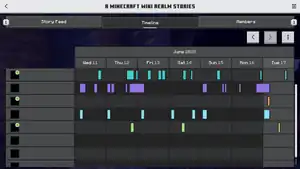
Realm Stories also contain a Timeline table that shows numerous activity of players in the Realm. The playing times are colored for each player. One week of playing times is shown on the screen, but older data can be viewed with the arrow buttons above. To gain access to the Timeline and store activity data, a player needs to opt in for the Timeline. Players can opt out at any time, and they can also opt in anytime later again. The Realm's owner can view all members that are opted out.
Members
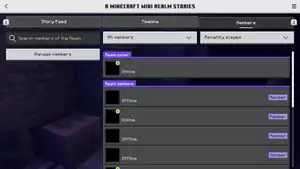
Shows a list of all Realm members and their activity or online status. The list can be sorted and filtered, and there is a text box on the top-left to search for members. The Realm's owner can also access the "Members" settings tab in the Manage Realm screen from here.
Realms Stories settings
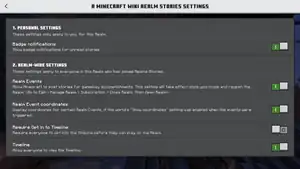
There are a few optios available for Realms Stories. These cannot be changed from the main settings screen.
| Option | In-game description | Default |
|---|---|---|
| Personal settings | These settings only apply to you, for this Realm. | |
| Badge notifications | Show badge notifications for unread stories. | 
|
| Realm-wide settings | These settings apply to everyone in this Realm who has joined Realms Stories. | |
| Realm Events | Allow Minecraft to post stories for gameplay accomplishments. This setting will take effect once you close and reopen the Realm. (Go to "Edit" → "Manage Realm" → "Subscription" → "Close Realm" → "Open Realm") |
|
| Realm Event coordinates | Display coordinates for certain Realm Events, if the world's "Show Coordinates" setting was enabled when the events were triggered. |
|
| Require Opt in to Timeline | Require everyone to opt into the Timeline before they can play on the Realm. | 
|
| Timeline | Allow everyone to view the Timeline. |
|
History
| Bedrock Edition | |||||||
|---|---|---|---|---|---|---|---|
| 1.20.60 | Preview 1.20.60.23 | Added Realms Stories. | |||||
| 1.20.70 | Preview 1.20.70.21 | Added a new story type called "Realm Events". | |||||
| Preview 1.20.70.22 | Added 4 new Realm Events. | ||||||
| Added two extra-special LARGE Realm Events. | |||||||
| Added screen-reader narration for Comments screen. | |||||||
| When in split-screen mode, only the primary user can access Realms Stories. | |||||||
| Preview 1.20.70.24 | Changed the Realms Stories Privacy and Online Safety modal on Xbox platforms to display a QR code instead of a link. | ||||||
| 1.20.80 | Preview 1.20.80.20 | The Members and Timeline tabs are now limited to rendering at most 300 Realm players, to avoid performance issues on large Realms. All players will still be searchable in the Members tab. | |||||
| When adding a new story, the text box is no longer cleared when the player leaves the Add Story screen. Essentially, players can save a draft of their Story. | |||||||
| When posting a Realm Story, the player’s avatar will only have the Online badge if they are currently playing in a game hosted by a Realm. | |||||||
| Added screen reader narration to Realms Stories ‘Opt In’ screen. | |||||||
| Added info button to Timeline tab. | |||||||
| Updated description text of certain Realms Stories settings. | |||||||
| Added unread story indicator on Story Feed tab. | |||||||
| Added a Realms Stories page to How to Play section of Minecraft. | |||||||
| Preview 1.20.80.21 | Applied consistent grayed out behavior across all Stories screens for avatars of players opted out of Realms Stories. | ||||||
| Players are now redirected to the first Story page upon posting a new Story. | |||||||
| Selected screenshot will now be saved with story draft if you back out of the "Add Story" page before posting. | |||||||
| Like/comment/option buttons widened to accommodate languages with longer words. | |||||||
| Preview 1.20.80.23 | Guest users in split-screen multiplayer will no longer trigger Realm Events. | ||||||
| 1.21.0 | Preview 1.21.0.20 | Updated the "Are you sure you want to opt out?" Realms Stories modal to ensure players know they can opt in later. (Preview only) | |||||
| 1.21.20 | Preview 1.21.10.21 | Typing into the search box on the Realms Stories Members tab no longer overrides the filter options. | |||||
| New lines are no longer removed from Realms Stories posts that are displayed in the story feed. | |||||||
| Preview 1.21.20.21 | Navigating away from the Realms Stories Story Feed tab upon reading the first page of stories will remove the unread stories badge as the user has seen the most recent posts. | ||||||
| Preview 1.21.20.22 | Cleaned up the disabled Realms Stories button interface on the pause screen when playing as a second user in split screen. | ||||||
| 1.21.30 | Preview 1.21.30.21 | Realms Stories content is no longer cropped when scrolling. | |||||
| Text no longer overlaps screenshots in Realms Stories on Galaxy Z Flip devices on any UI size. | |||||||
| 1.21.40 | Preview 1.21.40.20 | Added a new Realm Event. | |||||
| Preview 1.21.40.22 | Added a new Realm Event. | ||||||
| Preview 1.21.40.23 | Added support for unread Realms Stories badge notifications on the new play screen (Preview Only). | ||||||
| 1.21.50 | Preview 1.21.50.24 | Added a new Realm Event related to mobs. | |||||
| Preview 1.21.50.25 | Removed opt-out option from Realms Stories settings, now that it is in the timeline tab instead. | ||||||
| 1.21.90 | Preview 1.21.90.26 | Realm owners can now choose to require members to opt into the Timeline in order to play on the Realm. | |||||
Gallery
Screenshots
-
 The "Story Feed" tab.
 -
 The comments screen of a story.
 -
 The "Timeline" tab.
 -
 The "Members" tab.
 -
 The Realms Stories settings.
Development screenshots
-
![A sneak peek of the Realms Stories in "Timeline" tab opt in to timeline message.[1]](./_assets_/a15480eaece920c6a21581ca18e229aa.jpg) A sneak peek of the Realms Stories in "Timeline" tab opt in to timeline message.[1]
A sneak peek of the Realms Stories in "Timeline" tab opt in to timeline message.[1]
Trivia
- Realms Stories were inaccessible the first time launching Preview 1.20.60.23. They were accessible upon relaunch.
References
| Editions |
| ||||||
|---|---|---|---|---|---|---|---|
| Development |
| ||||||
| Technical |
| ||||||
| Multiplayer | |||||||
| Exclusive features |
| ||||||
| Removed | |||||||


