21

I have a netbook with an AZERTY layout. I've changed it to "bépo" to try it, but now I've reset it to a french layout.

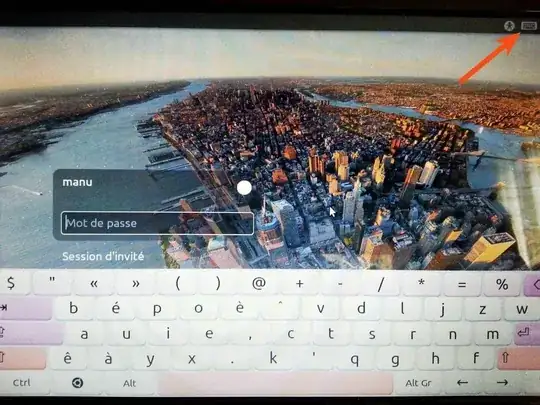
While all the apps have taken the change into account, Ubuntu's login manager still uses bépo, making entering passwords a challenge. I've enabled the virtual keyboard for the time being so that I could login again.

I don't remember what I had done in the first place to switch the login screen to bépo, but now I can't switch it back.
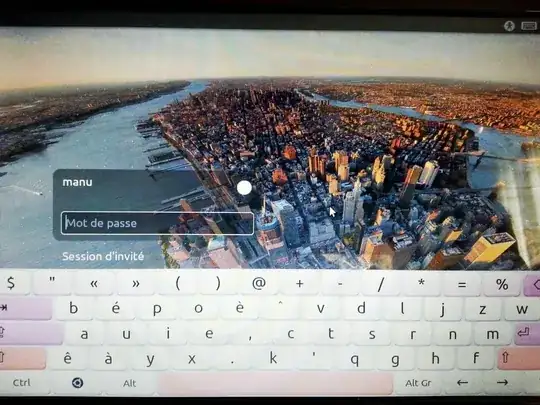
enter image description here

EDIT : In the keyboard settings page, if I click "use system defaults", then everything is in bépo ! Where is this different keyboard layout set ?

ANOTHER EDIT : Here's what did not work :

  1. Changing the layout in settings
  2. using the "use system defaults" checkbox in settings
  3. sudo dpkg-reconfigure keyboard-configuration
  4. changing it in Xconf
  5. adding a line in /etc/lightdm/lightdm.conf
  6. sudo dpkg-reconfigure locales
  7. slaming head against desk
  8. dpkg-reconfigure lightdm
  9. sudo gsettings set org.gnome.libgnomekbd.keyboard layouts "['fr']"
  10. combinations of the above

enter image description here

Is it possible to relaunch the keyboard configuration tool that's in ubuntu's setup ? The thing has automatic layout detection and it changes the setting everywhere.

muru
  • 207,228
Manu
  • 703

6 Answers6

13

What did seem to work for me was this suggestion: change /etc/default/keyboard.

Banging head on desk indeed, this is ridiculous.

poolie
  • 9,358
5

From terminal, run the following command to set the language layouts (you can set maximum four layouts) for your lightdm login screen:

gsettings set org.gnome.libgnomekbd.keyboard layouts "['us\taltgr-intl', 'fr']"

With the above command you set English (International) and French layouts, but you can change them as you wish.

To see the current layouts, you can use:

gsettings get org.gnome.libgnomekbd.keyboard layouts

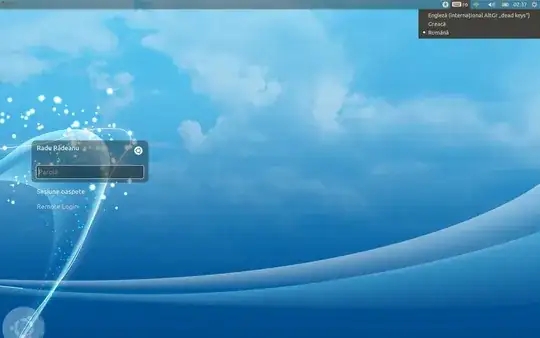
Now, you should be able to use the keyboard icon from the top-right of your screen:

keyboard icon

Next is a screen capture from my login screen (I used gsettings set org.gnome.libgnomekbd.keyboard layouts "['us\taltgr-intl', 'gr', 'ro']" in terminal). As you can see, I can change the language layout as I wish:

login screen

Radu Rădeanu
  • 174,089
  • 51
  • 332
  • 407
5

Must have been a weird lightdm bug.

Lightdm got the new keyboard layout once I changed the login manager to gdm, then back to lightdm, even though simply doing dpkg-reconfigure lightdm did nothing.

So here it is :

sudo apt-get update
sudo apt-get install gdm

(set gdm as the login manager when asked)

sudo dpkg-reconfigure lightdm

(set it as the login manager when asked)

sudo apt-get remove gdm

Then, restart.

Changing a keyboard layout in linux is serious business.

Manu
  • 703
3

What helped me was to enter shell alt+ctrl+f1 and close lightdm

sudo service lightdm stop

then

dpkg-reconfigure keyboard-configuration

and

sudo service keyboard-setup restart

I ran those commands as user and as root, then when I started lightdm

sudo service lightdm start

the keyboard was fixed.

Mark Kirby
  • 18,949
  • 19
  • 79
  • 116
ryukan
  • 31
  • 1
0

In GNOME 42 running GDM login manager, localectl told me VC Keymap: n/a.

Running sudo localectl set-x11-keymap dk set the login screen layout to Danish.

I have no input source selection available under Region & Languages > Login Screen.

See further this GNOME help page

Rasmus
  • 8,655
0

Make a short-key in System Settings > Keyboard Layout > Options under "key(s) to change layout" to switch layouts.

You can see detailed answer here Keyboard shortcut for Lockscreen not working

nDman
  • 43