I keep reading that to merge two partitions, they must be adjacent. But I haven't found any definition of the word "adjacent" in this context. How do I tell whether two partitions are adjacent?
Asked
Active
Viewed 1,911 times

3 Answers
9
First of all, you cannot merge partitions. You can delete one, and resize the other to use the now-free space additionally.
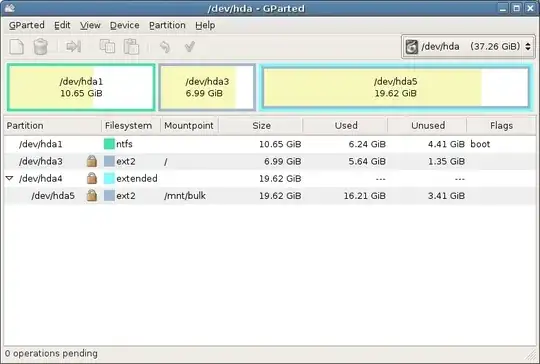
In this picture, the partitions hda1 and hda3 are adjacent, they could be "merged" by, e.g. backing up the data on hda3, deleting this partition, which would result in 7GiB of unallocated space between hda1 and the extended partition hda4 and the loss of all files in hda3. Now, one could resize hda1 to use this free space, too, and then put the files back on there.
hda1 and hda4 are not adjacent, as there is a partition in between.

s3lph
- 14,644
- 12
- 60
- 83
5
"Adjacent" means "right next to", so, if your partitions (called A, B, C, and D for this explanation) are physically laid out on the disk like this:
AAAAAAABBBBBBBCCCCCCCDDDDDDD
the, A and B are adjacent, B and C are adjacent, C and D are adjacent. No other pairs are adjacent. "Only adjacent partitions can be merged" makes sense when one considers how merging A and B happens, giving
AAAAAAAAAAAAAACCCCCCCDDDDDDD
You can tell by looking at gparted's display - if the partitions are next to each other, then they ARE adjacent.

waltinator
- 37,856
2
This image may make it a little clearer:
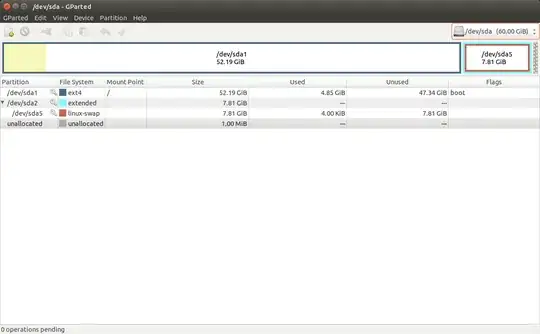
Partitions are physically next to each other on a hard drive, like this:

So you can't just make green and purple into one partition. You first have to make them next to each other, then swap them. These are the steps the computer does:
- Remove Red (free space)
- Remove Green (free space)
- Add Red (if wanted, at center)
- Stretch purple (make the free space the same format, e.g.
ext4)
The grey (unallocated) at the end of my image can't be part of /dev/sda1 because there is /dev/sda5 in the way.

Tim
- 33,500