Re-enabling hibernation by adding a rule to policy kit added the option to hibernate to the desktop session as expected, but not for the login screen.
How can I enable hibernation right from the login screen on 14.04?
Re-enabling hibernation by adding a rule to policy kit added the option to hibernate to the desktop session as expected, but not for the login screen.
How can I enable hibernation right from the login screen on 14.04?

Here is a solution. Hibernate option in desktop session and login screen as below:
Desktop Session :
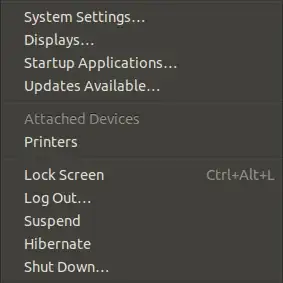
Login Screen :

First open your terminal and add the following :

sudo gedit /var/lib/polkit-1/localauthority/50-local.d/com.ubuntu.enable-hibernate.pkla
A txt file now is opened add the following lines :
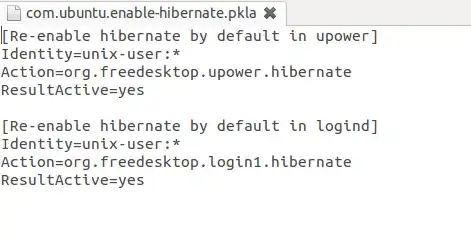
[Re-enable hibernate by default in upower]
Identity=unix-user:*
Action=org.freedesktop.upower.hibernate
ResultActive=yes

[Re-enable hibernate by default in logind]
Identity=unix-user:*
Action=org.freedesktop.login1.hibernate
ResultActive=yes
Save and reboot your system after that hibernate should appear and function well.
The configuration for hibernation already sits in file
/var/lib/polkit-1/localauthority/10-vendor.d/com.ubuntu.desktop.pkla
Just open this file and enable hibernation: ResultActive=yes
The resulting code looks like this:
[Disable hibernate by default in upower]
Identity=unix-user:*
Action=org.freedesktop.upower.hibernate
ResultActive=yes
and
[Disable hibernate by default in logind]
Identity=unix-user:*
Action=org.freedesktop.login1.hibernate
ResultActive=yes
That's all. Now you will see hibernate option in power dialog and login

The address of the policy kit file changed in Ubuntu 14.04.
Follow the same steps as before, except replacing the file:
/var/lib/polkit-1/localauthority/10-local.d/hibernate.pkla
with this one:
/var/lib/polkit-1/localauthority/50-local.d/hibernate.pkla
Try this one
sudo gedit /var/lib/polkit-1/localauthority/10-local.d/hibernate.pkla
Finally, 'restart' nautilus by executing nautilus -q and the indicator option should spring up.
That's a bug, which will hopefully be solved in Ubuntu 14.04. It is impossible to enable hibernation in login screen.
If you have a multiple-user setup in Ubuntu, you´ll need to also add this snippet:
[Re-enable hibernate for multiple users by default in logind]
Identity=unix-user:*
Action=org.freedesktop.login1.hibernate-multiple-sessions
ResultActive=yes

The reason why hibernation is not present is because Ubuntu’s Hibernate feature has always not been working well in many computers. For new hardware models, the Hibernate feature often don’t work by default. In some instances, the Hibernate feature will even lead to data loss.
But if u wish to use it u can do as follows:
Hibernation is in "Power -> When power is critically low".
to include hibernation button:
First test whether your computer supports hibernation by typing the following codes in the terminal:
pm-hibernate
if it goes to hibernation follow the next step:
a. open the file :
sudo nano /etc/polkit-1/localauthority/50-local.d/com.ubuntu.desktop.pkla
b. then edit as follows:
[Re-enable hibernate by default]
Identity=unix-user:*
Action=org.freedesktop.upower.hibernate
ResultActive=yes


