38

In 11.10 Using Configuration editor, one used to be able to edit a boolean parameter named : Desktop_Show This allowed to hide/show all desktop icons. This latter was removed in 12.04. Config Editor in 12.04

Someone, knows how to hide desktop icons automatically?

Thanks

Hanynowsky
  • 2,801

3 Answers3

62

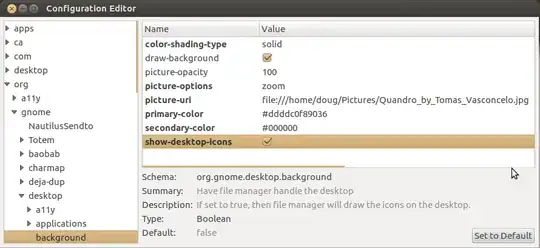
It's in gsettings (& dconf-editor), to do from cli use

gsettings set org.gnome.desktop.background show-desktop-icons false

From gui open dconf-editor (install dconf-tools) as in screen

dconf-editor

doug
  • 17,212
2

The MyUnity application (in the software center) has a lot of useful features for customizing Unity, including the ability to hide desktop icons. The newest version supports 12.04.

fossfreedom
  • 174,526
zookalicious
  • 2,303
1

If you are using the Gnome desktop environment then

  1. Open the Tweak tool
  2. Click on the Desktop tab
  3. Toggle the "Icons on Desktop" button to off.

Tweak Tool settings menu

David Foerster
  • 36,890
  • 56
  • 97
  • 151
Blue Fox
  • 11
  • 2