3

I've noticed something curious about my LCD screens (one of them is a TUF VG32VQ1B and the other an AOC I2269VW, if it makes a difference):

If I look at them at a shallow angle, any bright line of pixels at the very edge of the screen fades out (video). This isn't due to their regular "viewing angle" specification since at the angles the line disappear, the rest of the image is still clearly visible.

The ASUS screen seen from head-on and at a shallow angle Disregard my nephew's art on the wall in the background.

Here I demonstrate it with the application indicators of Windows 10, but the same happens at the other edges of either screen, as long as it is a bright line at the very edge.


This clearly impeccably realistic computer simulation that I certainly did not make in under 5 minutes of a screen shows that I would expect the only thing to hide the very edge of pixels to be the actual bezel of the display.


So why does it disappear when there is no physical obstruction?


Update: Here is another video that shows the fading over a plain bright surface so we can see the "falloff":

Screens at similar angles as above, but now displaying a bright image.

Kroltan
  • 89
  • 9

2 Answers2

3

This is due to following two facts:

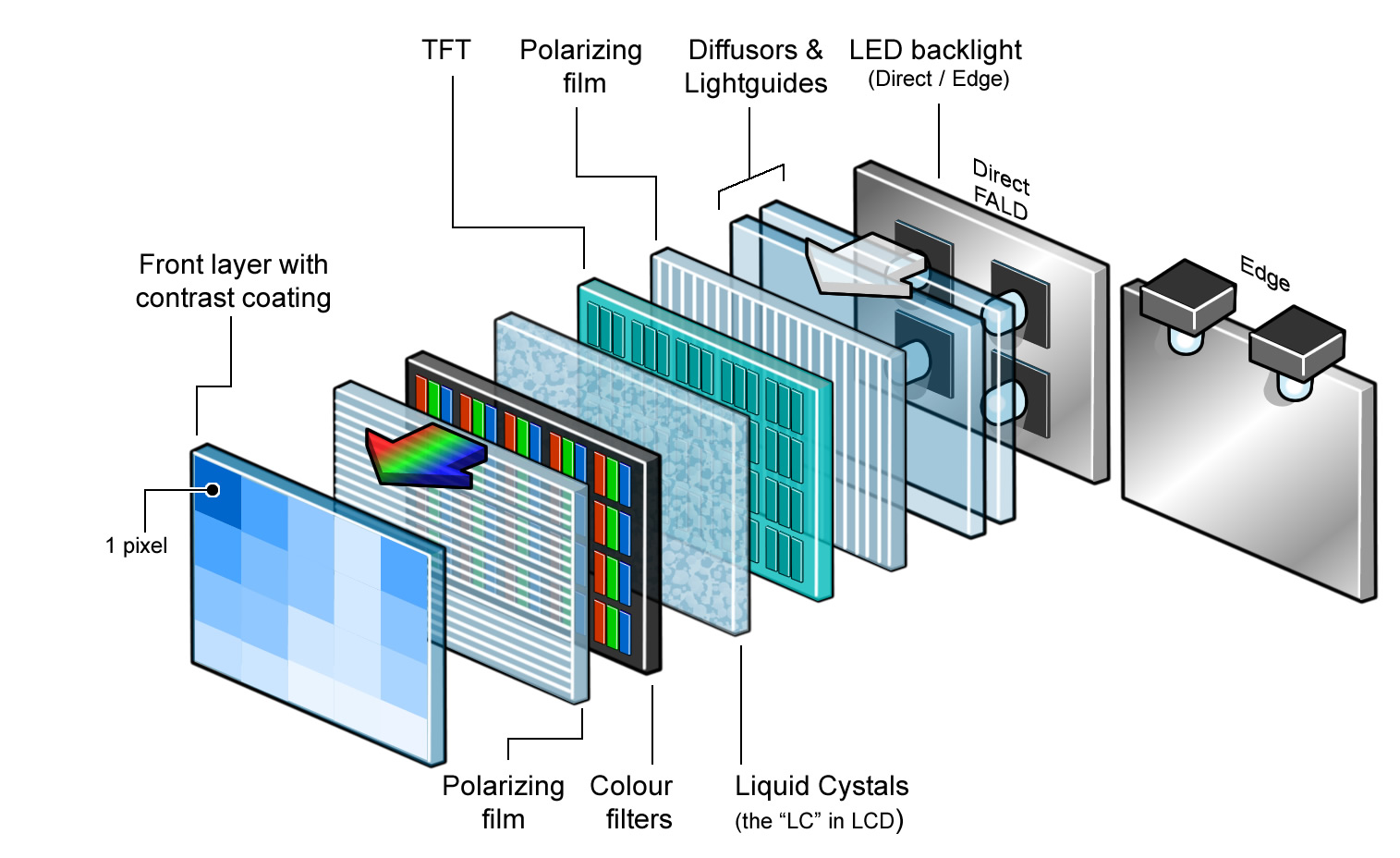
  1. The LCD backlight is a positioned a small distance behind the LCD matrix.
  2. The backlight in most of the monitors has about the same size as the LCD matrix.

The effect is that when you look at the screen from the front angle (your view vector is perpendicular to the screen) then the backlight is right behind the LCD matrix and you can see the pixels.

But when you look at it from shallow angle the backlight is simply not behind the LCD pixel matrix and the pixels are not highlighted. They appear to be dark.

This effect is especially visible on large LCD screens, for example: https://youtu.be/P0Z81n5TPY4?t=45s

Pixels without the backlight

The boundary "cut-off" of the light is not sharp, because there is a light diffuser placed in front of the backlight. As seen below in the LCD construction:

LCD construction

Janek_Kozicki
  • 400
  • 4
  • 12
1

As previously noted, consider the structure of an LCD. You have a backlight, a diffuser, RGB pixels, and a polarizer.

Since the backlight passes through a diffuser I would not consider it to be the principal cause, otherwise, it should happen for all the pixels regardless of being close to the edge (or at least you should have a region around the edge's pixel involved).

I would rather consider the polarization effects on the edge of the screen. Polarizers generally have some kind of "distortion" at the edges. Thus, it might reduce the angle of view of the edge's pixel.

Anyway, I do not see any dim pixel on my screen also on the edge, so consider also some damage at the edge of your screen!

gbon
  • 409