Java Edition protocol/Inventory
Minecraft displays the player inventory differently, according to how the window was opened. Ranges of slot indices vary in meaning between different “windows”.
Types
| Packet | Type | Name | Description |
|---|---|---|---|
inventory |
The player inventory. | ||
| Open Horse Screen | horse |
A inventory for horses. Used by Horse, Donkey, Mule, Llama, Trader Llama, and Camel. | |
| Open Screen | 0 | generic_9x1
|
A 1-row inventory, not used by the notchian server. |
| 1 | generic_9x2
|
A 2-row inventory, not used by the notchian server. | |
| 2 | generic_9x3
|
General-purpose 3-row inventory. Used by Chest, Minecart with Chest, Ender Chest, and Barrel. | |
| 3 | generic_9x4
|
A 4-row inventory, not used by the notchian server. | |
| 4 | generic_9x5
|
A 5-row inventory, not used by the notchian server. | |
| 5 | generic_9x6
|
General-purpose 6-row inventory, used by Large Chest. | |
| 6 | generic_3x3
|
General-purpose 3-by-3 square inventory, used by Dispenser and Dropper. | |
| 7 | crafter_3x3
|
Crafter | |
| 8 | anvil
|
Anvil | |
| 9 | beacon
|
Beacon | |
| 10 | blast_furnace
|
Blast Furnace | |
| 11 | brewing_stand
|
Brewing Stand | |
| 12 | crafting
|
Crafting Table | |
| 13 | enchantment
|
Enchanting Table | |
| 14 | furnace
|
Furnace | |
| 15 | grindstone
|
Grindstone | |
| 16 | hopper
|
Hopper or Minecart with Hopper | |
| 17 | lectern
|
Lectern | |
| 18 | loom
|
Loom | |
| 19 | merchant
|
Villager or Wandering Trader | |
| 20 | shulker_box
|
Shulker Box | |
| 21 | smithing
|
Smithing Table | |
| 22 | smoker
|
Smoker | |
| 23 | cartography_table
|
Cartography Table | |
| 24 | stonecutter
|
Stonecutter | |
The slot number is calculated starting at 0, counting up through the window's unique slots, and then counting through the players inventory.
For all windows, the slot in the upper-left corner of the player's inventory is slot n where n is the number of unique slots, and slot number -999 is always used for clicking outside the window.
The default inventory window, which is never explicitly opened by the server, has 10 unique slots.
Rectangular regions are always indexed starting with the upper-left corner and scanning across rows. If a window has a crafting region, the output slot is always slot 0 followed immediately by the input region.
Each window type is described in the following sections. All slot index ranges are inclusive and reflect the indices observed in the Minecraft protocol.
For the window properties (additional data in each window, e.g. smelting progress or enchantments), refer to the table in the Set Container Property packet.
Using -1 as slot index and as window id will set the cursor item (the stack dragged with the mouse).
Player Inventory

This is the inventory window that the player can always open, typically by pressing E since Beta 1.4. Before, you had to press I.

| Slot range | Description |
|---|---|
| 0 | crafting output |
| 1–4 | 2×2 crafting input (1 + x + 2 * y)
|
| 5–8 | armor (head, chest, legs, feet) |
| 9–35 | main inventory |
| 36–44 | hotbar |
| 45 | Offhand slot |
Horse

The GUI that appears when interacting with a tamed horse, or when opening the player's inventory while riding a tamed horse.

| Slot range | Description |
|---|---|
| 0 | saddle |
| 1 | armor |
| 2–28 | main inventory |
| 29–37 | hotbar |
-
 Horse slots
 -
 Skeleton horse slots
 -
 Zombie horse slots
 -
 Camel slots
Donkey

The GUI that appears when interacting with a tamed donkey or mule, or when opening the player's inventory while riding a tamed donkey or mule.
| Slot range | Description |
|---|---|
| 0 | saddle |
| 1 | armor |
| 2–16 | donkey inventory |
| 17–43 (2-28 if unchested) | player inventory |
| 44–52 (29-37 if unchested) | hotbar |
-
 Unchested donkey
 -
 Chested donkey
 -
 Unchested mule
 -
 Chested mule
Llama

The GUI that appears when interacting with a tamed llama or trader llama that has a chest, or when opening the player's inventory while riding a tamed llama.
Depending on the value of the strength field, the number of chest rows may vary (max is 5, so 15 slots).
| Slot range | Description |
|---|---|
| 0 | saddle |
| 1 | carpet |
2 - (2 + 3 * strength)
|
llama inventory |
(2 + 3 * strength) + 1 - (2 + 3 * strength) + 27
|
player inventory |
(2 + 3 * strength) + 28 - (2 + 3 * strength) + 35
|
hotbar |
-
 Unchested llama
 -
 Llama with strength 1
 -
 Llama with strength 2
 -
 Llama with strength 3
 -
 Llama with strength 4
 -
 Llama with strength 5
Chest

The generic_9x3 GUI appears when interacting with a single chest, minecart with chest, ender chest, or barrel.
| Slot range | Description |
|---|---|
| 0–26 | chest |
| 27–53 | main inventory |
| 54–62 | hotbar |
-
 Generic 9x1 slots
 -
 Generic 9x2 slots
 -
 Chest slots
 -
 Generic 9x4 slots
 -
 Generic 9x5 slots
 -
 Large chest slots
Dispenser

The generic_3x3 GUI appears when interacting with a dispenser or dropper.
| Slot range | Description |
|---|---|
| 0–8 | 3×3 dispenser contents (x + 3 * y)
|
| 9–35 | main inventory |
| 36-44 | hotbar |
Crafter

The crafter GUI appears when interacting with a crafter.
| Slot range | Description |
|---|---|
| 0-8 | 3×3 crafting input (x + 3 * y)
|
| 9–35 | main inventory |
| 36–44 | hotbar |
| 45 | result |
Anvil

The anvil GUI appears when interacting with an anvil.
| Slot range | Description |
|---|---|
| 0 | first item |
| 1 | second item |
| 2 | result |
| 3–29 | main inventory |
| 30–38 | hotbar |
Beacon

The beacon GUI appears when interacting with a beacon.
| Slot range | Description |
|---|---|
| 0 | payment item |
| 1–27 | main inventory |
| 28–36 | hotbar |
Furnace

The furnace GUI appears when interacting with a furnace.
| Slot range | Description |
|---|---|
| 0 | ingredient |
| 1 | fuel |
| 2 | output |
| 3–29 | main inventory |
| 30–38 | hotbar |
Blast Furnace

The blast_furnace GUI appears when interacting with a blast furnace.
Same layout as a furnace; however, the recipe book displays blast furnace recipes instead of regular furnace recipes.
| Slot range | Description |
|---|---|
| 0 | ingredient |
| 1 | fuel |
| 2 | output |
| 3–29 | main inventory |
| 30–38 | hotbar |
Smoker

The smoker GUI appears when interacting with a smoker.
Same layout as a furnace; however, the recipe book displays smoker recipes instead of regular furnace recipes.
| Slot range | Description |
|---|---|
| 0 | ingredient |
| 1 | fuel |
| 2 | output |
| 3–29 | main inventory |
| 30–38 | hotbar |
Brewing Stand

The brewing_stand GUI appears when interacting with a brewing stand.
| Slot range | Description |
|---|---|
| 0-2 | bottles/potions |
| 3 | potion ingredient |
| 4 | blaze powder |
| 5-31 | main inventory |
| 32-40 | hotbar |
Crafting

The crafting GUI appears when interacting with a crafting table.
| Slot range | Description |
|---|---|
| 0 | crafting output |
| 1–9 | 3×3 crafting input (1 + x + 3 * y)
|
| 10–36 | main inventory |
| 37–45 | hotbar |
Enchantment

The enchantment GUI appears when interacting with an enchanting table.
| Slot range | Description |
|---|---|
| 0 | item to enchant |
| 1 | lapis lazuli slot |
| 2–28 | main inventory |
| 29–37 | hotbar |
| Button | Description |
|---|---|
| 0-2 | Enchantment |
Grindstone

The grindstone GUI appears when interacting with a grindstone.
| Slot range | Description |
|---|---|
| 0 | first item |
| 1 | second item |
| 2 | result |
| 3–29 | main inventory |
| 30–38 | hotbar |
Hopper

The hopper GUI appears when interacting with a hopper or minecart with hopper.
| Slot range | Description |
|---|---|
| 0-4 | hopper slots |
| 5–31 | main inventory |
| 32–40 | hotbar |
Lectern

The lectern GUI appears when interacting with a lectern with a book.
The player inventory is not included.
| Slot range | Description |
|---|---|
| 0 | book |
| Button | Description |
|---|---|
| 0 | unused |
| 1 | Page back |
| 2 | Page forward |
| 3 | Take Book |
100 + page - 1
|
Change page (via "change_page" click event)
|
Loom

The loom GUI appears when interacting with a loom.
| Slot range | Description |
|---|---|
| 0 | banner |
| 1 | dye |
| 2 | pattern |
| 3 | result |
| 4–30 | main inventory |
| 31–39 | hotbar |
| Button | Description |
|---|---|
n
|
Pattern n
|
Merchant
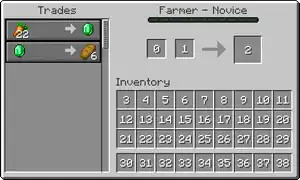
The merchant GUI appears when interacting with a villager or wandering trader.
| Slot range | Description |
|---|---|
| 0-1 | input items |
| 2 | result |
| 3–29 | main inventory |
| 30–38 | hotbar |
Shulker Box

The shulker_box GUI appears when interacting with a shulker box.
generic_9x3, it is technically a distinct GUI (with its own texture).| Slot range | Description |
|---|---|
| 0–26 | box slots |
| 27–53 | main inventory |
| 54–62 | hotbar |
Smithing

The smithing GUI appears when interacting with a smithing table.
| Slot range | Description |
|---|---|
| 0 | template |
| 1 | base item |
| 2 | additional item |
| 3 | result |
| 4–30 | main inventory |
| 31–39 | hotbar |
Cartography Table

The cartography_table GUI appears when interacting with a cartography table.
| Slot range | Description |
|---|---|
| 0 | map |
| 1 | paper |
| 2 | output |
| 3–29 | main inventory |
| 30–38 | hotbar |
Stonecutter

The stonecutter GUI appears when interacting with a stonecutter.
| Slot range | Description |
|---|---|
| 0 | input |
| 1 | result |
| 2–28 | main inventory |
| 29–37 | hotbar |
| Button | Description |
|---|---|
n
|
Recipe n
|


Derivative works must be licensed using the same or a compatible license.