Dungeons:Tutorials/Beginner's guide

This starter guide provides advice for players who do not know how to begin their Minecraft Dungeons journey.
Controls and interface
Movement
Mouse & Keyboard: Press the Left mouse button
Controller: Use the joystick
Melee Attack and Interact
Mouse & Keyboard: Press the Left Mouse
Controller: On Xbox and Nintendo Press A, On Play Station Press X
Ranged Attack
Mouse & Keyboard: Press the Right Mouse
Controller: On Xbox Press RT, On PlayStation Press L2, On Nintendo Press ZR
Use Item No.
Mouse & Keyboard: Press the 1, 2, and 3
Controller: On Xbox Press X, Y, and B, On PlayStation Press Square, Triangle, And Circle, On Nintendo Press Press Y, X, and B
Heal
Mouse & Keyboard: Press the E
Controller: On Xbox Press LB, On Play Station Press L1, On Nintendo Press L
Roll
Mouse & Keyboard: Press the Spacebar
Controller: On Xbox Press RB, On PlayStation Press R1, On Nintendo Press R
Directional Roll
Mouse & Keyboard: Press Thumb mouse button
Xbox: Press RB
Pause Menu
Mouse & Keyboard: Press the Esc
Controller: On Xbox Press Start/Menu, On PlayStation Press Options, On Nintendo Press +
Open Inventory
Mouse & Keyboard: Press the I
Controller: Press Up
Read Map
Mouse & Keyboard: Press the M
Nintendo & Xbox: Press the Down button
Controls and interface Overview
Inventory
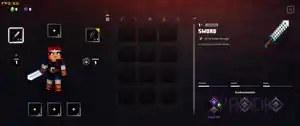
The inventory consists of 300 slots the player can scroll through, used for melee weapons, ranged weapons, armor, artifacts, and cosmetics. When the inventory contains at least 270 items, a message stating the slots in use appears at the bottom of the screen. The low capacity message disappears if the amount of items lowers and the inventory is re-opened.
Weapons
Weapons are used to attack and defeat mobs in Missions. You get a  Sword for melee and a
  Bow for ranged upon starting the game, or when you had no weapons equipped in those slots.
| Basics | |
|---|---|
| Builds | |
| Completing missions | |


