9

Cortana is Microsoft's intelligent personal assistant for Windows Phone 8.1, Microsoft Band, and Windows 10.

I am interested in how can someone turn on their Xbox One by using Cortana voice command. Unfortunately when I was searching in the topic I only found articles about how to turn on Cortana on the Xbox itself. In my case Cortana should listen on my PC running Windows 10.

If possible I want to avoid serious scripting and such for first and I hope that there is a more sophisticated solution, if only because all of these are Microsoft products.

Bence Kaulics
  • 7,843
  • 8
  • 42
  • 90

4 Answers4

8

Wake-on-LAN is relatively new for the Xbox One. This feature was released with the August update.

Luckily, you don't have to script yourself a solution. Others have already done the work for you:

  • Xbox on by arcreative: Xbox One power control from CLI or Node.JS application.
  • Xbox remote power by Schamper: A script that can turn your Xbox One on remotely.

If you're interested in figuring out something for yourself, this technet article is a must-read.

I must admit, I'm a little disappointed I couldn't find a completely integrated method of communicating with your Xbox One from a PC or phone with Windows 10. Both PC and Windows phone have an Xbox app after all.

'Teaching' Cortana to recognize and execute custom scripts has been explained in this Stack Overflow answer.

Bence Kaulics
  • 7,843
  • 8
  • 42
  • 90
Mast
  • 196
  • 1
  • 7
4

Without Cortana

  1. By using the Xbox button on your controller if your controller is paired to your Xbox One.

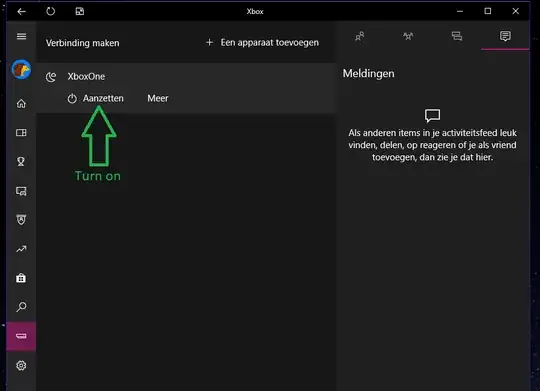
  2. By using the official Windows 10 Microsoft Xbox app. To make this work, you have to connect your Xbox One to the Windows 10 app by following these steps. If streaming works, your Xbox One is connected to your Windows 10 Xbox app. Now shutdown your Xbox One. You should still see your Xbox listed in the Windows 10 Xbox app. It now should also offer you an option to turn on your Xbox One see screenshot below), and there you have it! :)

Notice: I only tested this on my Xbox One connected by LAN, Xbox One configured in high energy mode and with the Windows 10 Xbox app version 38.38.14002.00000. Comments if this works on WiFi and on low energy settings are welcome.

A screenshot (in dutch) of what this looks like:
enter image description here

With Cortana

I don't think Cortana supports waking your xbox by using your voice nativly so you need a 3th party script or app. The script or app should use the wake-on-lan protocol and target your xbox one MAC adres to wake it. This guy has a video about cortana waking his pc, it should also work with your xbox one.

Another option might want to look into is using IFTT with the Cortana integration and some other wake-on-lan integration. This is an example to wake your xbox one by using Google Assistant. You might create your own working applet without any scripting at all.

scre_www
  • 141
  • 3
3

For reference here is some C# Universal Windows Platform (UWP) code that I wrote to wake up an Xbox One:

public static async Task XboxWake(IPAddress ipAddress, string liveId, int retries = 5)
{
    using (var socket = new DatagramSocket())
    {
        var connectionProfile = Windows.Networking.Connectivity.NetworkInformation.GetInternetConnectionProfile();
        await socket.BindServiceNameAsync("", connectionProfile.NetworkAdapter);

        using (var stream = await socket.GetOutputStreamAsync(new HostName(ipAddress.ToString()), "5050"))
        {
            using (var writer = new DataWriter(stream))
            {
                for (int retry = 0; retry < retries; retry++)
                {
                    byte[] payload = new byte[3 + liveId.Length];
                    payload[0] = 0x00;
                    payload[1] = (byte)liveId.Length;

                    for (int i = 0; i < liveId.Length; i++)
                        payload[i + 2] = (byte)liveId[i];
                    payload[payload.Length - 1] = 0x00;

                    byte[] header = new byte[6];
                    header[0] = 0xdd;
                    header[1] = 0x02;
                    header[2] = 0x00;
                    header[3] = (byte)payload.Length;
                    header[4] = 0x00;
                    header[5] = 0x00;

                    using (var ms = new MemoryStream(header.Length + payload.Length))
                    {
                        ms.Write(header, 0, header.Length);
                        ms.Write(payload, 0, payload.Length);

                        writer.WriteBytes(ms.ToArray());
                    }
                    await writer.StoreAsync();

                    await Task.Delay(1000);
                }
            }
        }
    }
}

(GitHub Gist link of the above code)

Aurora0001
  • 18,520
  • 13
  • 55
  • 169
Haukman
  • 131
  • 2
2

I have developed a (paid) app called XBoot One that you can use it to turn on your Xbox remotely both in Android and Windows. It's not integrated with Cortana yet but it will be in future releases.

Play Store Link

It will be in Microsoft Store soon.

Helmar
  • 8,450
  • 6
  • 36
  • 84
mdx0111
  • 129
  • 2