0

Since I switched to Ubuntu, I have been having tons of problems. This is only one of them.

The software manager seems to be unable to install deb files; For example, I have tried to install MegaSync from its .deb file, but when I click install, it looks like if it began loading and then the install button appears again as if it wasn't touched. Here's a GIF of what I'm talking about:

GIF

Doesn't even ask for my password, and of course, the software doesn't install. It's strange, because I could install Opera using a .deb file before.

Things I have tried;

  • To run sudo apt update in the terminal
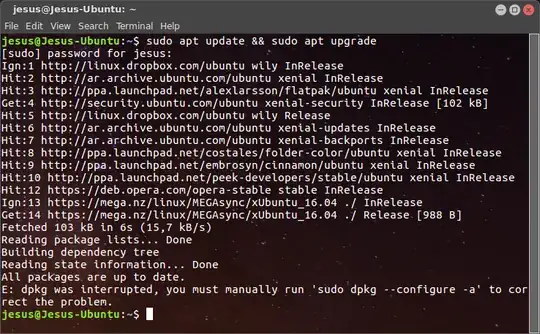
    enter image description here

  • Restart device

Any ideas?

EDIT: After another restart, I could install some apps; However, I am still unable to open/launch MEGASync.

EDIT 2: This is not a duplicate; Megasync is not the only not working deb, I am having some others that are not working, such as Gdebi and WPS Office.

karel
  • 122,292
  • 133
  • 301
  • 332
Jesús
  • 25

2 Answers2

3
  1. The error message in your comment says that dpkg was interrupted. First you must run the command sudo dpkg --configure -a in the terminal to correct this problem.

  2. You mistakenly downloaded megasync-xUbuntu_16.10_amd64.deb, however you are using Ubuntu 16.04, not 16.10, so download megasync-xUbuntu_16.04_amd64.deb for Ubuntu 16.04 instead.

  3. Then try to install the MegaSync .deb file again by changing to the directory that contains the Megasync .deb file that you downloaded (megasync-xUbuntu_16.04_amd64.deb) with cd and running this command:

    sudo apt install ./megasync-xUbuntu_16.04_amd64.deb  
    

    The advantage of this command over sudo dpkg -i megasync-xUbuntu_16.04_amd64.deb is that it automatically installs the package's dependencies along with the package.

karel
  • 122,292
  • 133
  • 301
  • 332
-1

I experienced a similar issue and i was able to figure out the next step by entering a terminal and doing the installation manually with dpkg:

cd /home/user/dir/with/package/
sudo dpkg -i package.deb

In most cases i would recommend to use the package provided from the repositories or use an PPA to avoid this kind of conflice and any further conflicts it may cause.

noreabu
  • 186