How would I be able to find logs of recent login or usage activity on my desktop? Is there a script or place in Ubuntu that holds data that tells you of recent logins from user, guest, or remote.
Asked
Active
Viewed 336 times


3 Answers
3
Actually, the best tool is the command last
last
You can pipe the output to less
last | less
or a file and then search the file.

Panther
- 104,528
1
You can show login history of user-accounts as following:
Go to System Settings > User Accounts and click on History button
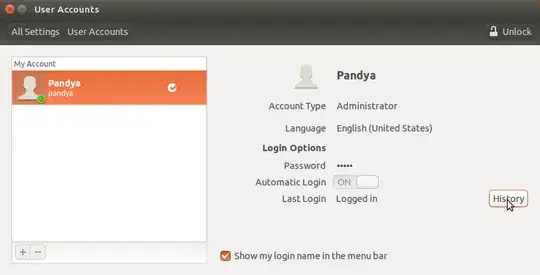

From Command-line Open terminal and type: last
Usage: last [-num | -n num] [-f file] [-t YYYYMMDDHHMMSS] [-R] [-adioxFw] [username..] [tty..]
Ex: last pandya for activity of user=pandya
For more information see man last
last, lastb - show listing of last logged in users
FILES:
/var/log/wtmp
/var/log/btmp
Also Visit:how-can-i-track-who-sshes-into-my-linux-machine & Log SSH activity


0
The file /var/log/auth.log is most likely what you are looking for. The messages look like the following for local logins:
Jun 3 21:09:57 johnserver login[1810]: pam_unix(login:session): session closed for user johndoe
and like so for remote logins:
Jun 3 21:16:53 johnserver sshd[949]: Accepted password for johndoe from 127.0.0.1 port 54425 ssh2
where johnserver is the hostname and johndoe is the username.
I am sorry that I do not have any knowledge on how guest logins are displayed/conveyed.

CameronNemo
- 1,675