I installed Ubuntu Desktop 14.04 on my PC. I have bought a hard disk and added it to my PC. The computer does not recognize the new hard drive. How can I let my Ubuntu use the new HDD I bought?
Asked
Active
Viewed 2.6k times

2 Answers
8
Your hard disk might have no partitions yet.Therefore it's not usable until you make a partition.
You can install the software gParted from Ubuntu software center, and make a new partition in your new hard disk.
Open gParted and select the correct drive from top right drop down list:

Choose Device menu > Create Partition Table

Create a new msdos partition table.

Now add a new partition to the table by right clicking on unallocated space.
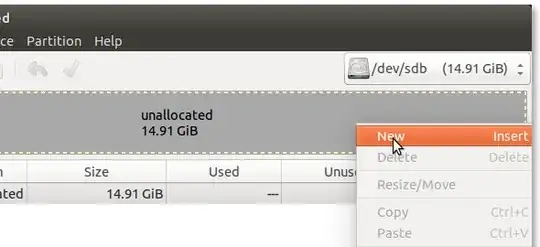
Setup your partition:
(TIP: Ext4 file system is efficient. NTFS file system is supported by Microsoft Windows)

Once done click on the right button:

Its is better to reboot your computer. Then your new hard disk will be available to use.

Naveen
- 9,551
0
It does highly depend on what ptoblems you do encounzer, but in general I'd say that hard drives can be supposed to be detected by the BIOS.
If this is the case run:
$ sudo lshw -C disk
to get information about the drive. There should be one column for the new disk which contains logical name. That name will then be used to mount the disk. Let's assume that it is /dev/sdb.
$ mkdir $HOME/my_new_drive
$ sudo mount /dev/sdb $HOME/my_new_drive
Will then make your new drive available under the directory $HOME/my_new_drive.
If you want to get the drive mounted everytime you boot you'll need to modify the fstab. Refer to the manual for further hints.

Theolodis
- 189