1

First I must admit that I did something really stupid.

I de-installed unity from my ubuntu 12.04 LTS to install kubuntu-desktop as I wanted to try out a different desktop environment.

The problem is that by de-installing unity it also de-installed my login screen. Apparently ldm and gdm are not included in the kubuntu-desktop package.

Now this means that when I start my ubuntu with grub, I will get a black screen after the splash screen and I can not do anything. I can't open up a terminal, and I can't press ALT + F2 to install either one of them.

The disk is encrypted and I can not access it from my windows boot. To make the situation even more dramatic: I saved the decrypt key on the same disk on a different partition.

Have I completely locked myself out? Can I alter the grub configuration so that I can get a terminal after the splash?

While typing this I just came up with the idea to boot into my other linux OS on that same disk. Maybe I can get something to work from there.

Braiam
  • 69,112

2 Answers2

1

Boot to recovery mode, drop to a root shell, and run:

mount -o remount,rw /
apt-get update
apt-get install -f
apt-get install kdm

That should install and configure KDM. Reboot and post back if you have problems.

The only other potential problem you might have would be if you need propriety drivers , what graphics card do you have ?

Panther
  • 104,528
0

Boot from a live CD

chroot to your partition and you can easily install whatever u like.


You’ll want to boot from your Ubuntu Live CD, choosing “Try Ubuntu without any change to your computer” from the boot menu.

Once the system boots, open up a new Terminal window from Applications \ Accessories and then type in the following command:

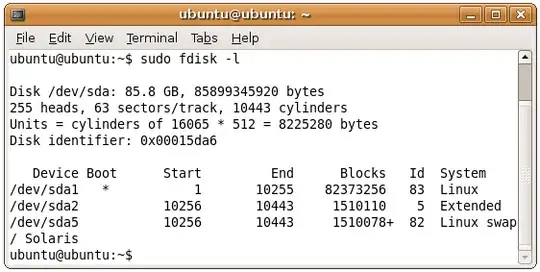
sudo fdisk -l

This command is used to tell what device name the hard drive is using, which in most cases should be /dev/sda1, but could be different on your system. enter image description here

Now you’ll need to create a directory to mount the hard drive on. Since we’re actually booting off the live cd, the directory doesn’t really get created anywhere.

sudo mkdir /media/sda1

The next command will mount the hard drive in the /media/sda1 folder.

sudo mount /dev/sda1 /media/sda1

Now it’s time for the command that actually does the magic: chroot.

sudo chroot /media/sda1

Now you can do whatever you want then exit and unmount the mounted partitions and reboot

Maythux
  • 87,123