0

I've posted this problem here and hope to get a fix, but until now still no result, so I'm trying here too. I hope there is a Linux pro here who can help me out.

I've do some searching here on this forum, the closest result i can get is here but didn't get the real fix.

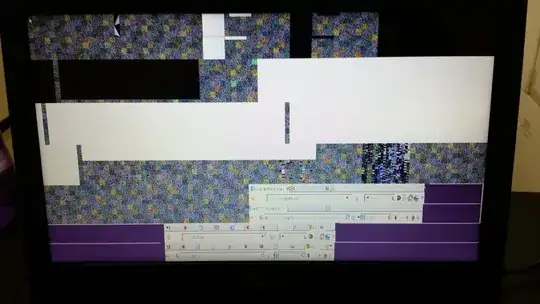
After I reinstalled Ubuntu due to I've messed up the system previously on some trial and error, I got a weird pixelated screen after my login but before the desktop appear. Other than that is no problem, i can do all my thing such as watching movie, playing steam games, etc. I really hope to fix this annoying problem so i can convince my friend to try switch to Linux.

  1. attachment 001, the boot screen, no problem.the boot screen
  2. attachment 002, the login screen, no problem.the login screen
  3. attachment 003-01, after i've type in my password and log in, the pixelated screen problem appear every time if i shutdown my laptop on the previous session.the pixelated screen01
  4. attachment 003-02, this pixelated screen problem appear if i restart my laptop on the previous session.the pixelated screen02
  5. attachment 004, after the pixelated screen, the desktop appear, no problem.the desktop

I've searched for the fix on Ubuntu Forums, Ask Ubuntu and Google as well, but I can't find any relevant problem like mine (maybe I've overlooked them due to I'm not an expert user on Linux). I only get those weird checkerboard boxes, or when doing installation process, or deformed text.

My laptop specifications:

  • Asus A45V Series, Intel Core i7
  • Single OS, Ubuntu 12.04LTS only
  • Nvidia geforce GT 645M

2 Answers2

1

I suspected it was something to do with nvidia and xorg server, so I do some searching and tried something described in installing-nvidia-drivers-on-ubuntu-12-04 and on ubuntu-forums, and the problem is solved now.

The basic theory is to remove nvidia and xorg completely then reinstall them:

  1. Reboot my laptop to recovery mode by keep the Shift key pressing down after the laptop manufacturer logo appear and release it after Grub menu fully loaded, then choose the 'Recovery Mode'.

  2. Choose 'Boot Normally' when a menu appear.

  3. Open up terminal by hitting Ctrl+Alt+T.

  4. Remove the xorg.conf by typing:

    sudo rm /etc/X11/xorg.conf
    
  5. Remove all nvidia package by typing:

    sudo apt-get remove --purge nvidia*
    
  6. Remove xorg by typing:

    sudo apt-get remove --purge xserver-xorg
    
  7. Reinstall xorg by typing:

    sudo apt-get install xserver-xorg
    
  8. Reboot the system by typing:

    sudo reboot
    
  9. After successful reboot, the pixelated screen is gone~ (yay~!!)

  10. I open 'Additional Drivers', I see 2 nvidia drivers, version 319 and 331 (version of both is in extra information provided below them) which is not activated, so I activated version 319 and then reboot. (because I had a problem with 331 previously)

  11. Then I run a program which need 3D support, in this case a Steam game, but Steam detected there is a newer version of nvidia and ask me to update it, so I close Steam, go back to the 'Additional Drivers', choose the 331 version and activate it, then restart my laptop, and the pixelated screen is still gone~~ (double yay~!!)

In the process of trial and error, maybe I've missed out some step or done something wrong and I met some problems such as low graphic mode, looping in login screen. If you meet one of them, or maybe both...

To solve low graphics mode:

  1. Reboot into Recovery mode again.

  2. Choose 'Boot Normally' when a menu appear.

  3. Open up terminal by hitting Ctrl+Alt+T.

  4. Remove all nvidia package by typing:

    sudo apt-get remove --purge nvidia*
    
  5. Install the more stable/tested version:

    sudo apt-get install nvidia-current
    
  6. Install the more up-to-date version:

    sudo apt-get install nvidia-current-updates
    
  7. Reboot.

To solve the looping in Login screen:

  1. At the login screen, press Crtl+Alt+F1 to boot into shell environment.

  2. Type your username and password to login.

  3. Change the working directory to your home directory:

    cd ~
    
  4. Rename a hidden file:

    sudo mv .Xauthority .XauthorityBak
    
  5. Reboot.

This should fix the problem, but if you started to get a 'System Problem Detected' when you would login from a locked desktop, try to change the .Xauthority ownership in your home directory by typing the following command in terminal:

sudo chown $USER: .Xauthority
0

I have faced similar issues, but this was when I installed the proprietary video driver for my graphics card.

I think this happens when Ubuntu initialises the graphics driver for the first time.

For me, it was pretty much harmless, as in, it doesn't cause any difference to the working of the computer. I ignored it due to this reasoning.

If it causes any problem in the working of Ubuntu after it boots up, then it should be a cause of concern. Until then, no issues.