0

After unlocking via fingerprint multiple windows appear requiring manual password input for Keyring. It appears to be managed by Seahorse, but no settings there address logging in.

[screenshot of keyring window
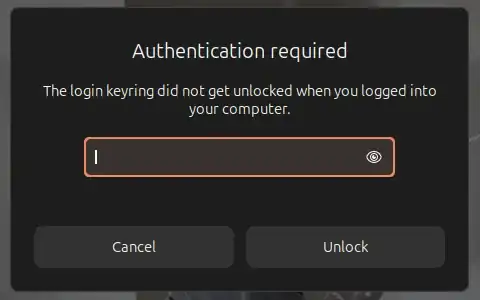
gnome-keyring dev page is 'no longer maintained'. keyring is expected to unlock with system unlock without additional input. searches on this issue only revealed solutions for much older versions (Ubuntu 12.10, etc.)

System Details Report


Report details

  • Date generated: 2025-02-06 09:17:56

Hardware Information:

  • Hardware Model: Dell Inc. Vostro 7620
  • Memory: 8.0 GiB
  • Processor: 12th Gen Intel® Core™ i7-12700H × 20
  • Graphics: Intel® Graphics (ADL GT2)
  • Graphics 1: Intel® Graphics (ADL GT2)another popup screenshot
  • Disk Capacity: 512.1 GB

Software Information:

  • Firmware Version: 1.22.0
  • OS Name: Ubuntu 24.10
  • OS Build: (null)
  • OS Type: 64-bit
  • GNOME Version: 47
  • Windowing System: Wayland
  • Kernel Version: Linux 6.11.0-14-generic
karel
  • 122,292
  • 133
  • 301
  • 332
Steven
  • 1

1 Answers1

0

Usually Gnome Keyring unlocks if the passwords (your Linux log-in and Gnome Keyring) are the same at the time you log in to your Gnome session. So make sure your passwords are the same. I have had several issues in the past where this broke, usually when installing other desktop environments (such as KDE). It was always my fault, or and environment issue, for example I was using flatpak version of a Gnome application in KDE (and needed flatpak version of gnome keys, etc.). There maybe different solutions depending on the root cause of the issue you have.

Additionally, if you configure your Gnome session to log in automatically (bypassing the log-in screen to go straight to desktop) this is a known and expected behavior.

If you are in the default desktop, maybe this post can help: Automatically unlock other keyring than "Login" on login (not auto-login)

Ali E.
  • 41