I assume you want to install Ubuntu in the unallocated 25 GB space at the bottom.
No! You Don't Need Another ESP!
As you are dual booting from a single physical drive, it needs (must have) only one EFI System Partition (ESP).
This question is fully answered in If there is already an EFI partition for windows, do I need to create a new EFI partition for Ubuntu?
However: you have to make sure that you boot the installation USB in the UEFI mode when you install Ubuntu. See Installation problems with GRUB, can only install by reinstalling Windows in legacy mode but need to keep in UEFI mode for details.
The rest of the answer is devoted to subsequent questions asked in comments.
Something Else...
When you get to the partition selection in "Something Else" This unallocated 25 GB should show up as free space like this picture:
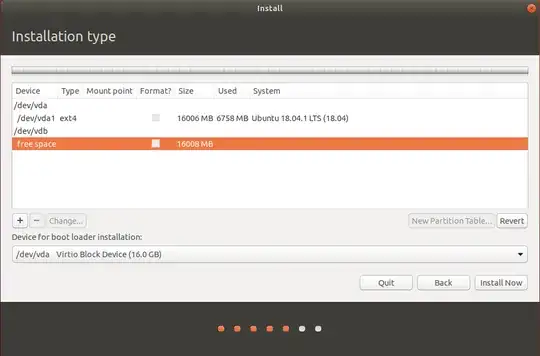
Highlight the free space and click on the + to create a partition. This will be the Ubuntu system partition.
- Create root system partition
/ in ext4 format:
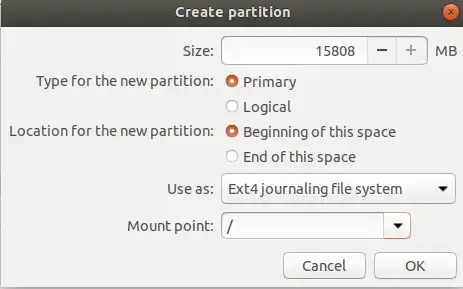
Make sure the bootloader is installed in the first drive as a whole, /dev/sda in your case. As long as you have booted the LiveUSB in UEFI mode, the installer will find the EFI System Partition (ESP) and install part of the grub bootloader there. Never, Never, NEVER select a specific partition (like /dev/sda2) for the bootloader installation.
Continue the rest of the installation as you normally would by pressing Install Now button.
Hope this helps


