to change the login screen color equivalent to those 15 colors which are available when we open Settings>Background>LockScreen>color
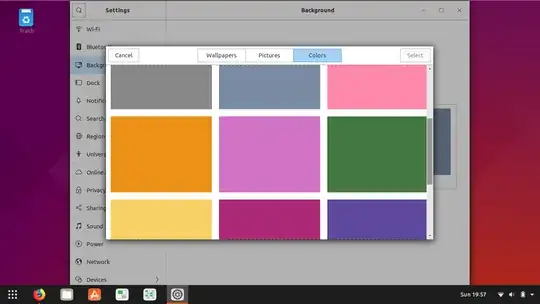
first set the required color as lockscreen from the settings>background>lockscreen>color
to know the value of this color run the below command.
gsettings get org.gnome.desktop.screensaver primary-color
Example:
pratap@i7-6550U:~$ gsettings get org.gnome.desktop.screensaver primary-color
'#7a8aa2'
pratap@i7-6550U:~$
Copy the color, in above case it is #7a8aa2
now we need to edit the gdm3.css file.
open the file with your favorite editor, mine is gedit. so
sudo -H gedit /etc/alternatives/gdm3.css
go to line number around 1985 & 1986 and find the below content.
#lockDialogGroup {
  background: none;
  background-color: none;
  background-gradient-direction: vertical;
  background-gradient-start: #6D2169;
  background-gradient-end: #370026; }
change the content with
#lockDialogGroup {
  background: none;
  background-color: none;
  background-gradient-direction: vertical;
  background-gradient-start: #7a8aa2;
  background-gradient-end: #7a8aa2; }
here in the line number 1985 & 1986 put the color you want in place of #7a8aa2
save the file, close & reboot to see the change.


these are the 15 colors + default one.
#7a634b
#425265
#475b52
#888888
#7a8aa2
#ff89a9
#ed9116
#d272c4
#437740
#fad166
#ab2876
#5d479d
#008094
#db5d33
#000000
#023c88


