I'm not quite sure what you mean by "combining" these maps, but here is a simple example (in Keras):
model = keras.models.Sequential([
    layers.InputLayer((res, res, 1)),
    layers.Conv2D(3, 7, activation='sigmoid'),
    layers.Conv2D(3, 7, activation='sigmoid'),
layers.GlobalMaxPooling2D(),
layers.Dense(1, activation='sigmoid')

])
Layer (type)                 Output Shape              Param #
=================================================================
conv2d_199 (Conv2D)          (None, 42, 42, 3)         150
_________________________________________________________________
conv2d_200 (Conv2D)          (None, 36, 36, 3)         444
_________________________________________________________________
global_max_pooling2d_92 (Glo (None, 3)                 0
_________________________________________________________________
dense_102 (Dense)            (None, 1)                 4
=================================================================
Total params: 598
Trainable params: 598
Non-trainable params: 0
I used sigmoid activations on the convolutional layers as well (with three "kernels"), since their outputs are easy to visualize as RGB images.
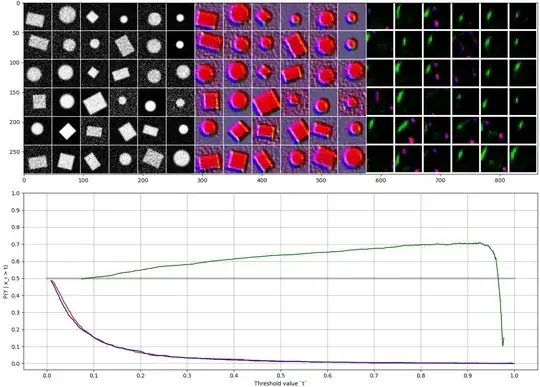
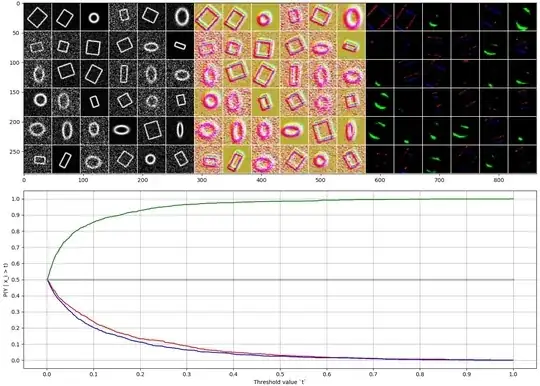
I trained the network on generated 48x48 grayscale images, each showing either an ellipse or a rectangle. Input images are shown on the top right, and they are normalized so that 25% of the pixels are black and 2% are white.
The intermediate output is quite hard to interpret, but the second output (before global max pooling) correlates well with the input images, and also with the output target class. The green channel seems to correspond to circles and ellipses (detecting curvature?), while red and blue channels react to linear lines. These correlations are also shown in the lower plot.
Then when we add a second convolutional layer, how can it extract a higher order feature without combining feature maps in some way?
Note that while the first Conv2D layer has weights of shape [7, 7, 1, 3] (ignoring the bias), the seconds one has a shape of [7, 7, 3, 3]. Eg. it sees all three channels of the previous layer simultaneously, meaning three "separate" matrices. So "convolutional layers only apply the filter on one matrix at a time" isn't quite true. Instead they apply to one tensor at a time, which can be interpreted as stacked matrices.
Note that the network may learn to detect very different aspects, depending on the initial parameters and specifics of the data. For example in this case the shapes are filled solid, and the network makes the distinction whether there are corners in the image or not. The green channel alone doesn't seem to be good for this classification task.